Brand: Huawei
Category: Other
Document Type: Manual
Language: EN
Brand: Huawei
Category: Other
Document Type: Manual
Language: EN
Uploaded: Nov. 21, 2025, 9:09 p.m.
Warranty information is not explicitly detailed in this manual, other than stating that unauthorized modifications void it.
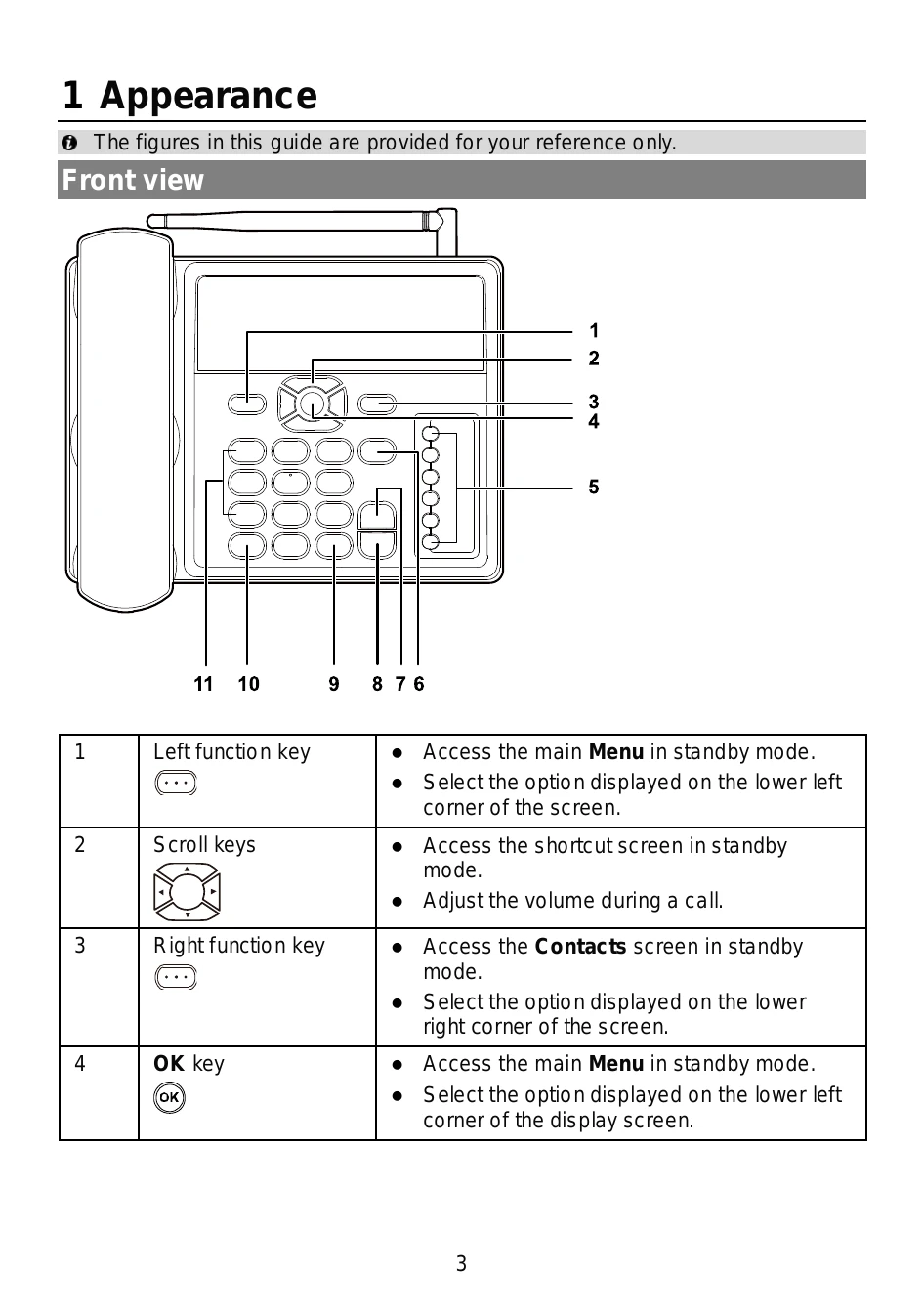
The manual illustrates the front and back views of the F615 phone, identifying various keys and ports such as the left/right function keys, scroll keys, OK key, shortcut keys, end key, hands-free key, call/redial key, # key, * key, number keys, antenna port, power jack, wall-mounting brackets, battery container, coiled cord jack, battery container cover, SIM card slot, battery cord jack, headset jack, and data port.
Instructions are provided for installing the SIM card, battery, and antenna. It also covers connecting the power adapter and an optional headset. Connecting the phone to a PC for data services is also detailed.
The guide explains how to power the phone on and off using the end key. Basic call functions like making, answering, and rejecting calls are described, along with using the call log and phonebook.
Users can learn to create and read SMS messages. Different text input methods, including Predictive English input (T9) and Traditional English input (ABC or abc), are explained.
Phone settings such as phone lock, keypad lock, and PIN/PUK are covered. A FAQ section addresses common issues like the phone not powering on, no information on the screen, battery charging problems, and weak signal strength.
Crucial safety information regarding electronic device usage, interference with medical equipment, protecting hearing, areas with flammables, traffic security, operating environment, and child safety is provided. It also includes guidelines on accessories and charger safety, battery safety, and cleaning/maintenance.
Information on emergency call availability and proper disposal of the device and accessories is included.
Details on RF exposure requirements and FCC statements are presented.
| Problem | Solution |
|---|---|
| Phone cannot be powered on | 1. Remove the battery cover and check whether the battery is installed properly. 2. If the battery is properly installed, a possible cause for the problem is that the battery power is low. Charge the battery, and then try to power on the phone. |
| No information is displayed on the phone screen | If the phone is not used for a long time and the battery runs out of power, the phone may not display any information when it is being charged. This is a normal phenomenon. The phone can be powered on after the battery is charged for a while. |
| Battery cannot be charged | 1. Check that the phone and the power adapter are connected properly. 2. Check that the power adapter and the power socket are connected properly. 3. Replace the power adapter or the battery with a new one of the same model. |
| Signal strength is weak | 1. Check that the SIM card is installed properly. 2. Place the phone at a location where strong signals can be received. |