Manual for SPRITE 35-II

Manual for SPRITE 35-II

Brand: ILFORD

Category: Camera

Document Type:

Language: EN

Uploaded: Aug. 9, 2025, 11:59 p.m.

Warranty Information

For product specifications and warranty information visit - www.ilford.com
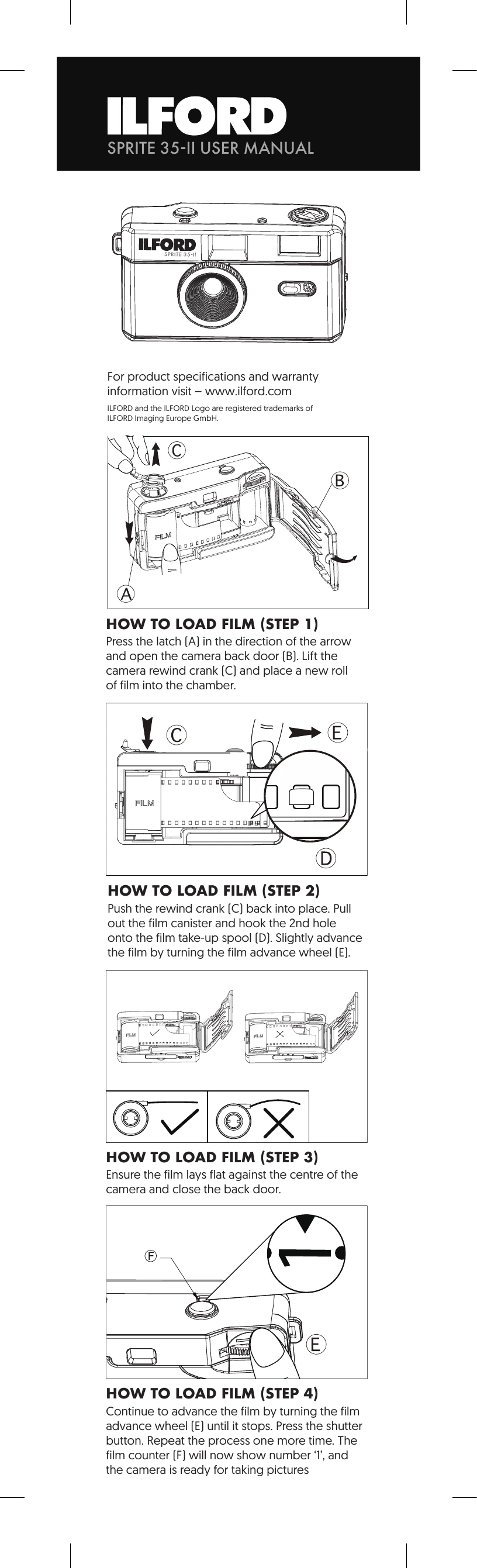
HOW TO LOAD FILM

  1. Open the camera back door.
  2. Place a new roll of film into the chamber.
  3. Hook the film onto the take-up spool.
  4. Advance the film until it stops, press the shutter button, and repeat once more.

HOW TO SHOOT PHOTOS

  • Stand at least 1 metre from the subject.
  • Take photos in sunny or partly sunny weather.
  • Keep the sun at your back.

HOW TO REWIND THE FILM

  1. Press the rewind button.
  2. Turn the film rewind crank clockwise until all film is rewound.
  3. Open the camera back door and remove the film.

HOW TO INSERT BATTERY (FLASH)

  • Open the battery door.
  • Insert one "AAA" battery, observing correct polarity.

HOW TO USE FLASH

  • Switch the flash button to the " ⚡" position.
  • Wait for the Flash Ready LED to glow.
Privacy Policy