Manual for NOTE

Manual for NOTE

Brand: Infinix

Category: Smartphone

Document Type:

Language: EN
Uploaded: Aug. 10, 2025, 12:03 a.m.

Warranty Information

This device meets international guidelines for exposure to radio waves.

Getting started

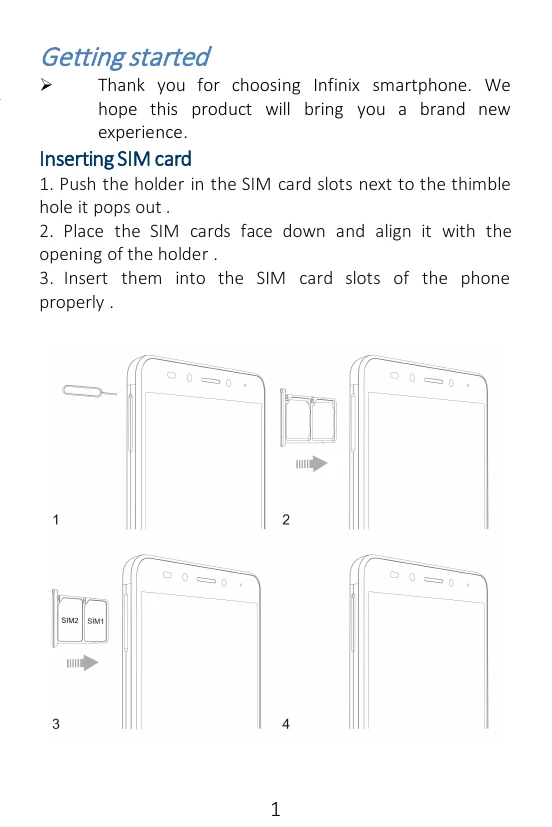
  • Insert SIM card by pushing the holder into the SIM card slots until it pops out. Place SIM cards face down and align with the opening, then insert them properly.

Charging the phone

  • Charge the device using a charger or a USB cable connected to a computer.

Features and parts

  • Identify various parts of the phone including SIM Card Holder, T Card Holder, Earphone Jack, Front camera, Volume, Camera, Flash, USB Jack, Speaker, Power Button, and Fingerprint Identify.
  • Note: The phone can be restarted by holding the power button for 10 seconds.

Making a call

  • On the start screen, tap the phone icon and enter a complete phone number to make a call.

Call log

  • You can make calls, add new contacts, and send messages from the call records interface.

Sending and Receiving message(s)

  • Enter the Messaging interface to create a new message. Touch the space for text input. Use the virtual keyboard to type. Tap to add attachments, select contacts, capitalize letters, and enter suggestions.

Troubleshooting and error codes

Maximum SAR for this model and conditions under which it was recorded
Head 0.376W/Kg
Body 0.765W/Kg
Privacy Policy