Manual for X555

Manual for X555

Brand: Infinix

Category: Smartphone

Document Type:

Language: EN
Uploaded: Aug. 10, 2025, 12:03 a.m.

Warranty Information

This device meets international guidelines for exposure to radio waves.

Getting Started:
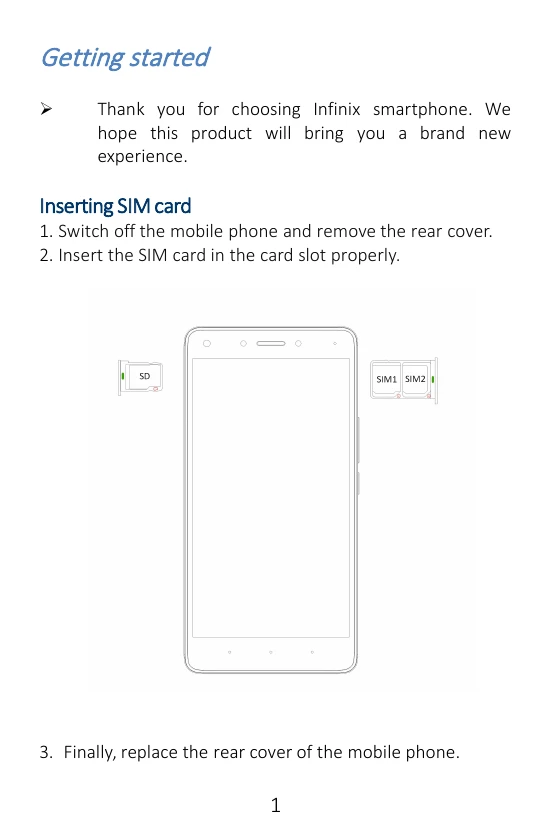
  • Inserting SIM Card: Switch off the phone, remove the rear cover, insert the SIM card, and replace the cover.
  • Inserting Memory Card: Switch off the phone, remove the rear cover, insert the Micro SD card, and replace the cover. Use only compatible memory cards.
  • Charging the Phone: Use the provided charger or a USB cable to connect to a computer. The phone can be restarted by holding the power button for 10 seconds.
Features:
  • Supports 4G SIM cards.
  • Includes camera, video recorder, FM radio, and sound recorder.
  • Allows installation of applications and games from Google Play (APK format).
Making a Call:
  • From the Home Screen, tap the call icon and dial a complete phone number.
Call Log:
  • Access call history to make calls, add contacts, or send messages.
Sending and Receiving Messages:
  • Enter Messaging, tap to compose a new message.
  • You can select contacts, add attachments (pictures, videos, audio files).
  • Text can be cut, copied, and pasted.
  • New messages can be read via the notification panel or by opening the Messaging app.
Privacy Policy