Manual for X602

Manual for X602

Brand: Infinix

Category: Smartphone

Document Type:

Language: EN
Uploaded: Aug. 10, 2025, 12:03 a.m.

Warranty Information

This device meets international guidelines for exposure to radio waves.

Getting Started:
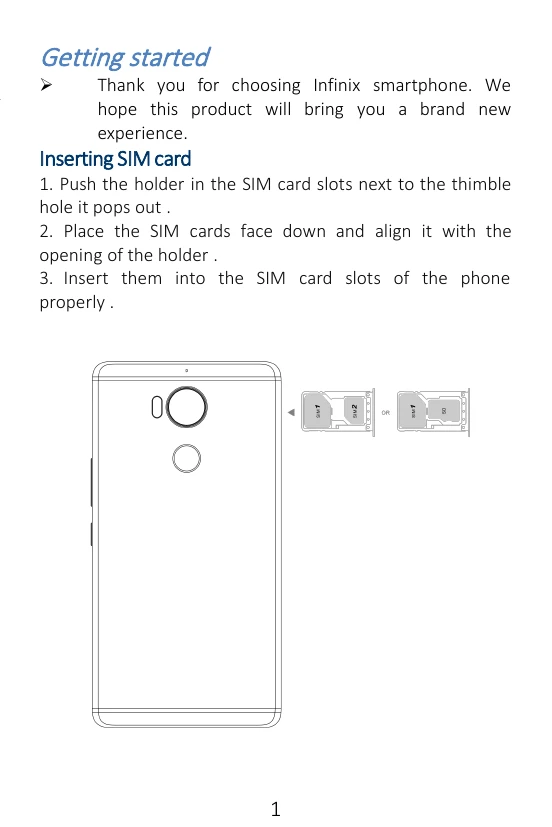
  1. Insert SIM Card: Push the holder, place SIM cards face down, and insert into slots.
  2. Charge Phone: Use a charger or connect to a computer via USB cable.
Making a Call:
  1. From the start screen, tap the phone icon.
  2. Enter a complete phone number to make a call.
Call Log:
  1. Access call records to make calls, add contacts, or send messages.
  2. Tap to add a new contact or tap to dial out.
Sending/Receiving Messages:
  1. Enter Messaging to create a new message.
  2. Touch text space for input, use virtual keyboard.
  3. Add attachments, select contacts, capitalize letters, and use suggestions.

Troubleshooting and error codes

Issue Solution
Phone not powering on Ensure the battery is charged. Try holding the power button for 10 seconds to restart.
SIM card not detected Check if the SIM card is properly inserted. Ensure it is compatible with the network.
Cannot make calls/send messages Verify network signal and ensure correct number is dialed/entered. Check SIM card status.
Privacy Policy