Brand: JVC
Category: Audio System
Document Type: Manual
Language: EN
Brand: JVC
Category: Audio System
Document Type: Manual
Language: EN
Uploaded: Nov. 21, 2025, 7:36 p.m.
No specific warranty information found in the provided manual pages.
Press the /1 AUDIO button to turn on the System. The STANDBY lamp will turn off. Then, select the desired source (DVD/CD, AUX, FM/AM, TAPE-A, or TAPE-B) using the corresponding buttons.
Use the AUDIO VOL +/– buttons on the remote control or the VOLUME +/– buttons on the main unit to adjust the volume level in 32 steps.
Select the FM or AM band using the FM/AM button. Tune to a station by pressing TUNER FM or TUNER AM. You can also preset up to 30 FM and 15 AM stations for quick access.
Insert a disc into the appropriate tray. Press DVD/CD to start playback. You can pause, stop, select titles/chapters, and navigate through menus using the remote control.
Insert a Type I tape into deck A or B. Use the TAPE-A and TAPE-B buttons to select the deck and press the playback button. You can change tape direction and rewind/fast-forward.
| Problem | Possible Solution |
|---|---|
| Adjustments or settings are suddenly canceled before you finish. | There is a time limit. Repeat procedure again. |
| Operations are disabled. | The built-in microprocessor may malfunction due to external electrical interference. Unplug the AC power cord and then plug it back in. |
| Unable to operate the System from the remote control. | The path between the remote control and the remote sensor on the System is blocked. The batteries are exhausted. |
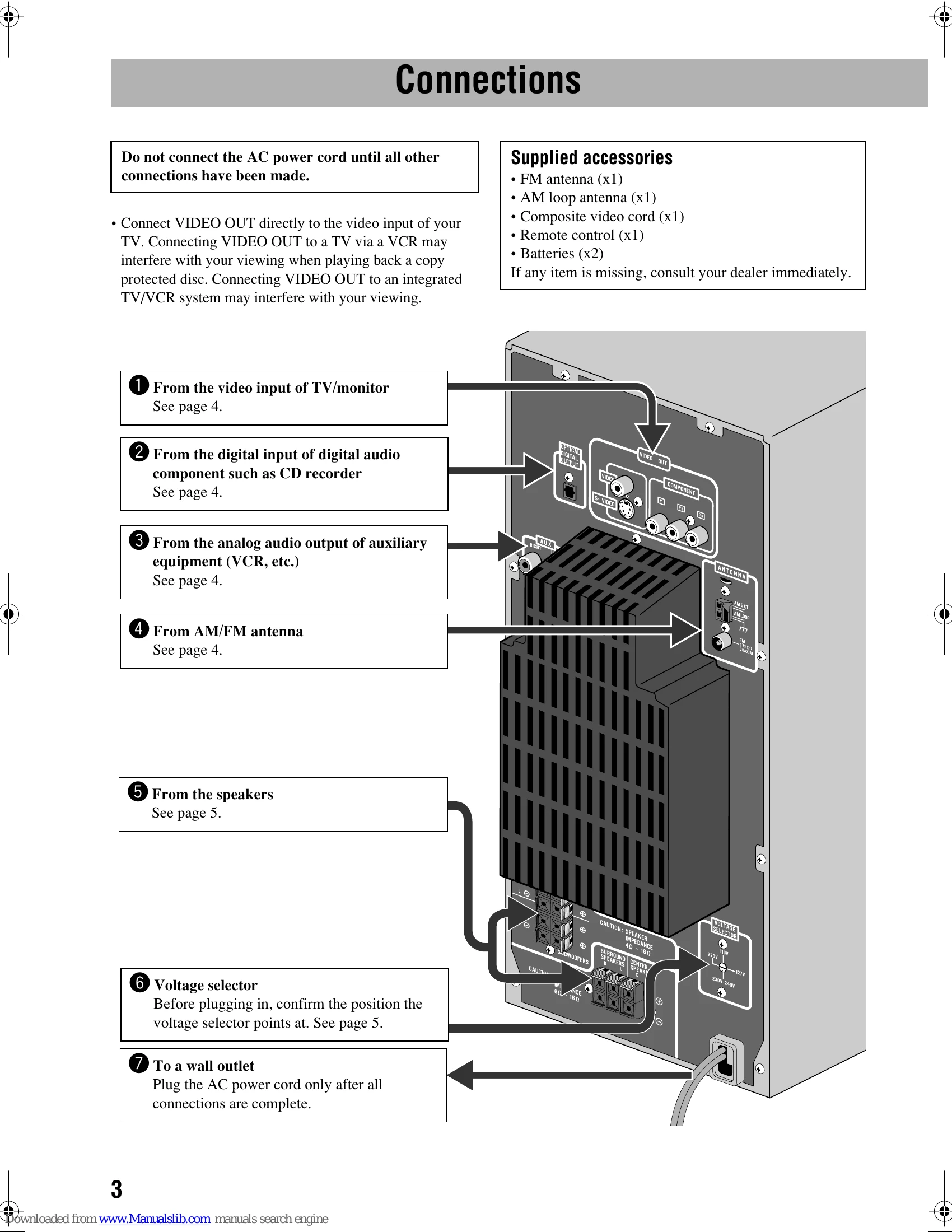
| No sound is heard. | Speaker connections are incorrect or loose. Headphones are connected. |
| No picture appears on the screen. | The video cord connections are incorrect or loose. |
| No picture is displayed on the TV screen, the picture is blurred, or the picture is divided into two parts. | The System is connected to a TV which does not support progressive video input. Incorrect color system is selected. |
| The left and right edges of the picture are missing on the screen. | Select "4:3 LB/4:3 MULTI LB" for "MONITOR TYPE". |
| Hard to hear broadcasts because of noise. | Antennas connections are incorrect or loose. The AM loop antenna is too close to the System. The FM antenna is not properly extended and positioned. |
| The disc does not play. | You have inserted a disc whose Region Code is not "4." The disc is placed upside down. |
| MP3 groups and tracks are not played back as you expect. | The playing order is determined when the disc was recorded. It depends on the writing application. |
| MP3/WMA/JPEG/MPEG-1/MPEG-2/ASF/DivX files are not played back. | The inserted disc may include different types of files. In this case, you can only play back the files selected by the "FILE TYPE" setting. You have changed the "FILE TYPE" setting after you inserted a disc. In this case, reload the disc. |
| The disc sound is discontinuous. | The disc is scratched or dirty. |
| The disc playback sounds strange. | Cancel Key Control. |
| No subtitle appears on the display though you have selected the initial subtitle language. | Some DVDs are programmed to always display no subtitle initially. If this happens, press SUB TITLE after starting play. |
| Audio language is different from the one you have selected as the initial audio language. | Some DVDs are programmed to always use the original language initially. If this happens, press AUDIO after starting play. |
| The disc tray does not open or close. | The AC power cord is not plugged in. Child Lock is in use. The Program Play is in use. Cancel the Program Play. |
| The cassette holder cannot be opened. | Power supply from the AC power cord has been cut off while the tape was running. Turn on the System. |
| Impossible to record. | Small tabs on the back of the cassette are removed. Cover the holes with adhesive tape. The Karaoke scoring function is in use. Cancel the scoring function. |
| Cannot activate the scoring function. | DVD Audio or DVD-VR is playing. You cannot use the scoring function while recording, or while the disc menu for DVD Video/SVCD/VCD is shown on the TV screen. |
| Scoring result seems wrong (or "– –" appears). | The playback time with the scoring function is too short. No input from the microphone or the input level (MIC LEVEL) is too low. You have sung in too quietly. |
| Daily Timer or Recording Timer does not work. | The System has been turned on when the on-time comes. Timer starts working only when the System is turned off. |