Brand: JVC
Category: Audio System
Document Type: Manual
Language: EN
Brand: JVC
Category: Audio System
Document Type: Manual
Language: EN
Uploaded: Nov. 21, 2025, 8:16 p.m.
No specific warranty period is mentioned in this manual.
| Symptom | Possible Cause | Action |
|---|---|---|
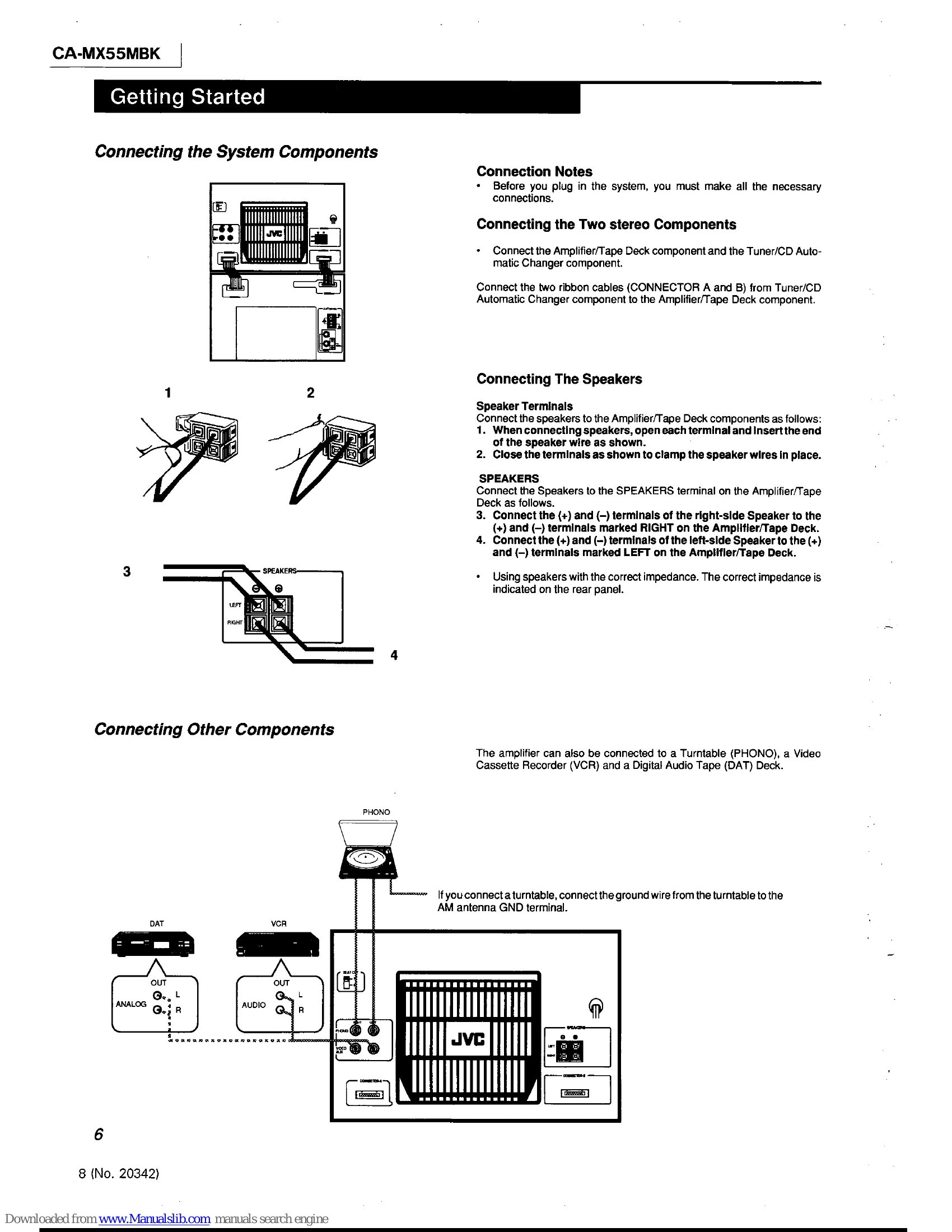
| No sound Is heard. | Speakers are connected incorrectly. | Re-connect speakers (See "Connecting the SystemComponent") |
| Impossible to record. | Tape tabs are broken out. | Cover tabs with adhesive tape. |
| Interference during broadcast. | Antenna is disconnected. The loop antenna is too close to the system. | Re-connect the antenna securely. Change the position and direction of the loop antenna. |
| CD Sound is discontinuous. | The CD is scratched or stained. | Clean or replace the CD. |
| The Remote Controller cannot be operated. | There is an obstruction blocking the remote sensor on the amplifier. The batteries of the Remote Controller are weak. | Remove the obstruction. Replace the batteries. |
| The magazine does not eject when the EJECT button is pressed. | The power is off. The magazine has not been inserted correctly. | Turn on the system. Push the magazine all the way in and try pressing the EJECT button again. |
| A selection on a CD was not played. | The CD is in the tray upside down. | Put the CD in the tray with the label side facing up. |
| Operations are disabled. | The built-in microprocessor may malfunction due to external electrical interference. | Unplug the system, then plug it back in. |
| The cassette holder cannot be opened. | The system was turned off because the timer was operated while the tape was running. | Turn on the system. |