Brand: JVC
Category: Audio System
Document Type: Manual
Language: EN
Brand: JVC
Category: Audio System
Document Type: Manual
Language: EN
Uploaded: Nov. 21, 2025, 6:50 p.m.
Consult the manual for detailed information on software licenses, trademarks, and warranties.
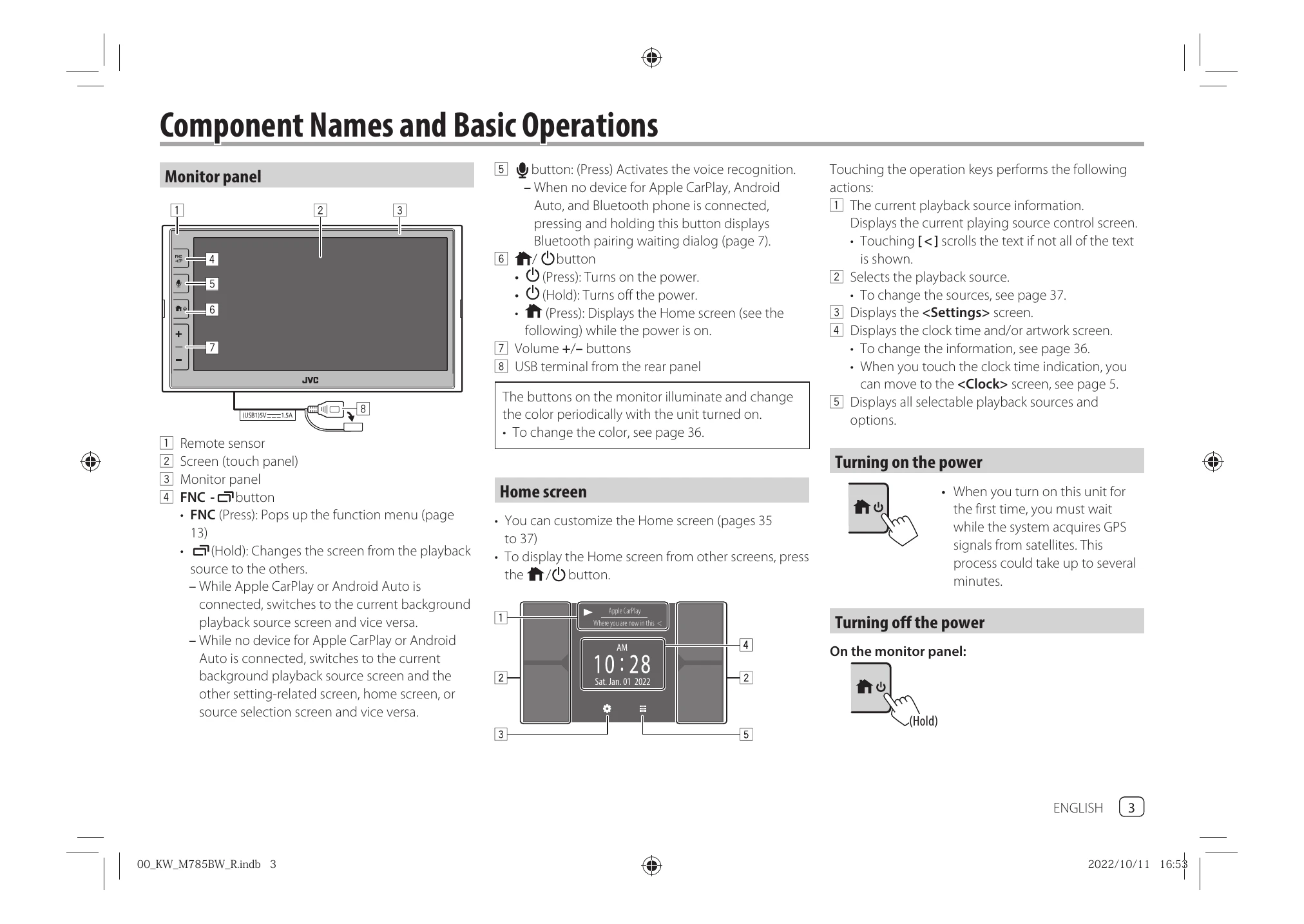
The monitor panel includes the remote sensor, touch panel, FNC button, voice recognition button, power button, and volume controls. The buttons illuminate and change color periodically when the unit is on.
The Home screen can be customized. Pressing the button displays the Home screen. While Apple CarPlay or Android Auto is connected, it switches to the current background playback source screen and vice versa.
When the unit is turned on for the first time, it acquires GPS signals. This may take several minutes and requires an outdoor, open area.
Press and hold the button on the monitor panel to turn off the unit.
Use the +/- buttons to adjust the volume from 00 to 40. Holding '+' above volume level 15 increases it continuously.
Use the attenuating key on the source control screen. To cancel attenuation, press the key again.
Display the source/option selection screen and touch [AV Off]. You can also use the pop-up function menu.
When powering on for the first time or initializing, the
| Problem | Solution |
|---|---|
| No sound comes out of the speakers. | Adjust the volume to the optimum level. Check the cords and connections. |
| The unit does not work at all. | Initialize the unit (page 40). Replace the battery (for remote controller). |
| "No Signal"/"No Video Signal" appears. | Start playback on the external component. Check cords and connections. Signal input may be too weak. |
| "Miswiring DC Offset Error”/“Warning DC Offset Error" appears. | A speaker cord has shorted or touched the car chassis. Wire or insulate the speaker cord, then turn the ignition switch off and on. |
| "Parking off" appears. | No playback picture is shown when the parking brake is not engaged. |
| Bluetooth device does not detect this unit. | Turn Bluetooth device off and on. Turn the unit off and on. |
| This unit does not pair with the Bluetooth device. | If connected via USB, disconnect it and retry. Turn Bluetooth device off and on. |
| Device disconnected or cannot be connected. | When iPhone with Apple CarPlay is connected via USB, it cannot connect via Bluetooth. Use Apple CarPlay screen for phone/audio. When Android Auto is connected via USB, Bluetooth connects automatically and disconnects current phone. |