Brand: JVC
Category: Audio System
Document Type: Manual
Language: EN
Brand: JVC
Category: Audio System
Document Type: Manual
Language: EN
Uploaded: Nov. 21, 2025, 8:50 p.m.
Refer to the manual for detailed warranty information.
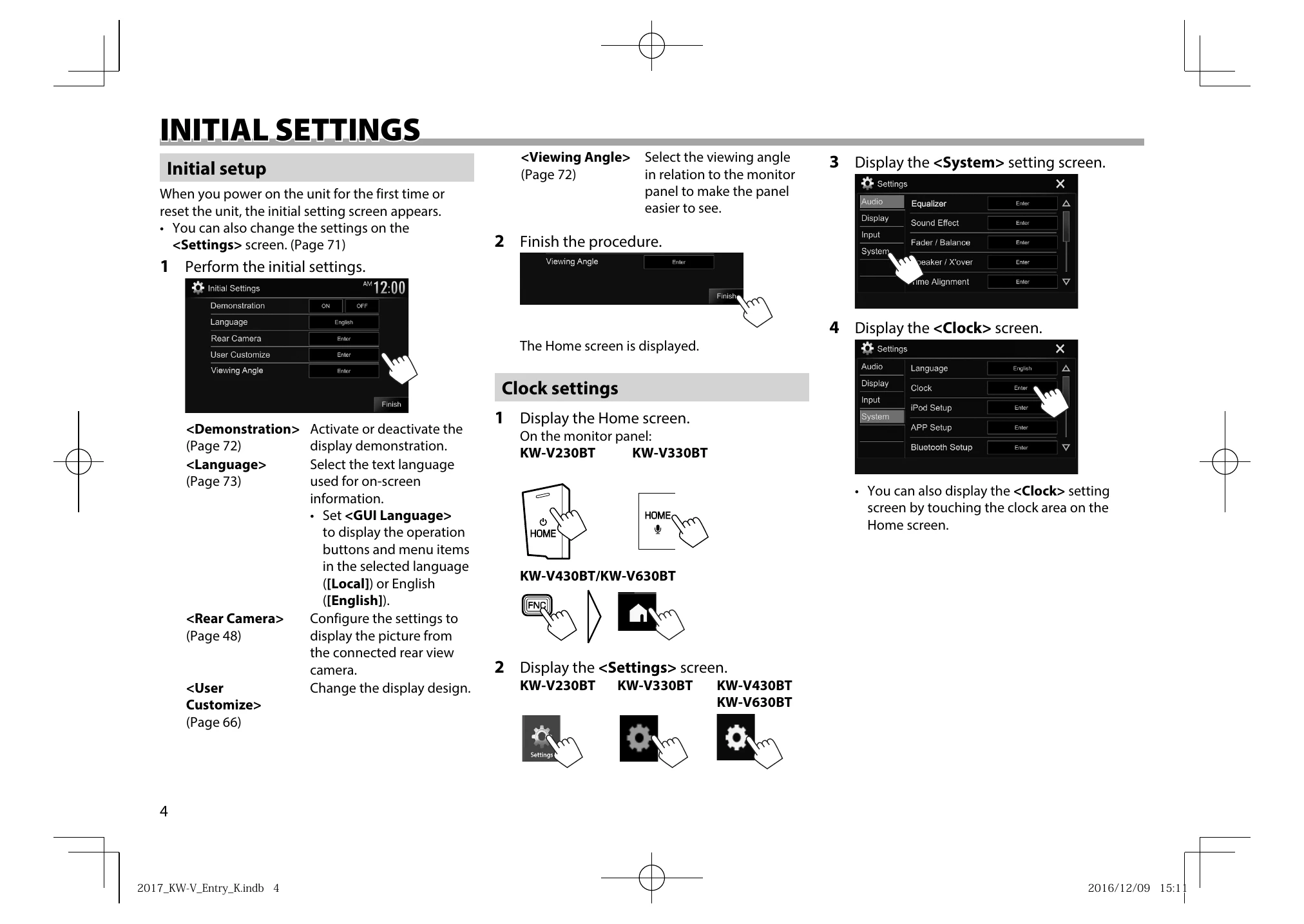
Upon first power-on or reset, the initial setting screen appears. You can adjust settings like Demonstration, Language, Rear Camera, User Customize, and Viewing Angle. The Home screen is displayed after completion. Clock settings can be adjusted by accessing the Clock screen from the Home screen or Settings menu.
Adjusting Volume: Press '+' to increase and '-' to decrease volume (00-35). Holding '+' continuously increases volume to level 15.
Turning Screen Off: Press and hold the screen off button.
Turning AV Source On/Off: Select sources from the Home screen.
Selecting Playback Source: Access sources via the Home screen or the source control screen.
Gesture Control: Use touch panel gestures for playback control and volume adjustment on the source control screen (where available).
Pop-up Short-Cut Menu: Accessible via the FNC button for quick access to various functions like phone control, screen settings, and equalizer.
| Message | Cause/Remedy |
|---|---|
| No Signal / No Video Signal | Start playback on the external component. Check cords and connections. Signal input may be too weak. |
| Miswiring DC Offset Error / Warning DC Offset Error | A speaker cord may have shorted or contacted the car chassis. Wire or insulate the speaker cord and reset the unit. |
| Parking off | No playback picture is shown when the parking brake is not engaged. |
| Authorization Error | Check if the connected iPod/iPhone is compatible with the unit. |
| USB Device Error | USB power voltage is abnormal. Turn the unit off and on. Connect another USB device. |
| Connection Error | Device connection failed. Connect the registered device. |
| Please Wait... | Unit is preparing Bluetooth function. Turn off/on if message persists. |
| No Voice Device | Connected mobile phone lacks a voice recognition system. |
| No Data | No phone book data in the connected Bluetooth phone. |
| Initialize Error | Bluetooth module initialization failed. Try again. |
| Dial Error | Dialing failed. Try again. |
| Hung Up Error | Call not ended. Park car and end call from mobile phone. |
| Pick Up Error | Unit failed to receive a call. |
| Please update Pandora App | Pandora app is not the latest version. Update it. |
| Please check device. | Pandora app not started, not installed, or an error occurred. |
| Login Error | Not signed into Pandora. |
| No skips remaining | No more songs can be skipped. |
| Failed to save your thumb rating | Thumb-up/down is prohibited. |
| No Station | No station available. |
| No Active Station | No station is being played. |
| Station limit reached | Station List is full. |
| Failed to save your bookmark | Failed to save bookmark. Try again. |
| Limited Connectivity | Pandora application connection cannot be established. |