Brand: JVC
Category: Audio System
Document Type: Manual
Language: EN
Brand: JVC
Category: Audio System
Document Type: Manual
Language: EN
Uploaded: Nov. 21, 2025, 6:18 p.m.
Manual Publish Date: null
None
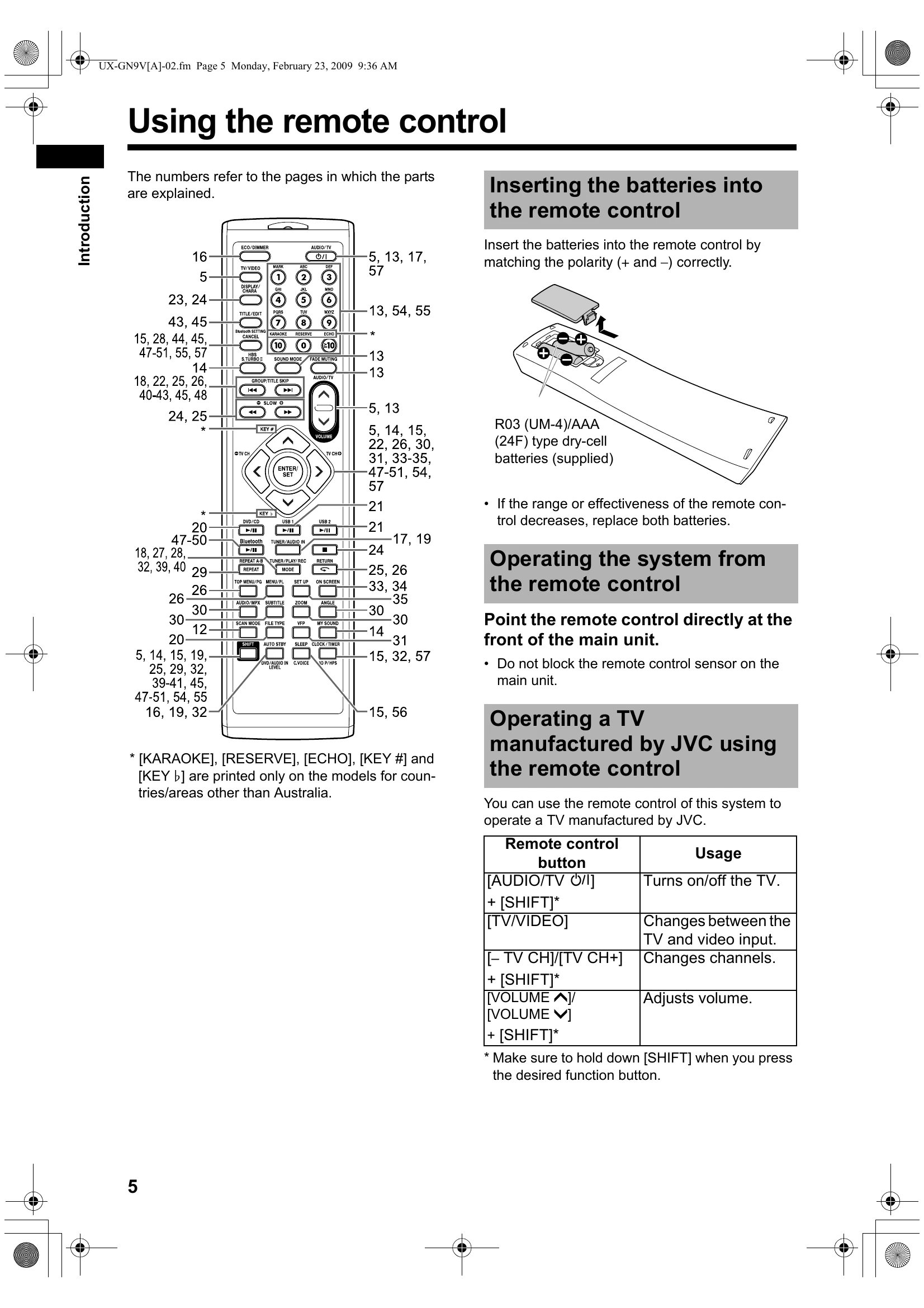
Press [AUDIO/TV ℌ/I] (or ℌ/I on the main unit).
\nThe function assigned to the pressed button starts working at the same time.
\nPress [VOLUME ▲] or [VOLUME ▼] repeatedly.
\nPress [FADE MUTING].
\nA combination of JVC sound technologies enables you to select the desired sound pattern. This function is called \"sound mode\".
\nPress [SOUND MODE] repeatedly.
\n| Problem | Possible cause | Possible solution | Reference page |
|---|---|---|---|
| Adjustments or settings are suddenly canceled before you finish. | There is a time limit. | Repeat the procedure again. | – |
| The remote control does not work. | The remote control sensor on the main unit is blocked. | Make sure that nothing is blocking the path between the remote control sensor and the remote control. | 5 |
| The batteries are running low. | Replace the batteries. | 5 | |
| No sound is produced. | The speakers are not connected correctly. | Connect the speakers correctly. | 7 |
| Headphones are connected. | Disconnect the headphone plug. | 15 | |
| No picture is produced. | Improper connection. | Connect all cables properly. | 8-11 |
| The picture is distorted. | The video signal type setting is not appropriate. | Select the video signal type suitable for your TV. | 12 |
| The screen size is abnormal. | The screen size setting is not appropriate. | Select the display method suitable for your TV. | 36 |
| No picture/sound is produced via the [HDMI MONITOR OUTPUT] terminal. | A disc/file recorded in a format incompatible with the main unit/TV is played back. | Confirm the playable disc/file types. | 60 |
| The connected TV is not compatible with HDCP. | Connect a TV compatible with HDCP. | 9 | |
| The main unit fails to recognize the TV connected to the [HDMI MONITOR OUTPUT] terminal. | Disconnect the HDMI cable and connect it again. | 9 | |
| The picture is distorted when the TV is connected to the [HDMI MONITOR OUTPUT] terminal. | An HDMI cable longer than 5 m (15 feet) is used. | Use an HDMI cable of 5 m (15 feet) or shorter to assure stable operation and picture quality. | – |
| The proportion of the picture is not appropriate. | Connect the TV to the [COMPONENT] terminals or the [VIDEO] terminal, and select the video signal type. | 8-12 | |
| The HDMI CEC function does not work. | The connected TV is not compatible with the HDMI CEC function. | Refer to the operation manual of the TV. | – |
| When you disconnect the HDMI cable and connect it again, the HDMI CEC function does not work properly. | "OFF" is selected for the "CEC" setting. | Select "ON 1" or "ON 2" for the "CEC" setting. | 37 |
| The previous connection setting is stored on the main unit. | Select "OFF" for the "CEC" setting, and then select "ON 1" or "ON 2" again. | 9 and 37 | |
| A disc cannot be played back. | If “RG ERROR” appears on the display window, the region code number of a disc is not compatible with this system. (only for a DVD VIDEO) | Confirm the region code number compatible with this system. | 60 |
| The disc is upside down. | Place the disc on the disc tray with the printed surface facing up. | 20 | |
| Tag information does not appear in the display window. | The tag type is not ID tag version 1. (only for an MP3 file) | This system only supports ID tag version 1. | – |
| Groups or tracks are not played back in the desired order. | The playback order is determined when the groups/tracks are recorded. | This is not a malfunction. | – |
| An MP3, WMA, WAV, JPEG, ASF, DivX, MPEG1 or MPEG2 file cannot be played back. | The loaded disc may include files of different types (MP3, WMA, WAV, JPEG, ASF, DivX, MPEG1 or MPEG2). | Select the file type. You can only play back the files of the selected types. If the main unit has read the file, select the desired file type, and then reload the disc or disconnect the USB device and connect it again. | 20 |
| A JPEG, ASF, DivX, MPEG1 or MPEG2 file on a USB cannot be played back. | The USB device on which the file is recorded is connected to the [USB2 AUDIO/REC PLAY] terminal. | Connect the USB device to the [USB1 VIDEO/AUDIO PLAY] terminal. | 21 |
| A certain point on the disc cannot be played back properly. | The disc is scratched or dirty. | Clean or replace the disc. | 63 |
| The produced audio language/displayed subtitle language is different from the one you have selected as the initial language. | Some disc/file are programmed for the initial language. | Select the audio/subtitle language. | 30 |
| The disc cannot be ejected. | The power cable is not connected to an AC outlet. | Connect the power cable correctly. | 11 |
| Disc ejection is locked. | Unlock the disc ejection. | 16 | |
| Changing the source takes time. | When you change the source to "DVD/CD", "USB1" or "USB2", it takes some time to activate the source. | This is not a malfunction. | – |
| The source cannot change to "USB1". | This system is reading a disc. | Press ◄, and then change the source to "USB1". | – |