Brand: JVC
Category: Camcorder
Document Type: Manual
Language: EN
Brand: JVC
Category: Camcorder
Document Type: Manual
Language: EN
Uploaded: Nov. 21, 2025, 8:42 p.m.
Manual Publish Date: 2000-01-01
| SYMPTOM | CORRECTIVE ACTION | PAGE |
|---|---|---|
| Power supply | ||
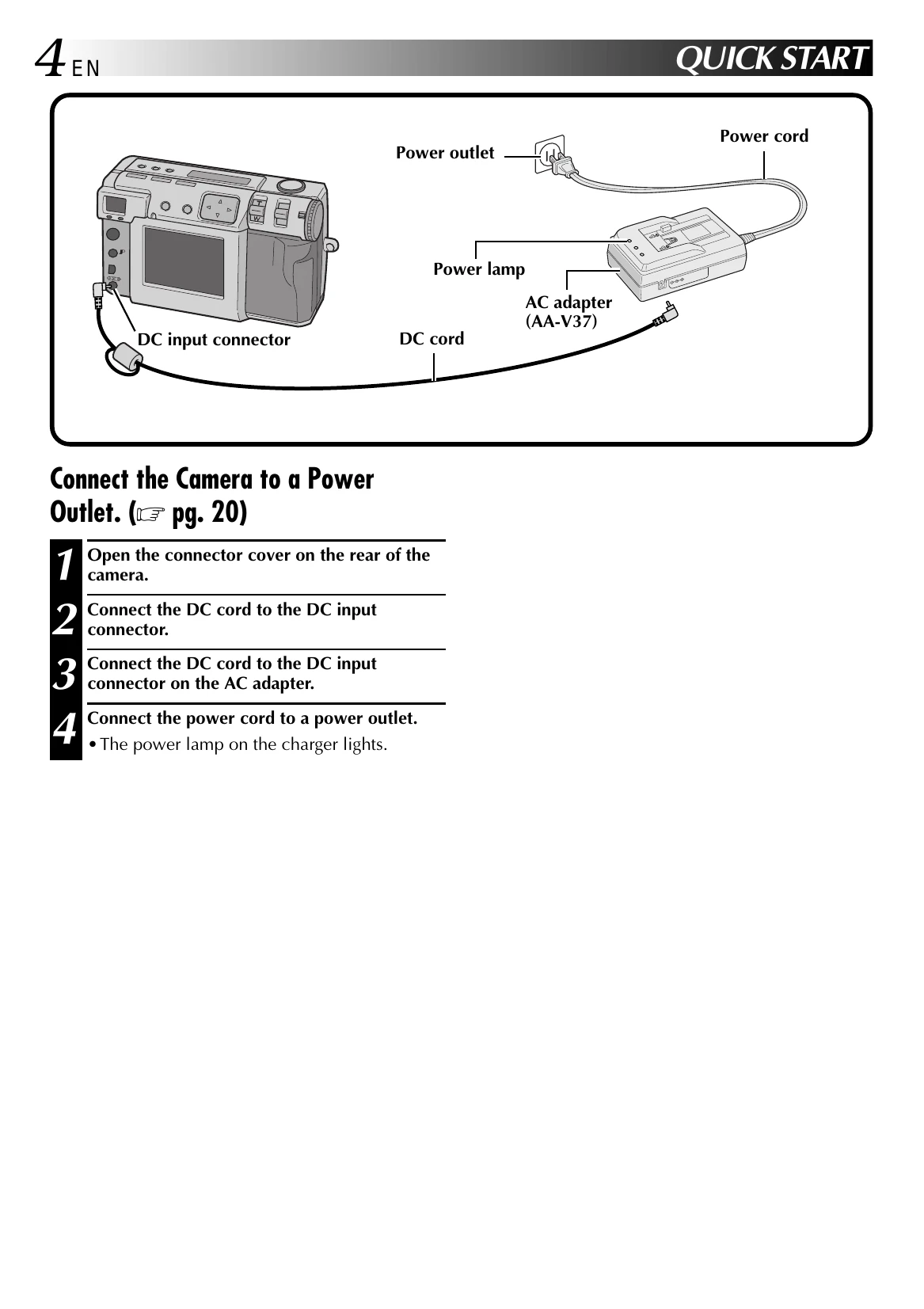
| The power does not come on. | • Make sure that the battery is fully charged. • Make sure that the power supply is connected correctly. |
18 20 |
| While shooting | ||
| Cannot shoot photos. | • Make sure that the Power dial is set to "A" or "M". | 26 |
| Cannot see the picture on the screen. | • Try turning the power off and then back on again. | 26 |
| Cannot use the menu functions. | • Make sure that the Power dial is not set to "A". | 28 |
| Half pressing the shutter button does not focus the camera. | • Make sure that there is sufficient light, and make sure that there is enough contrast in your subject. | 34 |
| When there is sunlight in the shot, the screen temporarily darkens or becomes black. | • This is not a malfunction. | — |
| The image on the LCD screen is dark, or too white. | • Use the ZOOM lever to adjust the brightness of the LCD screen. • You may be playing back a picture in a cold location. The LCD screen will appear slightly darker when it is cold. This is not a malfunction. • The LCD screen may be nearing the end of its operational life. Contact your nearest JVC dealer. |
54 |
| Memory Full. | • The "MEMORY FULL" message appears when the memory is full, making it impossible to take any more pictures. Either use a Memory card that has some free space in it, or create some free space in memory by saving pictures to a personal computer and then deleting those pictures from the camera's memory. | — |
| Color noise appears in contours of the subject on the LCD screen. | • This is not a malfunction. There is no problem with the recorded images. | — |
| The power turned off while attempting flash photography. | • The power may turn off during flash photography, even if the remaining battery power is indicated to be at half of the battery capacity. | — |
| Others | ||
| Cannot shoot photos even if the remaining photos counter shows number more than 0. | The remaining photos counter indicates the approximate number. It may not be able to shoot a photo even if the counter shows number more than 0, depending on the image size and quality. | 28 |
| The LCD screen is splotchy. | • Make sure that you are not pressing on the surface of the LCD screen anywhere. Pressure on the surface of the LCD screen can cause splotches in the image. If you remove the pressure from the LCD screen, it will return to normal after a while. | — |
| There are small bright or dark points on the LCD screen. | • The LCD screen is manufactured using extremely precise technology, and over 99.99% of the pixels will be normal, but less than 0.01% will be either always off or always on. | — |
| Cannot format a Memory card. | • The protect seal may be placed on the Memory card. If the data on the Memory card has been backed up on a personal computer, remove the seal and format the card. | 23 |
| Colored bands appear at the top and bottom of the screen when displaying the sun or a bright light source. | • This is not a malfunction. There is no problem with the recorded images. | — |