Brand: JVC
Category: Camcorder
Document Type: Manual
Language: EN
Brand: JVC
Category: Camcorder
Document Type: Manual
Language: EN
Uploaded: Nov. 21, 2025, 8:29 p.m.
Manual Publish Date: 1997-01-01
| SYMPTOM | POSSIBLE CAUSE(S) |
| POWER | |
| No power is supplied. | • The battery pack has not been attached correctly (pg. 6). • The battery pack is not charged (pg. 6). • The power supply has not been correctly connected (pg. 7). |
| The power suddenly goes off and doesn't come back on by itself. | • The battery pack has completely discharged. • Remove the cassette and disconnect the power source, then after a few minutes, try turning the power back on. If it still doesn't come on, consult your nearest JVC dealer. |
| RECORDING | |
| Recording cannot be performed. | • The recording tape's Erase Protection tab is missing. Cover the hole with adhesive tape. (Some tapes have sliding tabs. In this case, check the position of the tab.) |
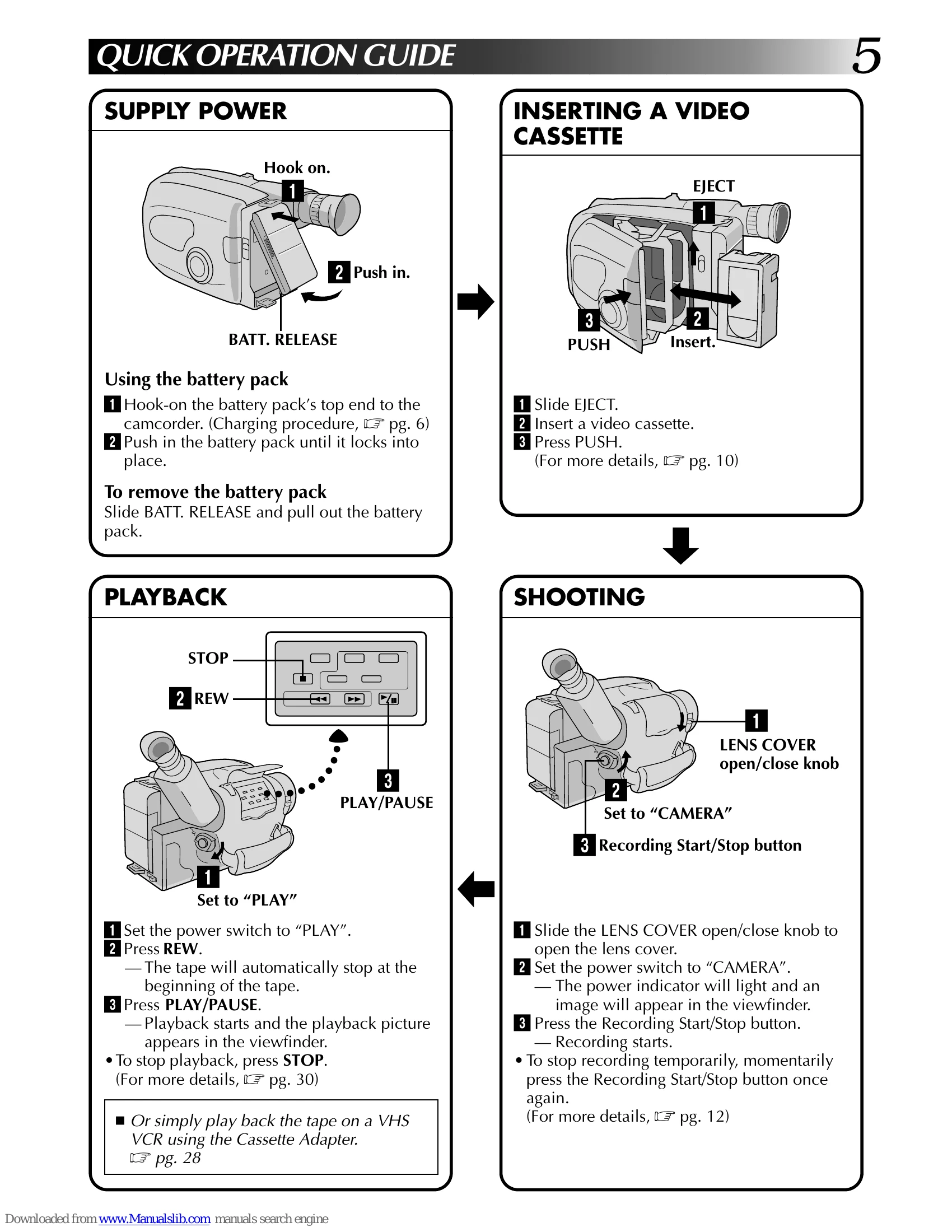
| Recording does not start. | • The camcorder Power switch has not been set to “CAMERA” (pg. 12). |
| PLAYBACK | |
| The tape is running, but there's no playback picture. | • The TV has not been set to its VIDEO mode or channel. • If A/V connection is used, the TV's VIDEO/TV switch has not been set to VIDEO. • The RF unit has not been set to the correct channel. |
| Noise bars appear in the playback picture. | • Manual Tracking has not been performed (pg. 31). |
| Playback picture is blurred or interrupted. | • The video heads are dirty or worn out. Consult your nearest JVC dealer for head cleaning or replacement. |
| The counter indication is blurred during Still playback. | • This is normal. |
| TAPE TRANSPORT | |
| The tape stops during fast-forward or rewind. | • The Counter Memory Function has been activated (pg. 31). • The tape is already fully wound on one reel or the other. |
| Rewinding or fast-forwarding cannot be performed. | • The tape is already fully wound on one reel or the other. |
| OTHER | |
| The tape won't eject. | • The battery pack is running low. |
| Some functions are not available. | • The PROGRAM AE select dial is set to "AUTO LOCK". |
| Vertical white lines appear when shooting a very bright object. | • This sometimes occurs when the contrast between the background and the object is great. It is not a defect of the camcorder. |
| Bright, crystal-shaped spots appear in the viewfinder. | • Sunlight is directly entering the lens. |
| The picture is blurred in the Quick Review or Retake mode. | • This is normal while recording in the LP mode. Some noise may be present while recording in the SP mode (pg. 10). |
| An error number (E03) appears in the viewfinder. | • Turn the camcorder's power off, then disconnect the power source. After a few minutes, try turning the power on again. If the error number still appears in the viewfinder, consult your nearest JVC dealer. |
| The image is out of focus. | • The diopter needs to be adjusted (pg. 8). • The scene being shot is adversely affecting the operation of Auto Focus (pg. 18). |
| A character generator title and the date and time displays disappear from the viewfinder. | • If you remove the power source from the camcorder while the power is on, all settings and selections are erased. Make sure to turn the camcorder's power off before disconnecting the power source. |
| Even though the Lens Cover is open, the Lens Cover Warning indicator blinks. | • The Lens Cover Warning indicator may blink when the camcorder is used in dark areas, regardless of the position of the Lens Cover. |