Brand: JVC
Category: Camcorder
Document Type: Manual
Language: EN
Brand: JVC
Category: Camcorder
Document Type: Manual
Language: EN
Uploaded: Nov. 21, 2025, 7:16 p.m.
Regarding This Manual This manual provides instructions for operating the JVC GR-D770AS camcorder. It covers basic operations, features, and maintenance.
Provided Accessories Ensure you have all necessary accessories, including AC adapter, power cord, battery pack, A/V cable, USB cable, CD-ROM, remote control unit, and lens cap.
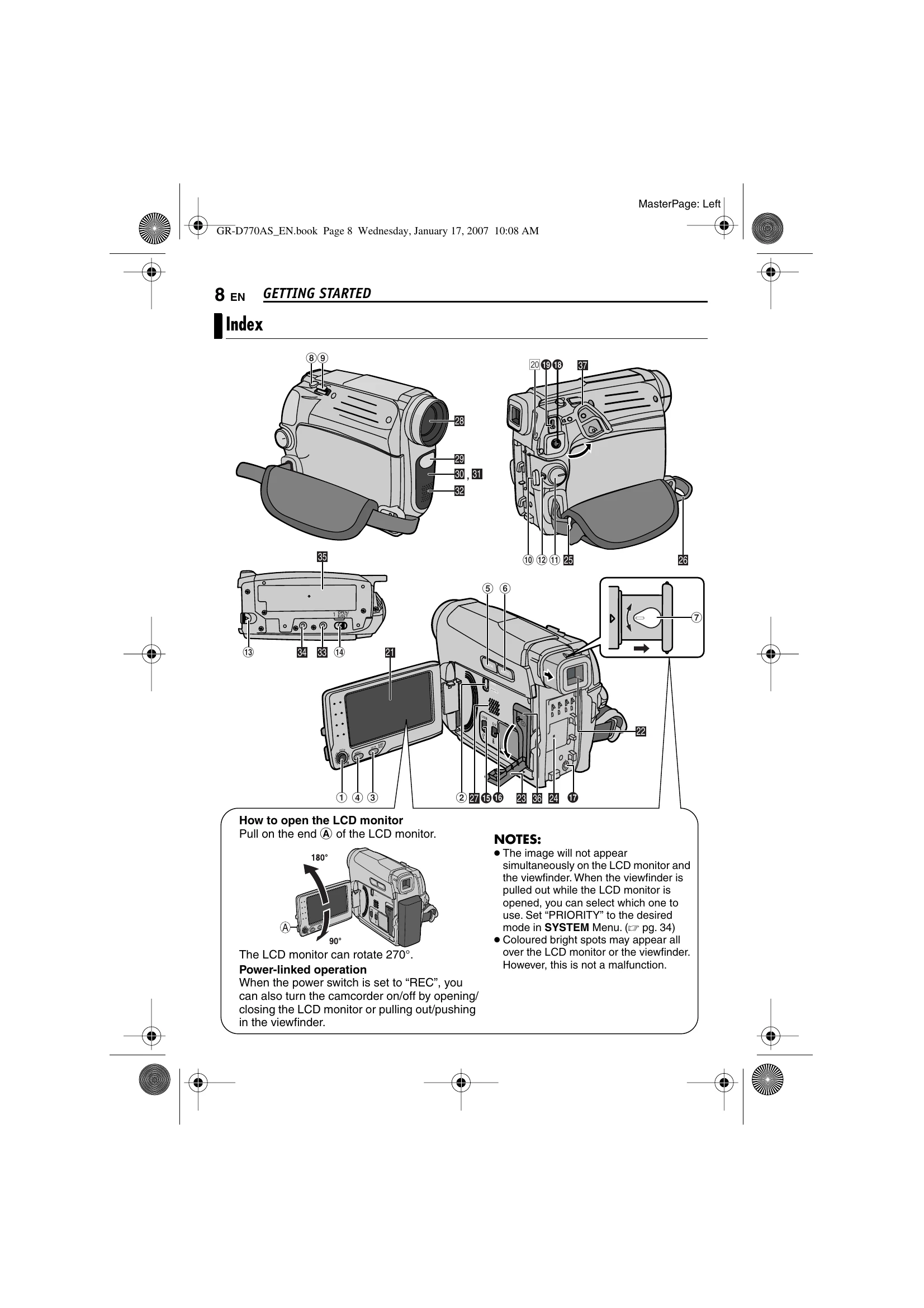
Controls Familiarize yourself with the camcorder's controls, including the control lever, power switch, and various buttons for recording and playback.
Indicators Understand the various indicators on the LCD monitor and viewfinder for recording status, battery level, and mode settings.
Loading/Unloading Learn how to load and unload video cassettes and memory cards.
Recording & Playback Basic recording procedures, tape remaining time, quick review, zooming, journalistic shooting, and interface shooting are explained.
| Problem | Possible Cause | Remedy |
| No power is supplied. | Power not connected properly. | Connect the AC Adapter securely. |
| Battery pack not attached firmly. | Detach and re-attach firmly. | |
| Battery is dead. | Replace with a fully charged one. | |
| Recording cannot be performed. | Tape's erase protection tab is set to “SAVE”. | Set the tab to “REC”. |
| “TAPE END” appears. | Replace with new cassette. | |
| Cassette holder cover is open. | Close the cover. | |
| When shooting a subject illuminated by bright light, vertical lines appear. | N/A | This is not a malfunction. |
| When the screen is under direct sunlight during shooting, the screen becomes red or black for an instant. | N/A | This is not a malfunction. |
| The LCD monitor or viewfinder indications blink. | Conflicting effect functions selected. | Re-read sections covering Effects. |
| The tape is moving, but there is no picture. | TV not set to VIDEO mode. | Set TV to the correct mode or channel. |
| Cassette holder cover is open. | Close the cover. | |
| Blocks of noise appear during playback, or no picture and blue screen. | Dirty video heads. | Clean heads with a cleaning cassette. |
| The focus does not adjust automatically. | Focus set to Manual mode. | Set Focus to Auto mode. |
| Lens is dirty or covered with condensation. | Clean the lens and check focus. | |
| The colour of Snapshot looks strange. | Unusual light sources or lack of white. | Find a white subject and include it in the frame. |
| The POWER/CHARGE lamp does not light during charging. | Battery pack not attached firmly. | Detach and re-attach firmly. |
| Charging in extreme temperatures. | Charge between 10°C to 35°C. | |
| The image looks like the shutter speeds is too slow. | “GAIN UP” set to “AUTO” in the dark. | Set “GAIN UP” to “AGC” or “OFF”. |
| Images on the LCD monitor appear dark or whitish. | Low temperature effects on LCD. | Adjust brightness and angle of LCD monitor. |
| LCD monitor's fluorescent light aged. | Consult nearest JVC dealer. | |
| Picture does not appear on the LCD monitor. | Viewfinder priority set, or brightness too low. | Set “PRIORITY” to “LCD” or adjust brightness. |
| If the monitor is tilted upward 180 degrees, open the monitor fully. | N/A | Open monitor fully. |
| Aspect ratio is strange. | Incorrect setting. | Change setting in “16:9 OUTPUT”. |
| The remote control does not work. | “REMOTE” set to “OFF” or not pointing at sensor. | Set “REMOTE” to “ON” or point at sensor. |
| Remote control batteries exhausted. | Replace batteries. | |
| TAPE END | Tape ended. | N/A |
| LENS CAP | Lens cap attached or dark. | N/A |
| A. DUB ERROR! | Attempted on blank portion, LP tape, or 16-BIT audio. | Refer to Audio Dubbing section. |
| Erase protection tab set to “SAVE”. | Refer to Audio Dubbing section. | |
| INSERT ERROR! | Attempted on LP tape, blank portion, or erase protection set to “SAVE”. | Refer to Insert Editing section. |
| MEMORY IS FULL | Memory card full. | N/A |
| SET DATE/TIME! | Date/time not set or clock battery dead. | Set date/time or consult dealer for battery replacement. |
| UNIT IN SAFEGUARD MODE (Error 01, 02, 06) | Power supply issue. | Remove and reattach battery or DC plug. |
| UNIT IN SAFEGUARD MODE (Error 03, 04) | Cassette issue. | Eject and reinsert tape. |