Brand: JVC
Category: Camcorder
Document Type: Manual
Language: EN
Brand: JVC
Category: Camcorder
Document Type: Manual
Language: EN
Uploaded: Aug. 10, 2025, 12:36 a.m.
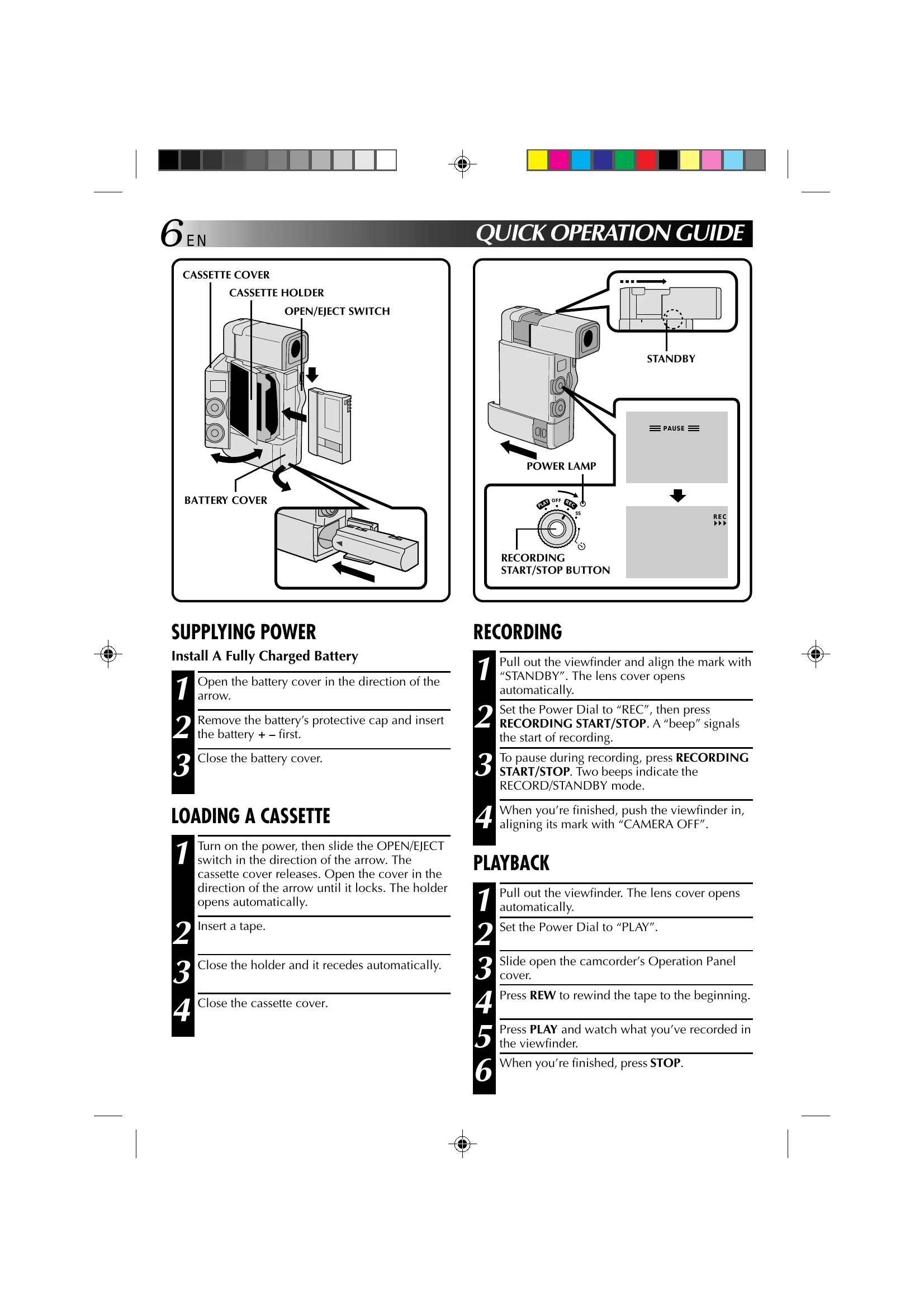
Supplying Power: Install a fully charged battery by opening the battery cover, removing the protective cap, and inserting the battery positive side first. Close the cover.
Loading a Cassette: Turn on the power, slide the OPEN/EJECT switch, open the cassette cover until it locks. Insert a tape, close the holder, then close the cassette cover.
Recording: Pull out the viewfinder and align with "STANDBY". Set the Power Dial to "REC". Press RECORDING START/STOP to begin recording. Press again to pause. Push the viewfinder in to finish.
Playback: Pull out the viewfinder. Set the Power Dial to "PLAY". Slide open the Operation Panel cover. Press REW to rewind. Press PLAY to watch. Press STOP when finished.
| SYMPTOM | POSSIBLE CAUSES | CORRECTIVE ACTION |
|---|---|---|
| 13. Digital Zoom doesn't work. |
13. 10x optical zoom is selected. • The Video Echo effect is activated. • Picture Wipe or Dissolve are being used in a scene transition. • 5-Second recording was done with the Power Dial set to "5S", and with "5SD" selected in the System Menu. • Snapshot Dissolve was attempted during Digital Zoom. |
13. Turn off the Video Echo effect. • Wait until the Picture Wipe or Dissolve effects are completed. • Change the setting of either the System Menu or the Power Dial. • Do not attempt to take a Snapshot when performing Digital Zoom. |
| 14. P.AE/Effects and Fade/ Wipe Effects don't work. |
14. The Select Dial is set to "AUTO". • The Power Dial is set to "5S". |
14. Set the Select Dial to "MANUAL". • Change the setting of the Power Dial. |
| 15. The Black & White Fader doesn't work. | 15. The Sepia or Monotone effects are activated. | 15. Turn off Sepia and Monotone. |
| 16. The Dissolve function doesn't work. |
16. P.AE/Effects Sepia, Monotone or Slow are activated. • The Squeeze mode is selected. |
16. Turn off Sepia and Monotone before adding Dissolve to a scene transition. • Make sure that the Squeeze mode in the Recording Menu is set to "OFF". |
| 17. The Picture Wipe and Dissolve functions don't work. |
17. The last selected editing scene is ending. • At the end of the last selected scene for editing, the Power Dial was set to "OFF". • The power is off. • The previously selected P.AE/Effect was changed after the last selected scene for editing was registered. • The P.AE/Effects in the Recording Menu were exchanged after the last selected scene for editing was registered. |
17. Select Picture Wipe or Dissolve before beginning recording. The effects are then automatically activated. • Do not turn off the camcorder's power after setting Edit-In and Edit-Out points, as they will all be erased. • The camcorder automatically shuts off after 5 minutes have elapsed in the RECORD/ STANDBY mode. Make sure you continue operations within 5 minutes after engaging RECORD/STANDBY. • Make sure you have selected the P.AE/Effects you want before starting editing. • Exchanging P.AE/Effects may deactivate the effect(s) you selected. Once you've selected an effect, do not perform an exchange before beginning editing. If you do, make sure you don't replace the effect(s) you selected. |