Brand: JVC
Category: Camcorder
Document Type: Manual
Language: EN
Brand: JVC
Category: Camcorder
Document Type: Manual
Language: EN
Uploaded: Nov. 21, 2025, 9:03 p.m.
Manual Publish Date: 2000
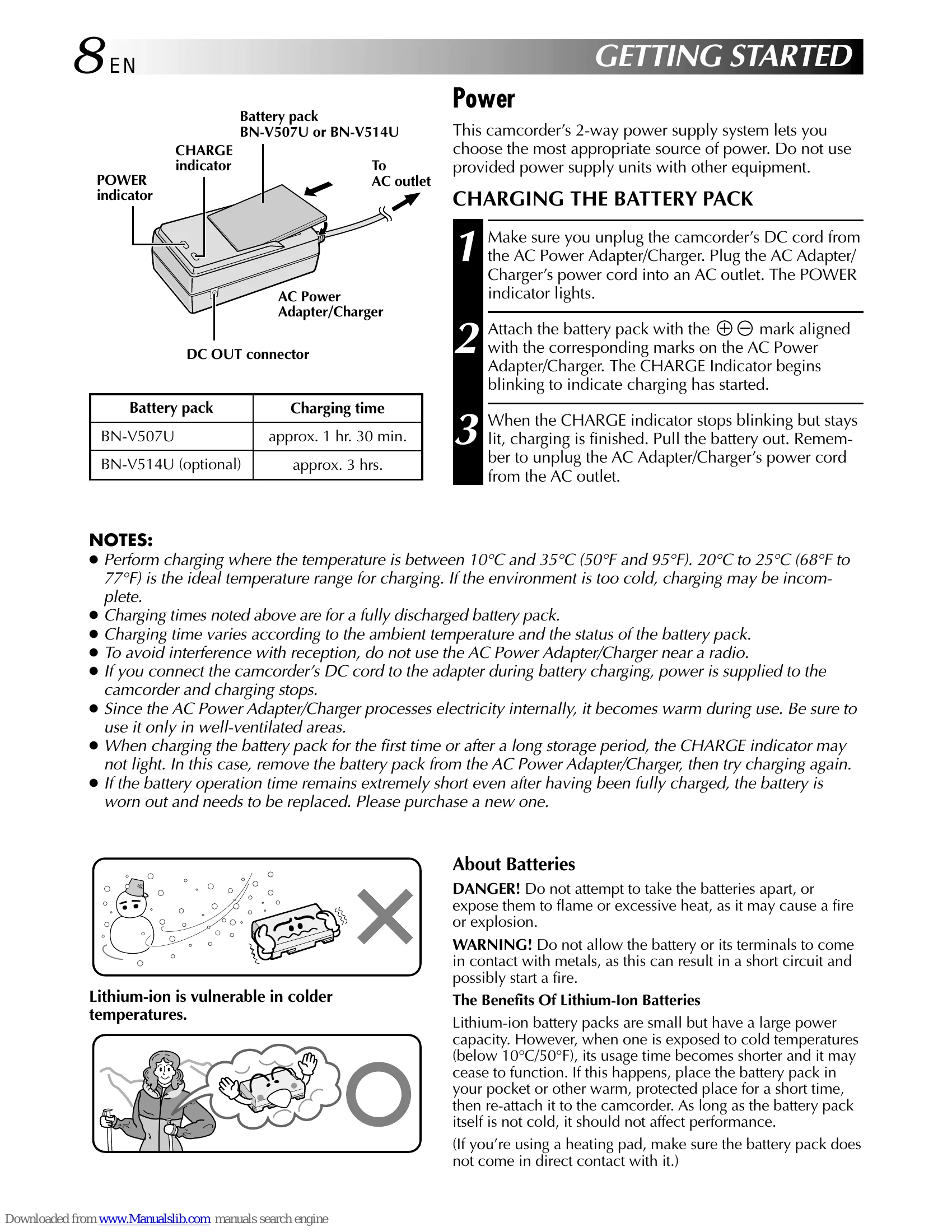
This camcorder offers a 2-way power supply system using either the AC adapter or battery pack. Ensure you use the provided power supply units with this equipment only.
Connect the AC Power Adapter/Charger as shown in the illustration.
Choose the appropriate mode using the POWER Switch and Operation Switch (CAMERA, OFF, PLAY/PC, MEMORY PLAY, MANUAL, FULL AUTO).
Select the desired mode: DUAL, VIDEO, PS, or DSC.
| Indications | Function |
|---|---|
| 🔌 | Displays the battery remaining power. Remaining power level: high |
| 🔌🔌🔌🔌 | Remaining power level: exhausted. As the battery power comes close to nil, the battery indicator 🔌🔌🔌 blinks. When the battery power is exhausted, power turns off automatically. |
| 📢 | Appears when no tape is loaded. (pg. 12) |
| ⚠️ | Appears when the erase protection tab is set to “SAVE” while the POWER Switch is set to “CAMERA”. (pg. 12) |
| ⚙️ | Appears if dirt is detected on the heads during recording. Use an optional cleaning cassette. (pg. 94) |
| 💧 | Appears if condensation occurs. When this indication is displayed, wait more than 1 hour until condensation disappears. |
| TAPE! | Appears if a tape is not loaded when START/STOP is pressed while the POWER Switch is set to “CAMERA” and the MODE Dial is set to “VIDEO”, “PS” or “DUAL”. |
| TAPE END | Appears when the tape ends during recording or playback. (pg. 19) |
| DIFFERENT FORMATTED TAPE | Appears if a tape in another format is loaded. |
| SET DATE/TIME! | • Appears when the date/time is not set. (pg. 11) • Appears when the built-in clock (lithium) battery is discharged and the previously set date/time is erased. (pg. 11) |
| A. DUB ERROR! | Appears if Audio Dubbing is attempted on a blank portion of a tape. (pg. 76) |
| A. DUB ERROR! <CANNOT DUB ON A LP RECORDED TAPE> <CANNOT DUB ON A 16BIT RECORDING> <CHECK TAPE'S ERASE PROTECTION SWITCH> |
• Appears if Audio Dubbing is attempted on a tape recorded in the LP mode. (pg. 76) • Appears if Audio Dubbing is attempted on a tape recorded in 16-bit audio. (pg. 76) • Appears if A. DUB (⌚) on the remote control is pressed when the erase protection tab is set to “SAVE”. (pg. 76) |
| MEMORY IS FULL | Appears when the MultiMediaCard's memory is full and shooting is not possible. |
| COPYING FAILED | • Appears if dubbing of copyguarded signals is attempted while this camcorder is being used as a recorder. • Appears in the following cases when dubbing from a tape to a MultiMediaCard (as digital stills or video clips): - when no MultiMediaCard is loaded. - when the MultiMediaCard's memory is full. - when the MultiMediaCard is not formatted. • Appears in the following cases when dubbing still images or sound effects stored in the MultiMediaCard's memory to a tape: - when condensation occurs. - when no tape is loaded. - when the erase protection tab is set to “SAVE”. - when a tape in another format is loaded. - when the tape ends. (pg. 64) |
| MEMORY CARD! | Appears if a MultiMediaCard is not loaded when SNAPSHOT is pressed while the POWER Switch is set to “CAMERA” and the MODE Dial is set to “DSC” or “DUAL”. |
| PLEASE FORMAT | Appears when there is a problem with a MultiMediaCard and its memory is corrupt, or it has not been initialized. Initialize the MultiMediaCard. (pg. 52) |
| NO STORED DATA | Appears when the POWER Switch is set to “MEMORY” and there are no files stored in the MultiMediaCard. |
| NO SOUND DATA | Appears if there are no sound files stored in the MultiMediaCard when DIGITAL SOUND is pressed. |
| NO STORED IMAGE | Appears when the POWER switch is set to “MEMORY” and all image files are deleted. |
| NO E-CLIP DATA | Appears when the POWER switch is set to “MEMORY” and all E-clip recording files are deleted. |
| UNSUPPORTED DATA | Appears when a file in a format other than MP3 is selected. |
| E01 – E06 UNIT IN SAFEGUARD MODE REMOVE AND REATTACH BATTERY | The error indications (E01 – E06) show what type of malfunction has occured. When an error indication appears, the camcorder turns off automatically. Remove the power supply (battery, etc.) and wait a few minutes for the indication to clear. When it does, you can resume using the camcorder. If the indication remains, consult your nearest JVC dealer. |