Brand: JVC
Category: Camcorder
Document Type: Manual
Language: EN
Brand: JVC
Category: Camcorder
Document Type: Manual
Language: EN
Uploaded: Aug. 10, 2025, 12:34 a.m.
Getting Started:
Charging the Battery:
Inserting an SD Card:
Video Recording:
Playback/Deleting Files:
| Troubleshooting | Possible Cause/Solution |
|---|---|
| Unit does not operate properly | Reset the unit: Remove all cables, press the "Reset button" inside the terminal cover, then reattach the AC adapter. |
| Electrostatic discharge, external noise, or interference | Reset the unit (see above). |
| Battery issues (short recording time) | The battery may need replacement. Consult a JVC service center. |
| Charging issues (CHARGE lamp blinking) | Remove AC adapter, press Reset, wait for room temperature to normalize, then retry charging. |
| Recording failure or data loss with SD card | Use only compatible SD cards. Do not touch SD card terminals. Check compatibility with your computer's OS. |
| LCD monitor damage | Do not push or apply shock to the LCD. Avoid rubbing with coarse cloth. |
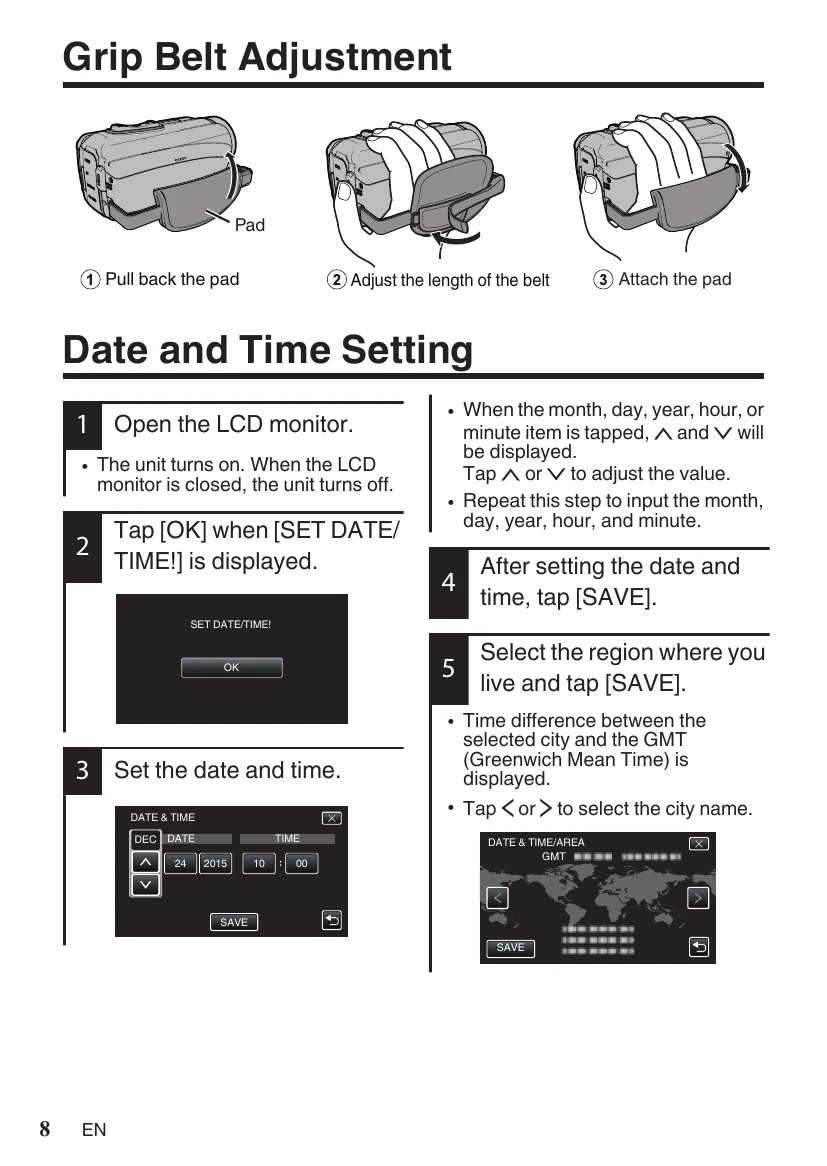
| Unit falling or dropping | Fasten grip belt securely. Securely attach to tripod if used. Parental guidance needed for children. |