Brand: JVC
Category: Camcorder
Document Type: Manual
Language: EN
Brand: JVC
Category: Camcorder
Document Type: Manual
Language: EN
Uploaded: Aug. 10, 2025, 12:34 a.m.
Manual Publish Date: 2016-01-01
| Troubleshooting | Possible Cause/Solution |
|---|---|
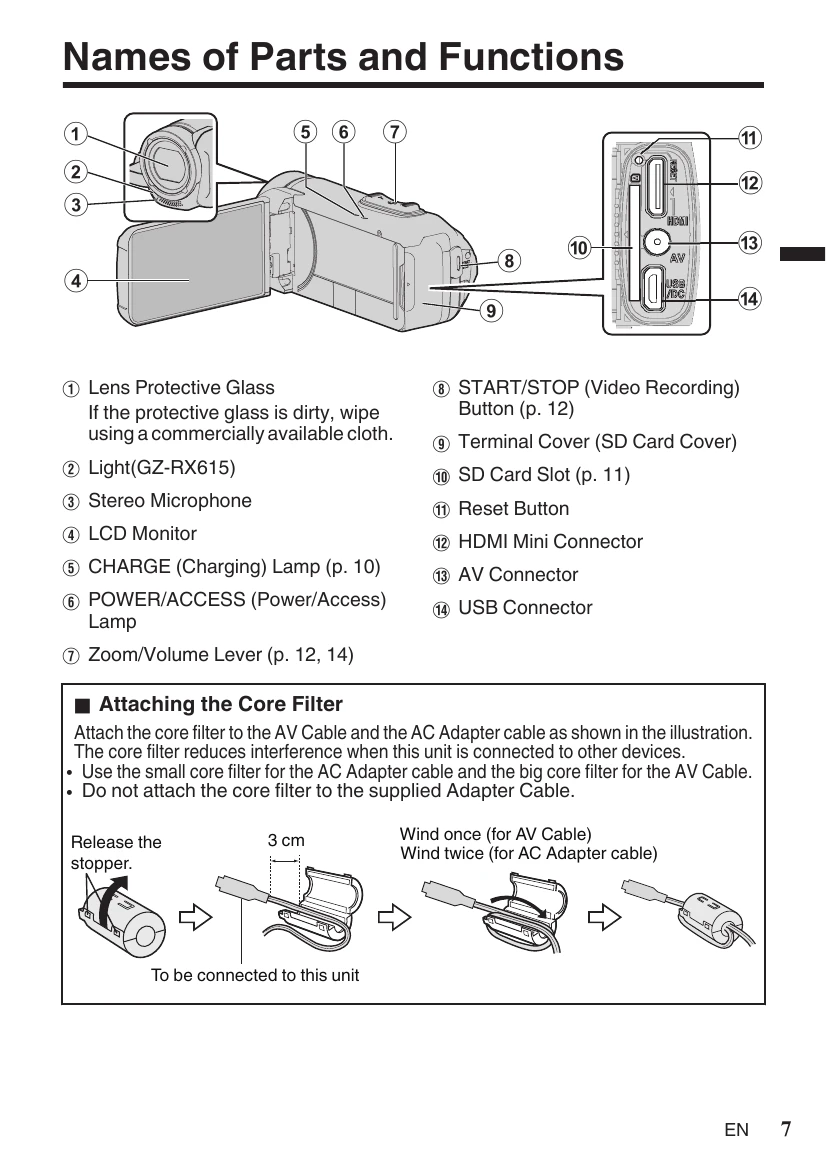
| Unit does not function properly | Microcomputer-controlled device. Electrostatic discharge, external noise, and interference (from TV, radio, etc.) may cause malfunction. Reset the unit: ① Remove all cables. ② Press the "Reset button" inside the terminal cover (close LCD monitor first). ③ Reattach AC adapter; unit powers on automatically. |
| Problems persist after reset | Consult your nearest JVC dealer or JVC service center. |