Brand: JVC
Category: DVD Player
Document Type: Manual
Language: EN
Brand: JVC
Category: DVD Player
Document Type: Manual
Language: EN
Uploaded: Nov. 21, 2025, 8:37 p.m.
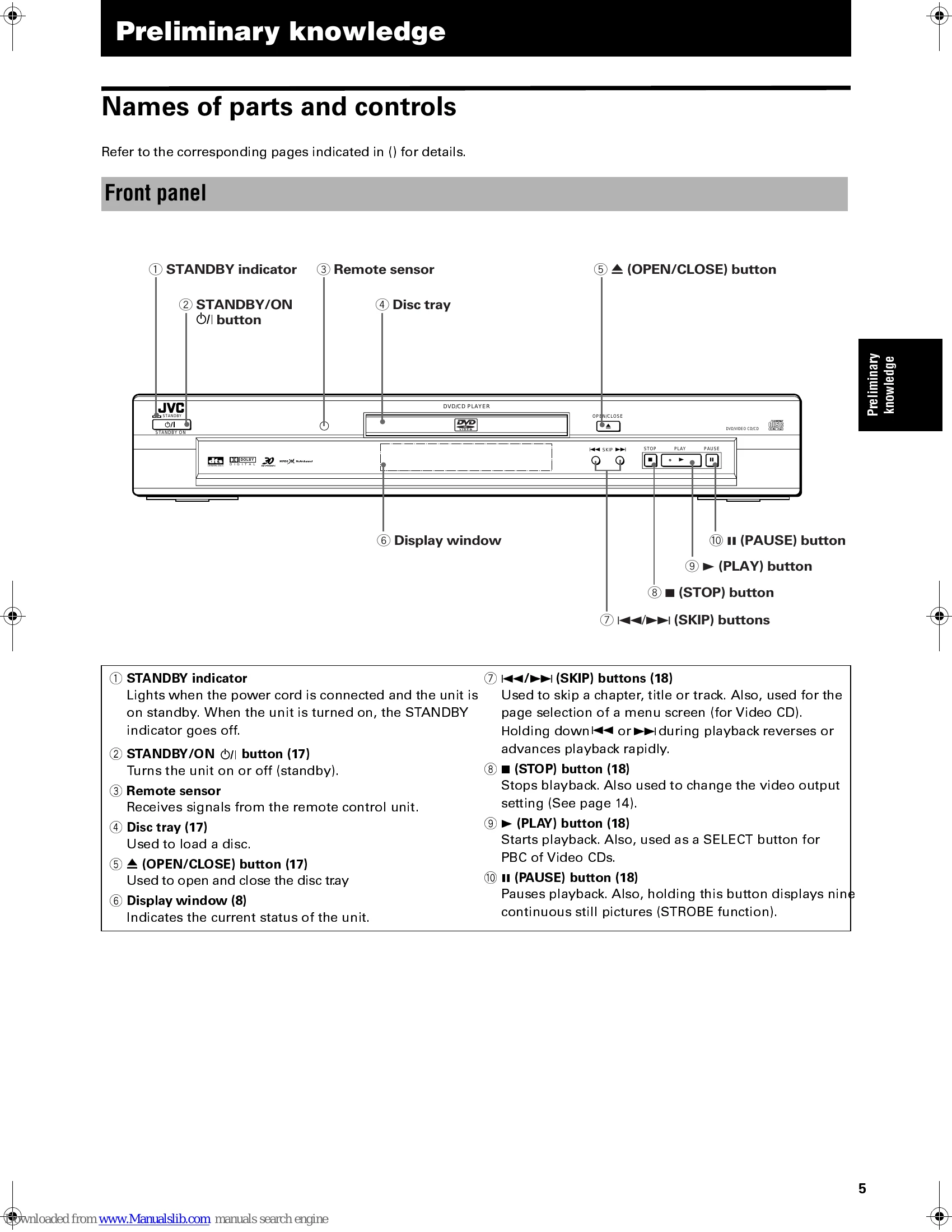
NOTE: Even if you press the STANDBY/ON O/I or /I button to turn off the unit, the unit is not disconnected from the AC power source as long as it is connected to the wall outlet. This state is called the standby mode. In this state, the unit consumes a very small amount of power.
NOTES: - The unit can play back DVD VIDEO, Audio CD, and Video CD discs only. - When loading a disc in the tray, be sure to position the disc inside the recess. Otherwise, the disc may be damaged when the tray is closed.
NOTES: - When the resume point is memorized, pressing ► starts playback from that point. - During playback, the display window shows the title/chapter or track number.
| Symptom | Possible case | Remedy |
|---|---|---|
| Power does not come on. | Power plug is not inserted securely. | Plug in securely. |
| Remote control does not work. | Too far from the unit. | More closer to the unit. |
| The tip of the remote unit is not pointed in the right direction. | Point the infrared light-emitting window toward the remote sensor on the front panel. | |
| Batteries are exhausted. | Replace the batteries with new ones. | |
| Battery polarity is incorrect. | Take out the batteries and insert them again in the correct direction. | |
| No picture is displayed on the monitor. | Connection of video cable is incorrect. | Connect the cable correctly. |
| Input selection of TV is incorrect. | Select correctly. | |
| Disc is not playable. | Use a playable disc. | |
| Picture is not normal when using the S-VIDEO jack. | The unit is set to feed the RGB signals (instead of the S-video signals). | Make the unit feed the S-video signals. |
| Picture is noisy. | The unit is connected to a VCR directly and the copyguard function is activated. | Connect the unit so that the picture signal flows directly to the TV. |
| No audio is reproduced. | Connection is incorrect. | Check the connections. |
| Input selection of amplifier is incorrect. | Select correctly. | |
| No audio is reproduced when playing back a DVD disc recorded with 96-kHz, linear PCM audio. | The audio signal is derived from the unit's DIGITAL OUT. | Use the AUDIO OUT when playing back such discs. |
| Sound is distorted or noise is generated. | Disc is dirty. | Wipe the disc surface. |
| Picture does not fit the television screen. | MONITOR TYPE is not correctly set. | Select monitor type correctly. |
| Television is not correctly set. | Set the television correctly. | |
| Operation is not possible. | Microcomputer malfunction due to lightning or static electricity. | Turn off the power and unplug the power cord, then connect the power cord again. |
| Moisture condensation caused by a sudden change of temperature or humidity. | Turn off the power, then turn it on a few hours later. |