Brand: JVC
Category: DVD Player/VCR
Document Type: Manual
Language: EN
Brand: JVC
Category: DVD Player/VCR
Document Type: Manual
Language: EN
Uploaded: Nov. 21, 2025, 6:51 p.m.
Refer to your JVC dealer for warranty information.
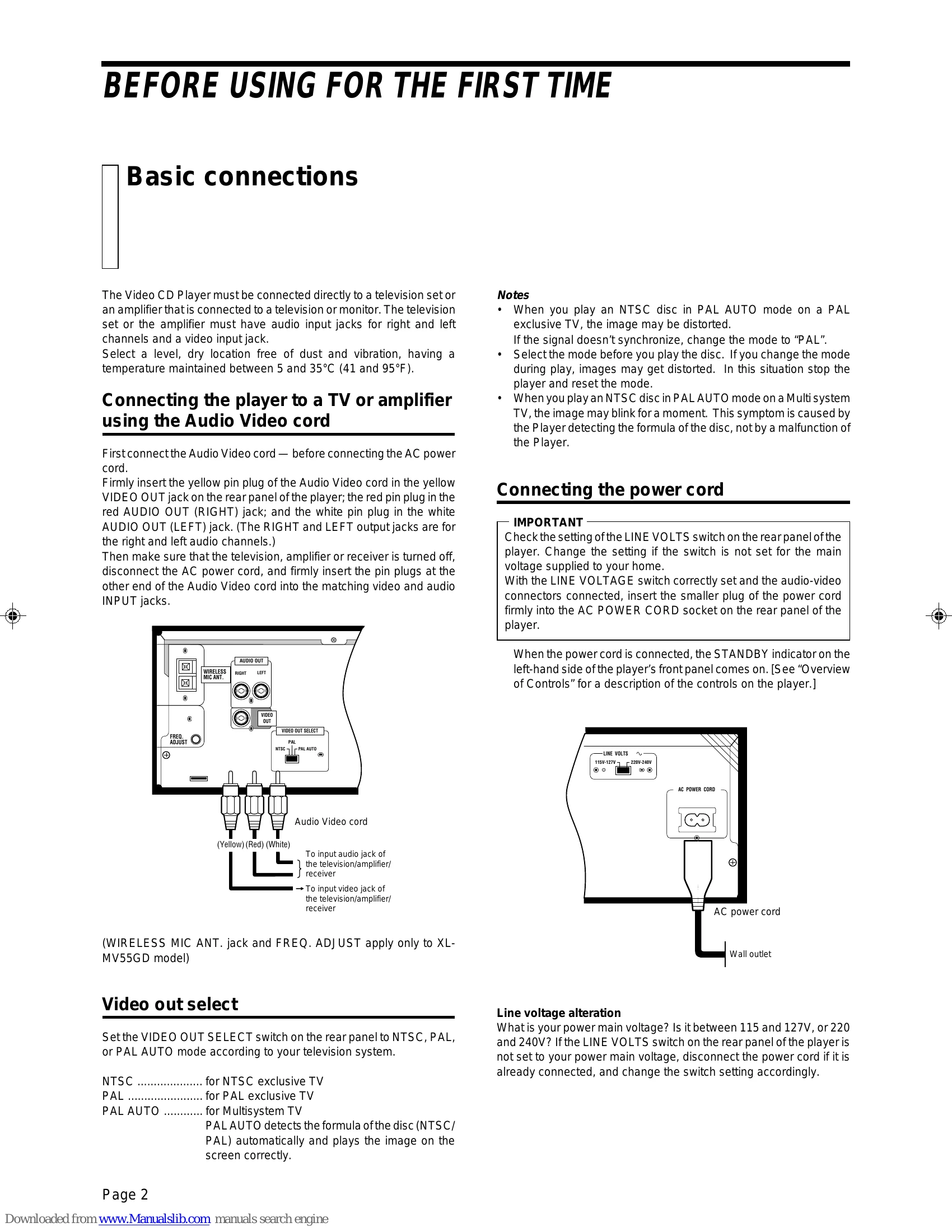
Connect the Video CD player to a TV or amplifier using the Audio Video cord and then connect the AC power cord. Ensure the LINE VOLTS switch is set correctly for your home's main voltage. Install batteries in the remote control and microphone (if applicable).
Select the desired mode (KARAOKE, NORMAL, PBC OFF). Load discs into the triple tray. Press the PLAY button or disc buttons to start playback. Use number keys for track selection. Functions like STOP, PAUSE, AUTO SEARCH/MANUAL SEARCH, and SLOW-MOTION playback are available.
The remote control allows operation of the player and can be preset to control your TV. The SHIFT button activates additional functions.
Enhance your experience with functions like track programming, repeating tracks, random playback, multiplex sound, VIDEO INTRO, highlights viewing, Spatializer mode, and bookmarking for later viewing. Microphones can be used for karaoke, with options for wired, wireless, and adjusting music key and echo effects. Vocal replace and vocal masking are also available.
This function, available on select Video CDs, provides menu-driven playback and high-resolution still images.
The Read-Protect function allows you to lock discs, requiring a code to unlock them.
The player can also play CD Graphics and Digital Audio CDs.
Consult the troubleshooting table for solutions to common issues like power not coming on, remote control not working, no image or sound, or disc playback problems.
| Symptom | Possible cause | Remedy |
|---|---|---|
| Power does not come on. | Power plug is disconnected from AC outlet. | Firmly connect the plug to AC outlet. |
| Remote control does not work. | Batteries are exhausted. | Replace the batteries with new ones. |
| The tip of the remote controller is not pointed at the receiving part of the player. | Use the remote control correctly. | |
| No image is displayed on the monitor. | The video cable is not connected. | Firmly connect the cable. |
| The TV is not set in video mode. | Set the TV in video mode. | |
| Playback does not start. | An incompatible disc is loaded. | Load a disc compatible with the player. |
| No disc is loaded. | Load a disc. | |
| Disc is loaded upside down. | Reload the disc with the label up. | |
| Speaker does not produce sound. | Audio cable is not connected. | Firmly connect the cable. |
| Operation of the external amplifier is incorrect. | Operate the amplifier correctly. | |
| Sound is distorted or noise is generated. Image is garbled. | Disc is dirty. | Wipe the disc surface with a soft cloth. |
| Connection is wrong. | Correctly connect cables. (See page 2.) | |
| Sound is intermittent. Image is garbled. | Disk is dirty. | Wipe the disc surface with a soft cloth. (See page 1.) |
| Disc is scratched. | Replace the disc with a new one. | |
| Disc is warped. | ||
| Disc tray does not come out when OPEN/CLOSE button is pressed. | Power plug is disconnected from the power outlet. | Firmly insert the plug into the outlet. |
| Operation is not possible. | Microcomputer malfunctions due to lightning or static electricity. | Turn the power off, then on again. |