Brand: JVC
Category: TV
Document Type: Manual
Language: EN
Brand: JVC
Category: TV
Document Type: Manual
Language: EN
Uploaded: Nov. 21, 2025, 8:46 p.m.
Refer to the \"Technical information\" section for warranty details.
Warning: Please follow all safety guidelines.
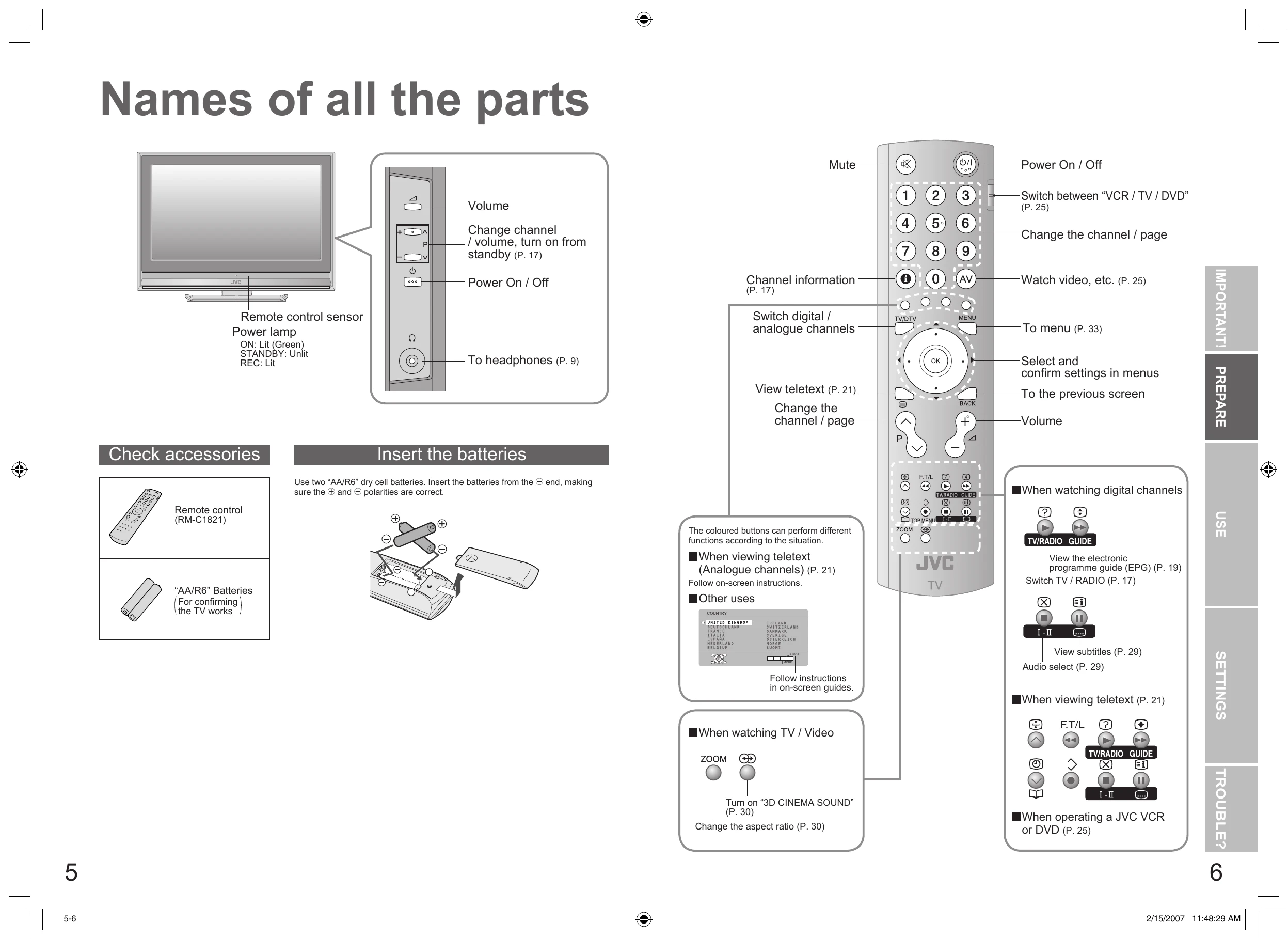
\nNames of all the parts: Familiarize yourself with the TV and remote control components.
\nBasic connections: Connect the aerial and external devices like VCRs or DVD players.
\nInitial settings: Set up language, country, and scan for digital/analogue channels.
\nEnjoying your new TV!: Learn to watch digital and analogue channels, view teletext, and use the EPG.
\nWatching videos / DVDs: Connect and play video sources.
\nCustomising your TV: Adjust picture and sound settings.
\nDTV configuration: Set up favourite channels and PIN codes.
\nDTV setup: Configure antenna power and upgrade tuner software.
\nAdvanced picture adjustment: Fine-tune picture settings like noise reduction and color.
\nTroubleshooting: Find solutions to common problems.
\nTechnical information: View specifications and connection details.
\n| Problem | Actions | Page |
|---|---|---|
| Analogue channels | ||
| Severe noise or snow | Is the TV connected correctly to the aerial? Change the direction of the aerial. Is the aerial or its cable damaged? Consult your retailer. |
49 |
| Patterns, stripes or noise | Is the aerial receiving interference from high-voltage power lines or wireless transmitters? Consult your retailer. Are connected devices too close to the TV? Insert the minimum distance between the aerial and the cause of interference until no interference. |
14 |
| Ghosting (Doubling of images) | Are you receiving interference from signals reflected off mountains or buildings? Adjust the direction of your aerial, or change to a good-quality directional aerial. | - |
| Basics | ||
| I can't turn it on! | Is the power cord connected to the AC outlet correctly? | - |
| Remote control stops working | Unplug TV, several minutes later plug it in again. | - |
| Screen | ||
| Digital channel screen is frozen | Hold down and on the TV simultaneously for three or more seconds to restart. | - |
| Some functions do not display on menu | It is not a malfunction. Some functions in the menu will not be displayed depending on the situation. | - |
| Aspect ratio changes unintentionally | Press to return to your settings. | 30 |
| Picture | ||
| Poor picture quality | Unnatural colour >> Adjust "COLOUR" and "BRIGHT". Check your "COLOUR SYSTEM". Noise >> Set to the following functions. PICTURE MODE: STANDARD DIGITAL VNR: ON DigiPure : OFF Dull picture >> Set to the following functions. PICTURE MODE: BRIGHT DIGITAL VNR: OFF DigiPure : ON |
38 34 38 38 34 38 38 |
| Strange picture when using an external device | If you connected S-Video output device, check the "S-IN" setting. If the top of the image is distorted, check the video signal quality itself. If movement appears unnatural when receiving a signal from a DVD player, etc. with 625p (progressive-scanning), change the output setting of the external device to 625i (interlace-scanning). |
- |
| Sound | ||
| Poor sound | Adjust the "BASS" and "TREBLE". If receiving a poor signal in "STEREO / I-II", switch to "MONO". |
34 34 |
| Screen | ||
| Black or white dots appear on the screen | LCD panels use fine dots ("pixels") to display images. While more than 99.99% of these pixels function properly, a very small number of pixels may not light, or may light all the time. Please understand that this is not a malfunction. | - |
| No picture, no sound | Some digital channels cannot be watched on this TV. | 55 |
| Functions | ||
| No sound | Check if the device is compliant with HDMI. Switch "AUDIO" in "HDMI SETTING" to "DIGITAL" or "AUTO" for HDMI devices, or "ANALOGUE" or "AUTO" for DVI devices. (Not available for "EXT-5".) |
34 |
| Green and distorted screen | Wait a little for the signal to stabilize when switching the signal format for an "HDMI" device. | - |
| Some functions do not work | It is not a malfunction. Some functions in the menu do not display depending on the situation. | 29 |
| "FEATURE NOT AVAILABLE" | Is the "T-V LINK" compatible device connected to "EXT-2"? Is the SCART CABLE "Fully Wired"? Is the "T-V LINK" compatible device turned on? After confirming all the conditions above, press "OK" button again. |
54 54 |
| Error message | ||
| "NO RECORDING" | A problem occurs at the recorder. | - |
| "NO RECORDING POSSIBLE" | The displayed video cannot be recorded. | - |
| "NO RECORDING MEDIA PROBLEM" | The recorder is not ready for recording. Check the videotape or DVD disc. | - |
| "NO RECORDING DEVICE BUSY" | The recorder is recording another programme, or is playing. | - |
| DTV | ||
| Forgot my PIN code! | The default PIN code is "0000". If you forget the numbers that you used to change the default PIN code, first input "0081" in the "Enter PIN code" and then register a new PIN code. | 39 |
| Locked channels can be watched without inputting PIN code | Once the PIN code is input, the lock function is released. If you want to use the lock function again, turn the TV off and then turn it on again. | - |
| When JVC or the broadcasting station informs you of the software | Upgrade the tuner software by using the "Receiver Upgrade" function. | 41 |
| "Services have changed. Do you want to Update PR list?" is displayed | Update the PR list (digital channels) "Updating the PR list" | 57 |