Brand: KENWOOD
Category: Audio System
Document Type: Manual
Language: EN
Brand: KENWOOD
Category: Audio System
Document Type: Manual
Language: EN
Uploaded: Nov. 21, 2025, 8:35 p.m.
This Kenwood product is warranted for one year from the original purchase date against defects in materials and workmanship.
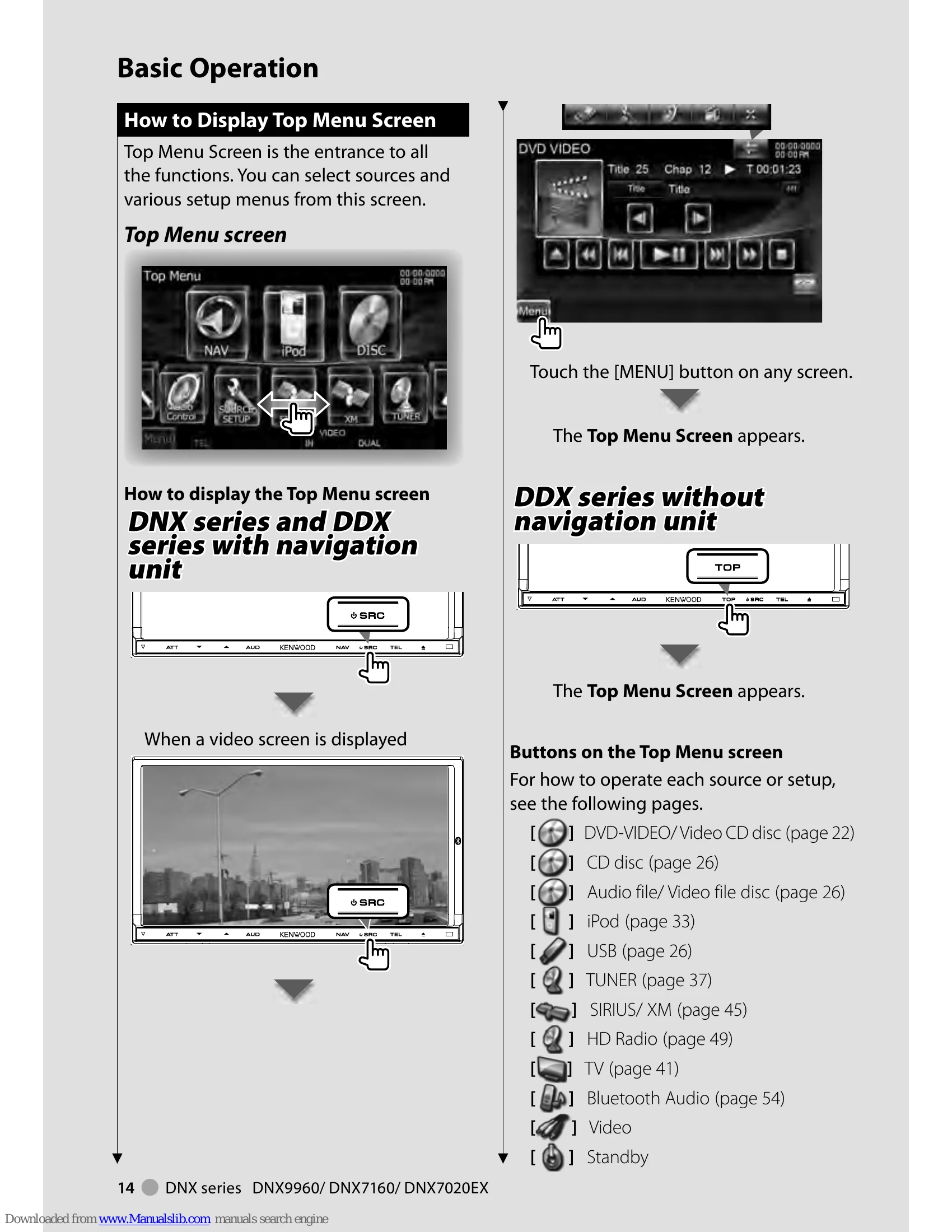
The Top Menu Screen serves as the entry point to all functions, allowing selection of sources and setup menus.
Displaying the Top Menu: Touch the [MENU] button on any screen. For the DNX series and DDX series with navigation, the top menu appears after pressing the NAV or TOP button respectively. When a video screen is displayed, the Top Menu can be accessed via the SRC button.
Customizing the Top Menu: Up to 3 frequently used sources or setups can be registered. Display the desired icon by scrolling, then drag and drop it to the preferred location.
How to play media: Media can be played from Disc, iPod, or USB devices. To insert/eject discs, use the [▲] button. For iPod/USB, stop playback via the source control screen before disconnecting.
Source Control Screen: Access this screen to find all control buttons for the selected source. It can be displayed from various screens, including the navigation screen with a secondary window.
Playback Screen of Visual Sources: Basic operations are available by touching the screen. The screen is divided into 4 functional areas, with specific functions varying by source.
Navigation Screen: Press the NAV button (DNX series) or TOP button (DDX series with navigation) to display the navigation screen.
Picture in Picture Function: Enables displaying both navigation and source screens simultaneously. Touching the source screen toggles between camera and source images.
Secondary Window Function: Allows control of audio sources while viewing the navigation screen, or navigation information while viewing the source control screen.
| Status bar Indicator items | Page |
|---|---|
| DVD Language Codes | 115 |
| Help? Troubleshooting | 116 |
| Help? Error | 117 |