Brand: KENWOOD
Category: Audio System
Document Type: Quick Start Guide
Language: EN
Brand: KENWOOD
Category: Audio System
Document Type: Quick Start Guide
Language: EN
Uploaded: Nov. 21, 2025, 9:08 p.m.
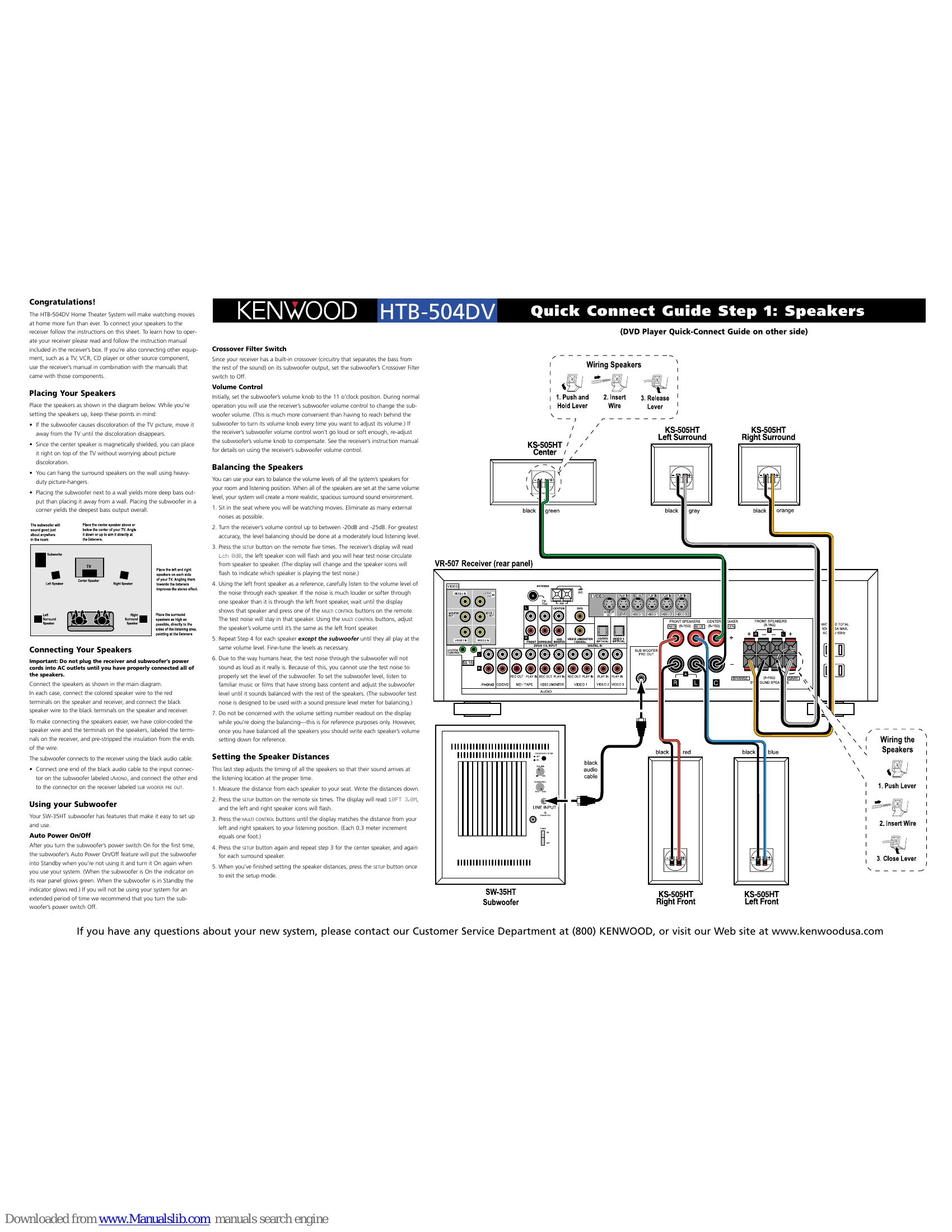
Placing Your Speakers: Position speakers as shown in the diagram, keeping speakers away from the TV if picture discoloration occurs. The center speaker is magnetically shielded. Surround speakers can be wall-mounted. Subwoofer placement affects bass output.
Connecting Your Speakers: Ensure receiver and subwoofer power cords are unplugged. Connect speaker wires to corresponding colored terminals on speakers and receiver. Connect the subwoofer to the receiver using the black audio cable.
Using Your Subwoofer: Auto Power On/Off feature activates when the system is used. Set the subwoofer volume knob to 11 o'clock initially. Use the receiver's subwoofer volume control for adjustments. Set Crossover Filter switch to Off.
Balancing the Speakers: Sit in the listening position and set receiver volume between -20dB and -25dB. Use the remote's SETUP button to cycle through speakers and adjust volume to match the left front speaker using MULTI CONTROL buttons. Adjust subwoofer level by ear using music or films with strong bass.
Setting the Speaker Distances: Measure distance from each speaker to your seat. Use the SETUP button and MULTI CONTROL buttons to input these distances into the receiver, adjusting for each speaker.
Connecting the DVD Player to the Receiver: Use supplied cables to connect the DVD player to the receiver. Connect the coaxial digital cable for digital audio, and audio/composite video cables for analog signals. S-Video can be used for improved video quality.
Programming the Receiver Remote: To control the DVD player with the receiver remote, press the DVD SOURCE button, then press and hold SETUP until the LED blinks twice. Enter the code "0-5-3-4". The LED will blink twice. Test by opening the DVD player's disc drawer.
Controlling the DVD Player: Press the DVD SOURCE button, then use the remote's playback controls to operate the DVD player. The remote will revert to receiver control after 15 seconds of inactivity.