Brand: KENWOOD
Category: Audio System
Document Type: Manual
Language: EN
Brand: KENWOOD
Category: Audio System
Document Type: Manual
Language: EN
Uploaded: Nov. 21, 2025, 9:02 p.m.
Refer to the warranty card for details.
To listen to radio broadcasts, select the tuner input and then a station. To listen to a tape, insert a tape and press play. To listen to a CD, place a CD on the tray and press play/pause. Adjust the volume using the VOLUME CONTROL.
Adjust volume for front, surround, and super woofer speakers simultaneously. Temporarily mute sound with the MUTE key. Use headphones by inserting the mini plug into the PHONES jack and adjusting volume. The system can be turned ON/OFF via remote control when in STAND BY mode.
Set timers for radio broadcast reception, CD playback, or tape playback. Customize ON/OFF times, days of the week, and program execution. AI TIMER functions offer wake-up alarms or sequenced CD and radio playback. The SLEEP timer turns the system OFF after a set period.
| Symptom | Cause | Remedy |
| Connections | ||
| Power cannot be turned ON. | The power cord is disconnected from the wall AC outlet. | Insert the power cord securely into the wall AC outlet. |
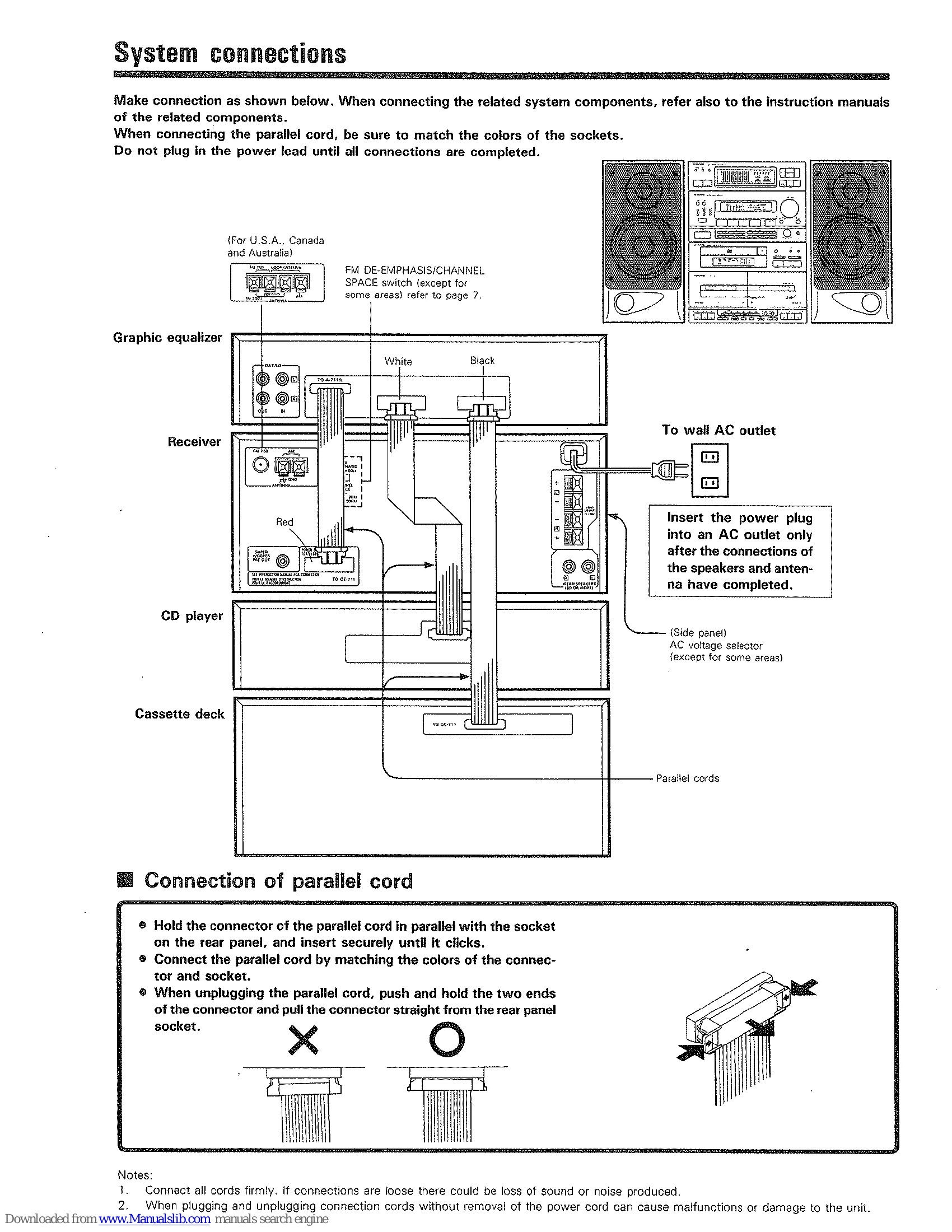
| The powers of the graphic equalizer, cassette deck and CD player cannot be turned ON. | The parallel cord is not inserted securely. | Insert the parallel cord securely. |
| Speaker | ||
| Sound is not output. | The speaker cords are disconnected. | Connect them properly referring to "System connections". |
| The volume is set to the minimum position. | Adjust the volume to a proper level. | |
| The MUTE key of the remote control unit is set to ON and the point indicator is blinking. | Press the MUTE key to OFF. | |
| The BALANCE control is turned fully to one side. | Adjust the BALANCE control position. | |
| The headphones plug is left inserted in the PHONES jack. | Remove the plug. | |
| Sound is not output from the surround speakers. | The SURROUND key is not set to ON. | Press the SURROUND key ON. |
| The surround speaker cord is disconnected. | Connect is properly referring to "System connections". | |
| Receiver | ||
| The clock display is blinking without changing from a certain time. | There was a power failure. | Set the current time again. |
| The power cord was unplugged. | Set the current time again. | |
| The timer does not work. | The current time is not set, or there was a power failure. | Set the current time referring to "Clock adjustment". |
| The timer ON time and OFF time have not been set. | Set the timer ON time and OFF time. | |
| The timer execution has not been specified. | Specify the execution of the desired program. | |
| Radio stations cannot be received. | No antenna is connected. | Connect an antenna. |
| The broadcast band is not set properly. | Set the broadcast band properly. | |
| The frequency of the desired station is not tuned. | Tune the frequency of the desired station. | |
| A station which was preset cannot be received by pressing the corresponding numeric key. | The preset station belongs to a frequency that cannot be received. | Preset a station with a receivable frequency. |
| The preset memory was cleared because the power cord had been unplugged for a long period of time. | Preset the station again. | |
| Interference. | Noise due to ignition noise of an automobile. | Install the outdoor antenna apart from the road. |
| Noise due to an influence from an electric appliance. | Turn off the power of the appliance. | |
| Noise due to a nearby TV set. | Install the system more apart from the TV set. | |
| Sound is distorted. | The N.B. CIRCUIT control is turned fully clockwise. | Return the N.B. CIRCUIT control to the center position. |