Brand: KENWOOD
Category: Audio
Document Type: Parts/Service
Language: EN
Brand: KENWOOD
Category: Audio
Document Type: Parts/Service
Language: EN
Uploaded: Nov. 21, 2025, 6:37 p.m.
Refer to the parts list for regional component variations.
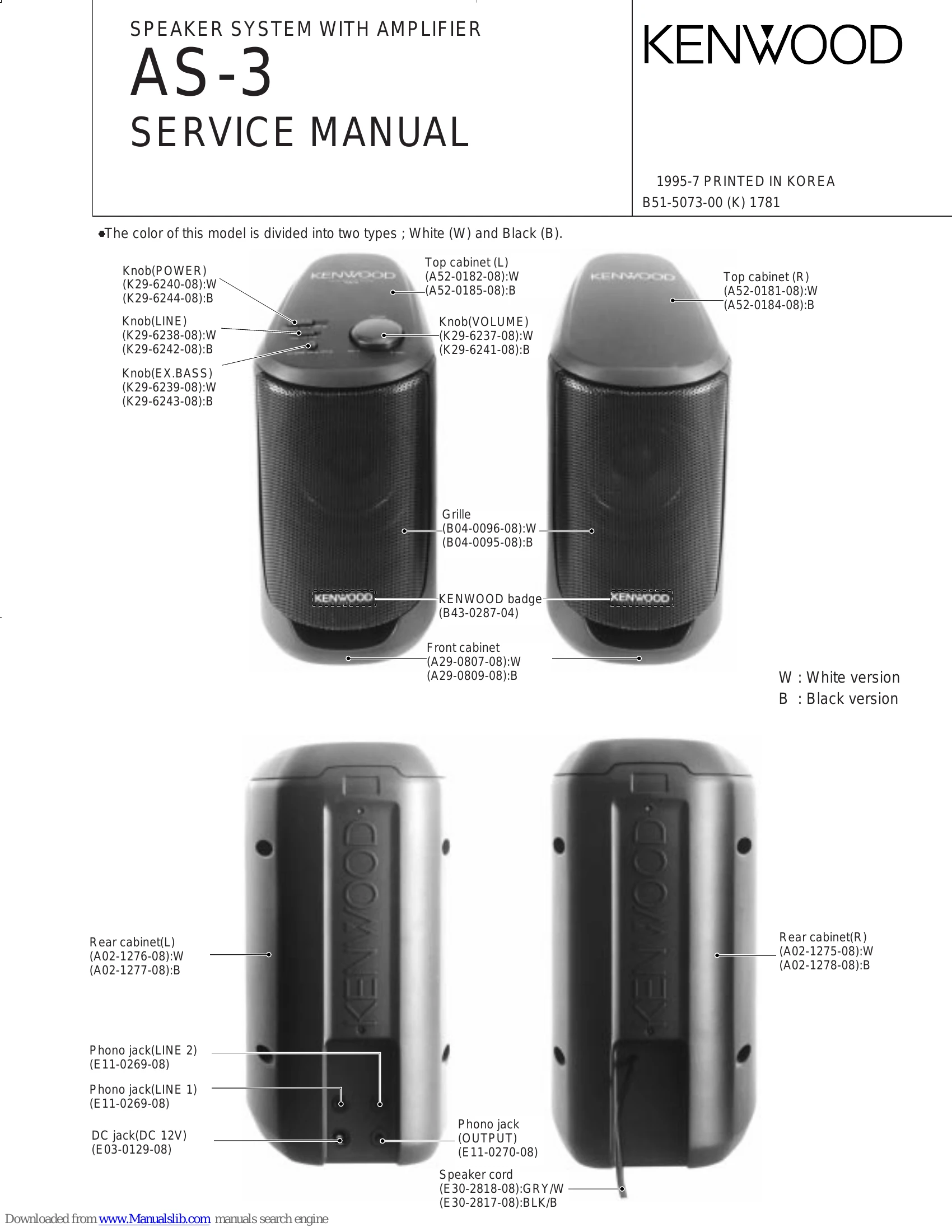
Front Panel: Features a Power button, Line select button (LINE 1/2), EX.BASS button, Power indicator, and a VOLUME control knob. The left speaker has a power indicator, and the right speaker has a volume control knob.
Rear Panel (Left Speaker): Includes LINE 1 input jack, DC 12V jack (for AC adaptor), LINE 2 input jack, and OUTPUT for the right speaker.
The system comes with an AC adaptor (available in M, E, or T type) and a connection cord.
| Symptom | Cause | Remedy |
| No sound | - Unit not turned on. - Speaker cord disconnected. - Volume set to minimum. - Input source not selected correctly. |
- Turn the unit ON. - Connect speaker cord securely. - Adjust volume. - Select the correct input source. |
| Distorted sound | - Volume set too high. - Input source issue. |
- Reduce volume. - Check input source. |
| No power | - AC adaptor not connected properly. - AC adaptor faulty. |
- Connect AC adaptor securely. - Replace AC adaptor. |