Brand: KENWOOD
Category: Audio
Document Type: Manual
Language: EN
Brand: KENWOOD
Category: Audio
Document Type: Manual
Language: EN
Uploaded: Nov. 21, 2025, 6:54 p.m.
Refer to the warranty card for details on the warranty period and conditions.
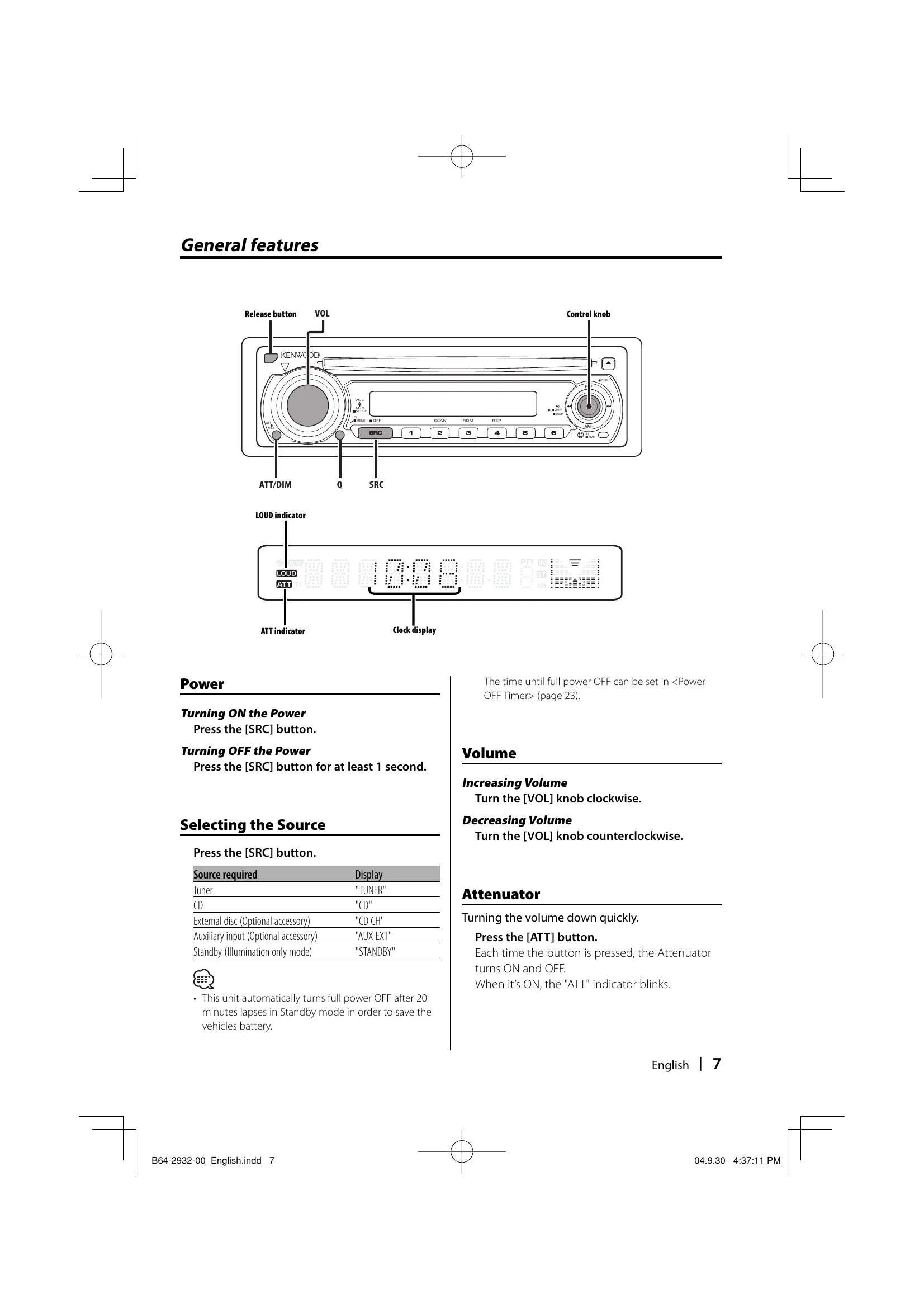
Turning ON: Press the [SRC] button.
Turning OFF: Press the [SRC] button for at least 1 second.
Press the [SRC] button. Available sources include TUNER, CD, External disc (optional accessory), Auxiliary input (optional accessory), and Standby.
Increasing: Turn the [VOL] knob clockwise.
Decreasing: Turn the [VOL] knob counterclockwise.
Press the [ATT] button to quickly turn down the volume. The "ATT" indicator blinks when ON.
Recall preset sound settings by pressing the [Q] button after selecting the source.
Adjust Bass, Middle, Treble, Balance, and Fader by selecting the source, entering Audio Control mode, selecting the item, and adjusting with the [VOL] knob.
Adjust Volume offset and Loudness. Select the source, enter Audio Setup mode (press [VOL] knob for at least 1 second), select the item, and adjust.
Enter Standby mode, select "STANDBY", then enter Speaker Setting mode by pressing the [VOL] knob to select speaker type.
| ? | What might seem to be a malfunction | Possible Cause & Solution |
| General | The power does not turn ON. | The fuse has blown. Check for short circuits and replace with the same rating. Speaker wire short-circuit or touching chassis. Wire/insulate speaker cable and press reset. |
|---|---|---|
| There's a source you can't switch. | No media inserted. Set the media. Disc changer isn't connected. Connect the Disc changer. | |
| The memory is erased when the ignition is turned OFF. | Ignition and battery wire incorrectly connected. Connect correctly. | |
| The TEL mute function does not work. | TEL mute wire not connected properly. Connect correctly. | |
| The TEL mute function turns ON even though the TEL mute wire is not connected. | TEL mute wire touching a metal part of the car. Pull wire away. | |
| Even if Loudness is turned ON, high-pitched tone isn't compensated for. | Tuner source selected. High-pitched tone isn't compensated for in Tuner source. | |
| No sound can be heard, or the volume is low. | Fader/balance settings are off. Center them. Input/output wires or harness incorrectly connected. Reconnect correctly. Volume offset values are low. Turn up Volume offset. | |
| The sound quality is poor or distorted. | Speaker wire pinched by screw. Check wiring. Speakers not wired correctly. Reconnect speakers correctly. | |
| The Touch Sensor Tone doesn't sound. | Preout jack is being used. Touch Sensor Tone can't be output from preout jack. | |
| Even though Synchronize Clock is ON, the clock can't be adjusted. | Received RDS station isn't sending time data. Receive another RDS station. | |
| Tuner source | Radio reception is poor. | Car antenna not extended. Pull antenna out. Antenna control wire not connected. Connect correctly. |
| Disc source | "AUX EXT" is displayed without achieving External disc control mode. | Unsupported disc changer is connected. Use the recommended changer. |
| The specified disc does not play, but another one plays instead. | Disc is dirty. Clean it. Disc loaded in wrong slot. Eject and check. Disc severely scratched. Try another disc. | |
| A CD ejects as soon as it is loaded. | CD is dirty. Clean it. CD is upside-down. Load correctly. | |
| Can't remove disc. | More than 10 minutes elapsed since ACC switch turned OFF. Turn ACC ON and press Eject. | |
| The disc won't insert. | Another disc already inserted. Remove it. | |
| Direct Search can't be done. | Another function is ON. Turn other functions OFF. | |
| Track Search can't be done. | For first/last song of disc/folder, Track Search can't be done backward/forward respectively. | |
| MP3/WMA source | Cannot play an MP3/WMA. | Media is scratched/dirty. Clean it. Recording condition is bad. Re-record or use another media. |
| The sound skips when an MP3/WMA is being played. | Media is scratched/dirty. Clean it. Recording condition is bad. Re-record or use another media. | |
| The MP3/WMA track time isn't displayed correctly. | Display may be incorrect due to MP3/WMA recording conditions. |