Brand: KENWOOD
Category: Audio
Document Type: Manual
Language: EN
Brand: KENWOOD
Category: Audio
Document Type: Manual
Language: EN
Uploaded: Nov. 21, 2025, 7:01 p.m.
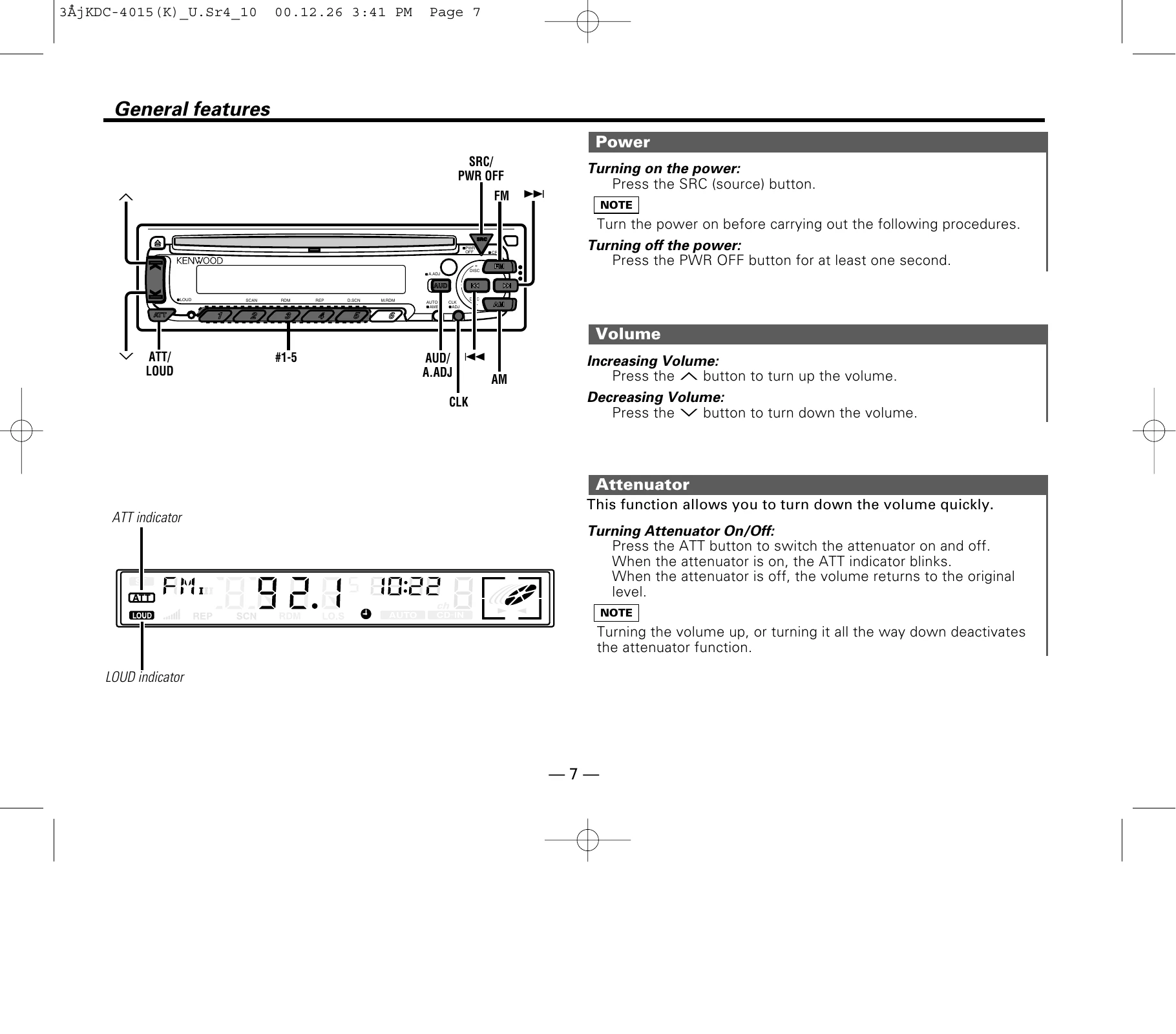
Turning on: Press the SRC (source) button.
Turning off: Press the PWR OFF button for at least one second.
Increase: Press the ▲ button.
Decrease: Press the ▼ button.
On/Off: Press the ATT button. The ATT indicator blinks when on.
Press the SRC button to cycle through Tuner, CD, External Disc Control (1 or 2/AUX), and Standby modes.
On/Off: Press the LOUD button for at least one second. The LOUD indicator lights up when on.
Press A.ADJ to enter. Use FM/AM to select settings (Bass, Treble, Balance, Fader). Use ◀/▶ buttons to adjust values.
Press AUD to enter. Select presets #1-5 for different music types.
Press SRC to Standby, then AUD. Select speaker type using ◀/▶ buttons.
On/Off: Press CLK.
Press CLK for 2 sec to enter adjustment mode. Use FM/AM for hours, ▶/◀ for minutes. Press CLK to exit.
| PROBLEM | POSSIBLE CAUSE | SOLUTION |
|---|---|---|
| The power does not turn on. | The fuse has blown. | After checking for short circuits in the wires, replace the fuse with one with the same rating. |
| No sound can be heard, or the volume is low. | Attenuator is turned on. | Turn off Attenuator. |
| The fader or balance settings are set all the way to one side. | Reset the fader or balance settings. | |
| Nothing happens when the buttons are pressed. | The input/output wires or wiring harness are connected incorrectly. | Reconnect the input/output wires or the wiring harness correctly. See the section on "Connecting Wires to Terminals". |
| The computer chip in the unit is not functioning normally. | Press the reset button on the unit (see p. 5). | |
| The sound quality is poor or distorted. | One of the speaker wires is being pinched by a screw in the car. | Check the speaker wiring. |
| The speakers are not wired correctly. | Reconnect the speaker wires so that each output terminal is connected to a different speaker. | |
| Radio reception is poor. | The car antenna is not extended. | Pull the antenna out all the way. |
| The antenna control wire is not connected. | Connect the wire correctly, referring to the section on "Connecting Wires to Terminals". | |
| The memory is erased when the ignition is turned off. | The battery wire has not been connected to the proper terminal. | Connect the wire correctly, referring to the section on "Connecting Wires to Terminals". |
| The ignition and battery wire are incorrectly connected. | Connect the wire correctly, referring to the section on "Connecting Wires to Terminals". | |
| A CD ejects as soon as it is loaded. | The CD is upside-down. | Load the CD with the labeled side up. |
| The CD is quite dirty. | Clean the CD, referring to the section on "Cleaning CDs" (see p. 6). | |
| The sound skips on a CD. | The CD is scratched or dirty. | Clean the CD, referring to the section on "Cleaning CDs" (see p. 6). |
| A track will not play. | Random play has been selected. | Turn off random play. |