Brand: KitchenAid
Category: Convection Oven
Document Type: Manual
Language: EN
Brand: KitchenAid
Category: Convection Oven
Document Type: Manual
Language: EN
Uploaded: Nov. 21, 2025, 7:44 p.m.
Manual Publish Date: 2000-05-01
KitchenAid offers a one-year full warranty, followed by limited warranties for specific parts.
Read and obey all safety messages. "DANGER" means certain death or serious injury. "WARNING" means possibility of death or serious injury. Follow important safety instructions to reduce risks of fire, electric shock, or injury.
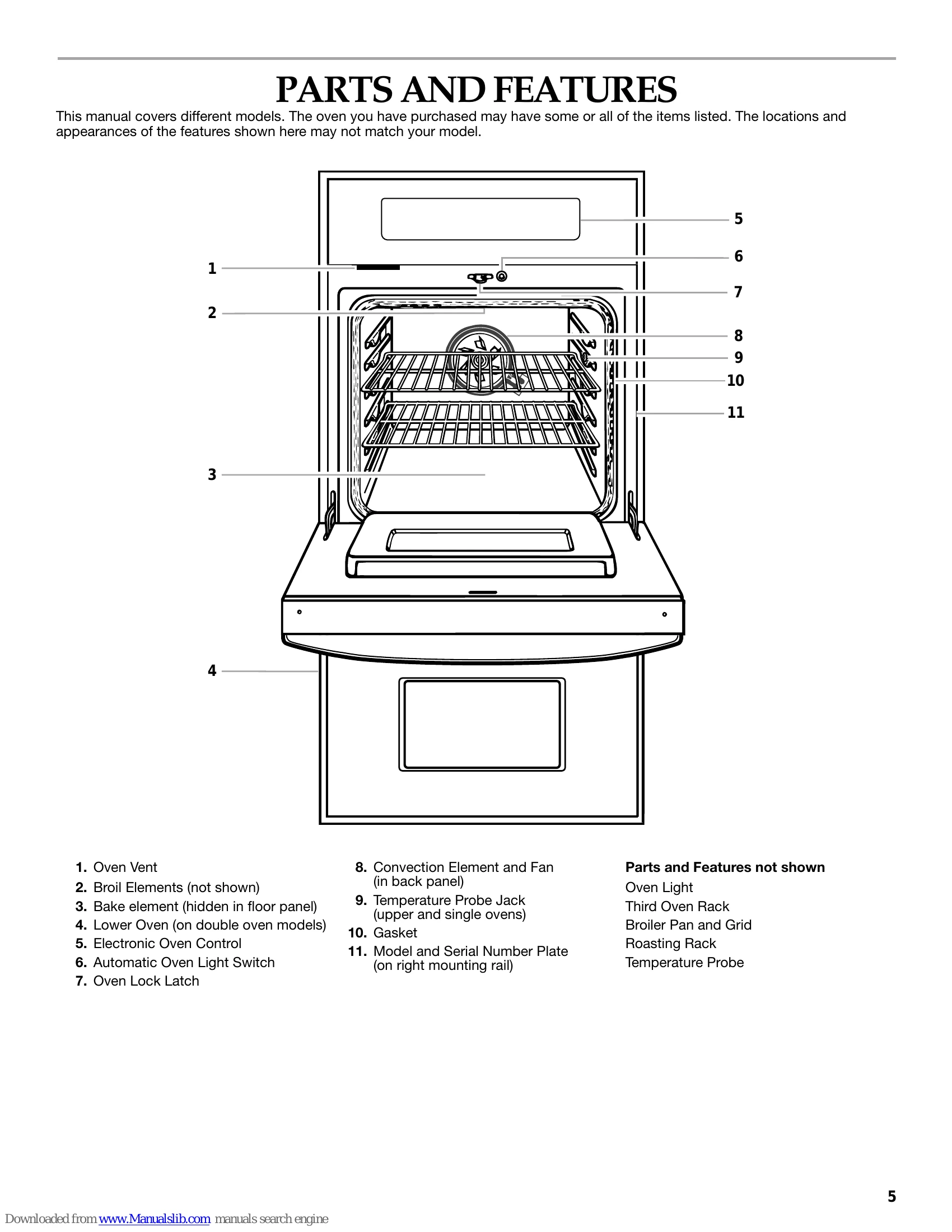
Diagram of oven components including oven vent, bake element, electronic oven control, and convection element.
Explanation of display functions, buttons (Start, Cancel, Clock, Timer, Bake, Broil, Convection, etc.), and basic operations like setting the clock, timer, and oven temperature.
Instructions on using aluminum foil, positioning racks and bakeware, using a meat thermometer, and understanding oven vents. Details on Baking and Roasting, Convection Baking, Convection Roasting, Maxi and Econo Broiling, Convection Broiling, Convect Full Meal, Convection Temperature Conversion, Dehydrating, Proofing Bread, Temperature Probe, and Timed Cooking.
Instructions for Self-Cleaning cycle, cleaning oven exterior, control panel, oven cavity, oven racks, broiler pan, and oven door. Includes instructions for replacing oven lights.
Solutions for common issues like "Nothing will operate," "Oven will not operate," "Oven temperature too high or too low," "Display shows messages," "Self-Cleaning cycle will not operate," and "Oven cooking results not what expected."
| TROUBLESHOOTING | POSSIBLE CAUSE AND SOLUTION |
| Nothing will operate | Blown household fuse or tripped circuit breaker: Replace fuse or reset circuit. Appliance not wired properly: See Installation Instructions. |
| Oven will not operate | Electronic oven control not set correctly: See "Electronic Oven Control". Delay start been set: See "Timed Cooking". Control Lock set (on some models): See "Control Lock". Sabbath Mode set (on some models): See "Sabbath Mode". One oven self-cleaning (on double oven models): Other oven cannot be set or turned on. Incorrect oven selected (on double oven models): Choose UPPER OVEN or LOWER OVEN first. |
| Oven temperature too high or too low | Oven temperature calibration needs adjustment: See "Oven Temperature Control". |
| Display shows messages | "PF", "PF id=27" or "PF id=30": Power failure. Clear display. See "Display(s)". Reset clock if needed. See "Clock". Letter followed by a number: Clear display. See "Display(s)". If reappears, call for service. See "Assistance or Service". |
| Self-Cleaning cycle will not operate | Oven door open: Close oven door. Function not entered: See "Self-Cleaning Cycle". Delay start Self-Clean set (on some models): See "Self-Cleaning Cycle". Delay start set: See "Timed Cooking". One oven self-cleaning (on double oven models): Other oven cannot be set to self-clean. |
| Oven cooking results not what expected | Appliance not level: Level appliance. See Installation Instructions. Improper temperature set: Double-check recipe. Improper oven temperature calibration set: See "Oven Temperature Control". Oven not preheated: See "Baking and Roasting". Improper bakeware used: See "Bakeware". Racks not positioned properly: See "Positioning Racks and Bakeware". Improper air circulation around bakeware: See "Positioning Racks and Bakeware". Batter not evenly distributed: Ensure batter is level. Improper length of time used: Adjust cooking time. Oven door opened while cooking: Oven peeking releases heat. Baked items too brown on bottom: Move rack to higher position. Pie crust edges browning early: Use aluminum foil. |