Brand: KitchenAid
Category: Gas Cooktop
Document Type: Manual
Language: EN
Brand: KitchenAid
Category: Gas Cooktop
Document Type: Manual
Language: EN
Uploaded: Nov. 21, 2025, 6:54 p.m.
Refer to the "Assistance or Service" section for warranty information and contact details.
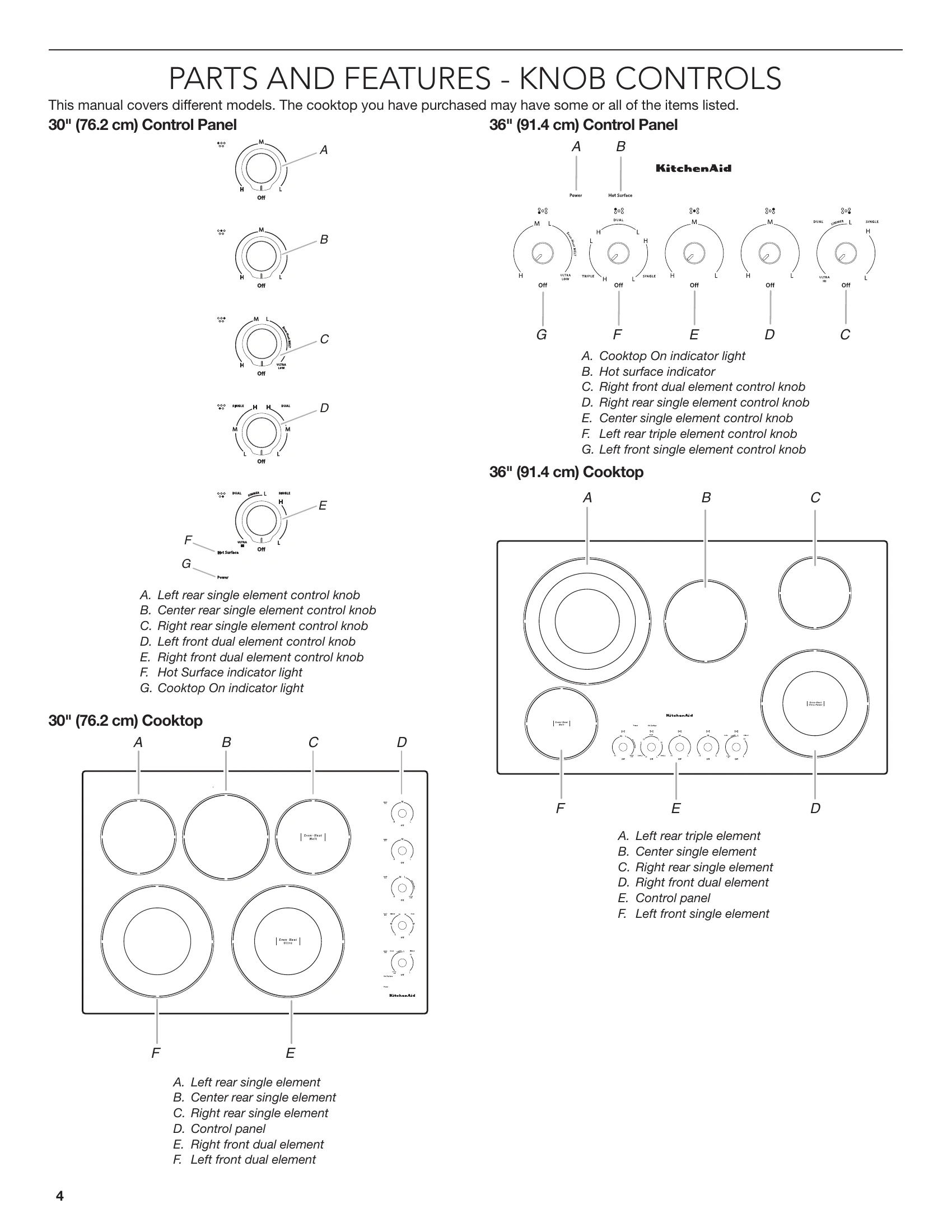
Push in and turn knob to desired heat setting. Use the chart for recommended use based on High (H) to Low (L) settings. Features like Even-Heat™ Ultra Power™ Element offer versatility. Hot surface and cooktop on indicator lights provide important visual cues. Remember the entire cooktop area may become hot when in use.
Touch On/Off keypad for the desired element. Use "+" or "-" to select power level (1-20). Holding "+" or "-" scrolls quickly. The cooktop regulates temperature automatically. Control Lock prevents unintended use. Hot Surface Indicator lights display "H" when an area is too hot. Cooktop ON light glows when any element is active.
| Problem | Possible Causes and/or Solutions |
|---|---|
| Nothing will operate | A household fuse has blown or a circuit breaker has tripped: Replace the fuse or reset the circuit breaker. If the problem continues, call an electrician. |
| Cooktop will not operate | Cooktop isn't wired properly: See the Installation Instructions. Control knob set incorrectly: Push in knob before turning to a setting. |
| Excessive heat around cookware on cooktop | One or more burners stopped working during use: Allow the cooktop to cool down for 30 minutes, then turn the burner on again. Cookware is not the proper size: Use cookware about the same size as the surface cooking area, element, or surface burner. Cookware should not extend more than 1/2" (1.3 cm) outside the cooking area. Cooktop surfaces become hot: When cooktop is in use, the entire cooktop area may become hot. |
| Cooktop cooking results not what expected | Proper cookware is not being used: See the "Cookware" section. Control knob is not set to the proper heat level: See the "Cooktop Controls" section. Cooktop is not level: Level the cooktop. See the Installation Instructions. Certain power levels seem to take longer to cook food or some power levels do not perform as well as usual: The cooktop regulates the temperature of the internal components and automatically reduces the power of all the elements in use without any visual or audible feedback. Allow the cooktop to cool down for 30 minutes to resume normal cooking performance. See "To Use" in the "Cooktop Controls" section. |
| Cooktop is beeping | Key is pressed and held: Remove any object left on the control area, or wipe any debris from the control panel surface. If the cooktop continues beeping for longer than 15 minutes, the control panel will lock, and the F1E0 code will appear in the display. See "Cooktop is dispalying F1E0 code" in this section. |
| Cooktop is dispalying F1E0 code | Cooktop is dispalying F1E0, indicating that one or more keys are permanently pressed: Follow the steps below. 1. Make sure the cooktop controls are off. 2. Clean the cooktop touch control panel thoroughly. See the "General Cleaning" section. 3. Disconnect power or unplug the cooktop. 4. After 1 minute, reconnect power or plug in the cooktop. 5. If error returns after 1 minute, call for service. |