Brand: KYOCERA
Category: Camera
Document Type:
Language: EN
Brand: KYOCERA
Category: Camera
Document Type:
Language: EN
Uploaded: Aug. 9, 2025, 11:37 p.m.
Manual Publish Date: null
null
This digital camera, the KYOCERA Finecam SL400R, offers high-resolution
| Problem | Cause | Solution |
|---|---|---|
| Nothing appears on the LCD monitor. | The lithium-ion battery pack is flat or is not inserted. | Load a lithium-ion battery pack into the camera and re-charge it. |
| There is no image on the LCD monitor. | The Power Save function has switched the camera off. (→ p.6-5) If you leave the camera for a while without using it, the camera goes into Sleep mode. | Press the POWER button again to switch the camera back on. |
| The number of available shots did not change when I took a picture. | This is because the photographed image size is small. | This is dependent on factors such as the quality mode and the subject and is not a problem. |
| I cannot erase an image. The [on] icon appears. | The image is protected. | Unprotect the image. (→ p.5-10) |
| The number of available shots did not increase after I erased an image. | This is because the erased image size is small. | This is dependent on factors such as the quality mode and the subject and is not a problem. |
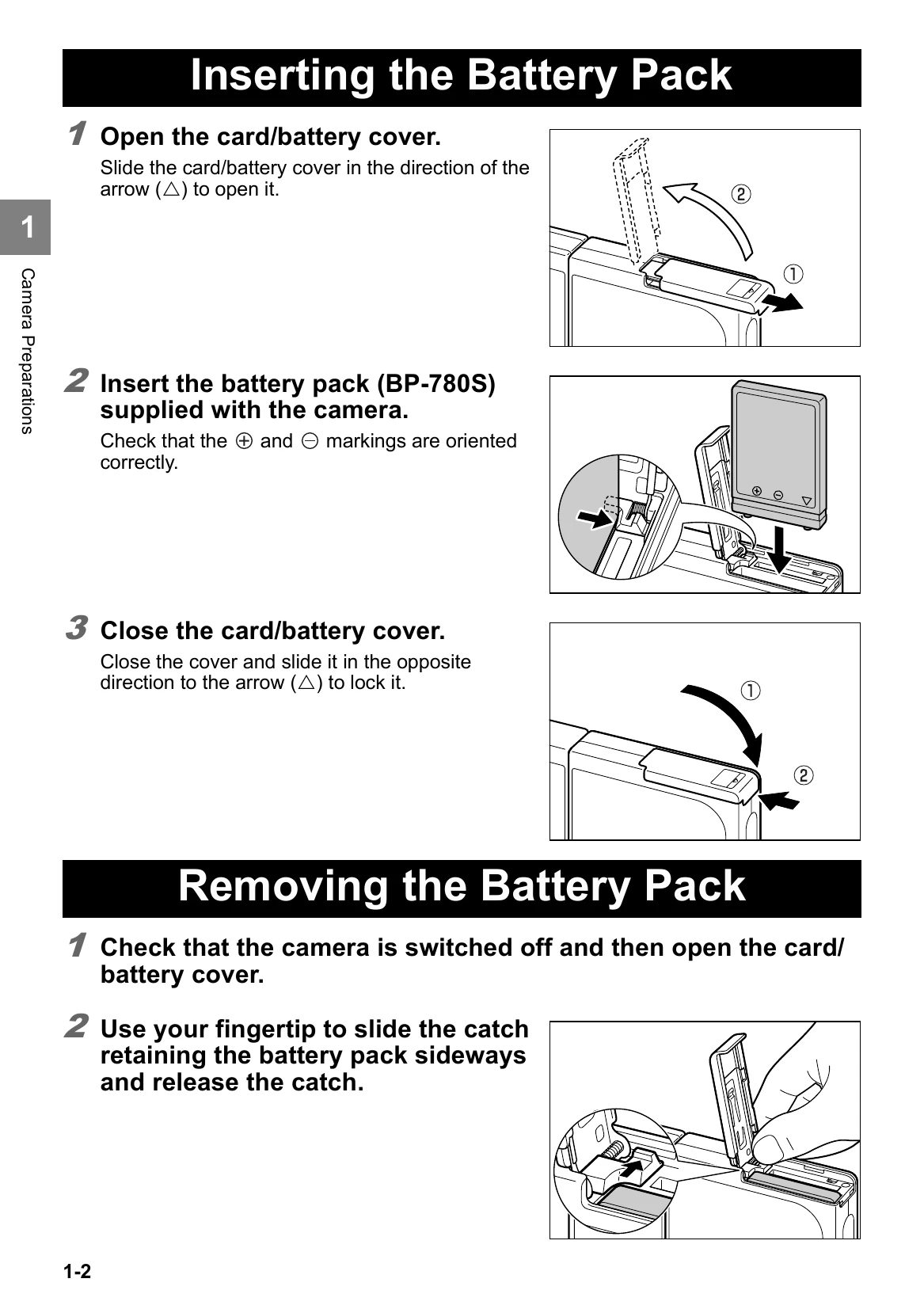
| I cannot charge the battery. | There is no lithium-ion battery pack loaded in the camera. The lithium-ion battery pack poles (+ and -) are the wrong way round. | Load a lithium-ion battery pack into the camera. Reload the lithium-ion battery pack correctly. |
| I cannot charge the battery. Or charging stops. The caution LED flashes slowly. | The AC adapter is not connected correctly. The battery pack terminals are soiled. The charging protection circuit was activated and halted charging because the ambient temperature is too high or too low. | Check that the adapter is securely connected to the camera and the power socket. Wipe the terminals with a soft clean cloth. Charge the battery when the ambient temperature is between 10°C and 30°C. (Charging is possible between 5°C and 40°C but will take slightly longer.) |
| The camera gets hot. | A strong current flows through the camera when the LCD monitor is used so the camera gets hot if the LCD monitor is used for an extended period. | While this is not a fault, you should leave the camera for a time before using it again. |
| The caution LED flashes slowly. | The flash is charging. | Briefly take your finger off the shutter release button and wait. |
| The caution LED flashes quickly. | This is the camera shake warning. The shutter speed is slow. | Place the camera on a stable surface to take the picture. |
| The camera will not focus. The shooting mark flashes. | The subject is a type that is not suited to autofocus. (→ p.3-2) | Use focus lock to focus on a strongly contrasting part of the subject, then compose the shot and take the picture. (→ p.3-2) |
| The picture came out completely white. | The image is overexposed. | Set LONG EXP to OFF or reset the camera settings. |
| I can't rotate or protect the image or specify DPOF settings. | The SD memory card is write-protected. | Release the write-protection for the card. (→ p.1-4) |