Manual for YASHICA DF-10/10S

Manual for YASHICA DF-10/10S

Brand: KYOCERA

Category: Camera

Document Type:

Language: EN
Uploaded: Aug. 9, 2025, 11:46 p.m.

Warranty Information

This camera comes with a 24-month warranty. Please refer to the manual for details.

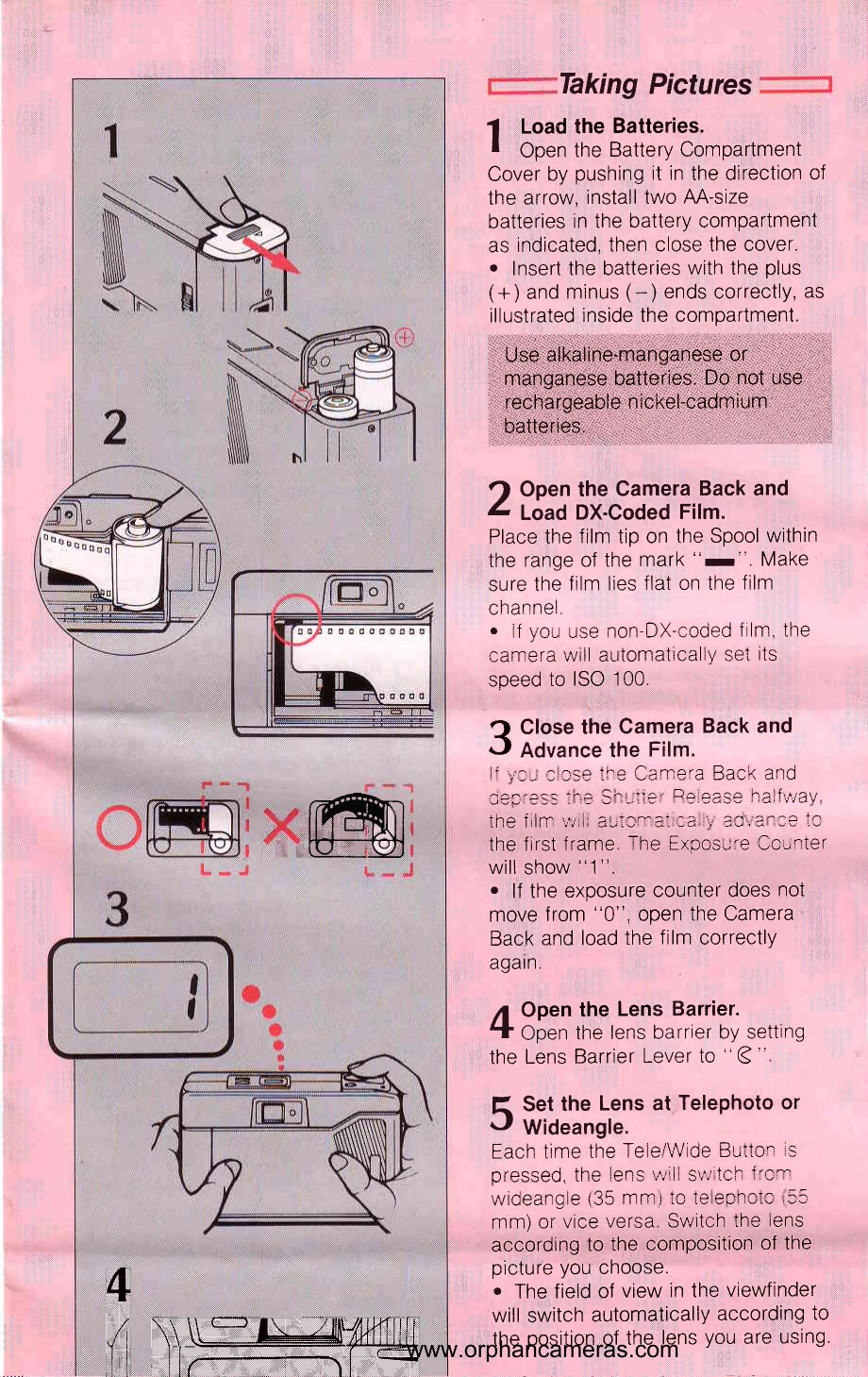
Taking Pictures

  1. Load Batteries: Open the battery compartment, insert two AA-size batteries (+ and - correctly oriented), and close the cover. Use alkaline-manganese or manganese batteries only.
  2. Load Film: Open the camera back, place the film tip on the spool, and ensure the film lies flat. For non-DX-coded film, the camera sets ISO to 100.
  3. Close and Advance Film: Close the camera back and half-press the shutter release. The film advances to the first frame, and the exposure counter shows '1'.
  4. Open Lens Barrier: Move the lens barrier lever to the open position.
  5. Set Lens: Use the Tele/Wide button to switch between 35mm wideangle and 55mm telephoto lenses. The viewfinder automatically adjusts.
  6. Take Picture: Compose your shot within the viewfinder frame and fully press the shutter release. Ensure subjects are within the specified distance ranges for wideangle (1.5m+) and telephoto (2m+).
  7. Film Rewind: After the last frame, the film automatically rewinds. Once the counter shows '0', open the back and remove the film.

Flash Photography

  1. Press Flash Mode Button: The flash starts charging, and the charging symbol blinks.
  2. Flash Ready: When the charging symbol is steady, the flash is ready. The shutter is locked during charging.
  3. Take Flash Picture: Frame your subject using parallax correction marks and press the shutter release. Avoid covering the flash or lens.

Using the Self-timer (DF-10S only)

  1. Aim and Mount: Aim the camera at the subject and place it on a stable surface.
  2. Press Self-timer Button: The self-timer lamp blinks, and the shutter trips in about 10 seconds. Press again to stop.
Privacy Policy