Brand: KYOCERA
Category: Cell Phone
Document Type:
Language: EN
Brand: KYOCERA
Category: Cell Phone
Document Type:
Language: EN
Uploaded: Aug. 10, 2025, 12:08 a.m.
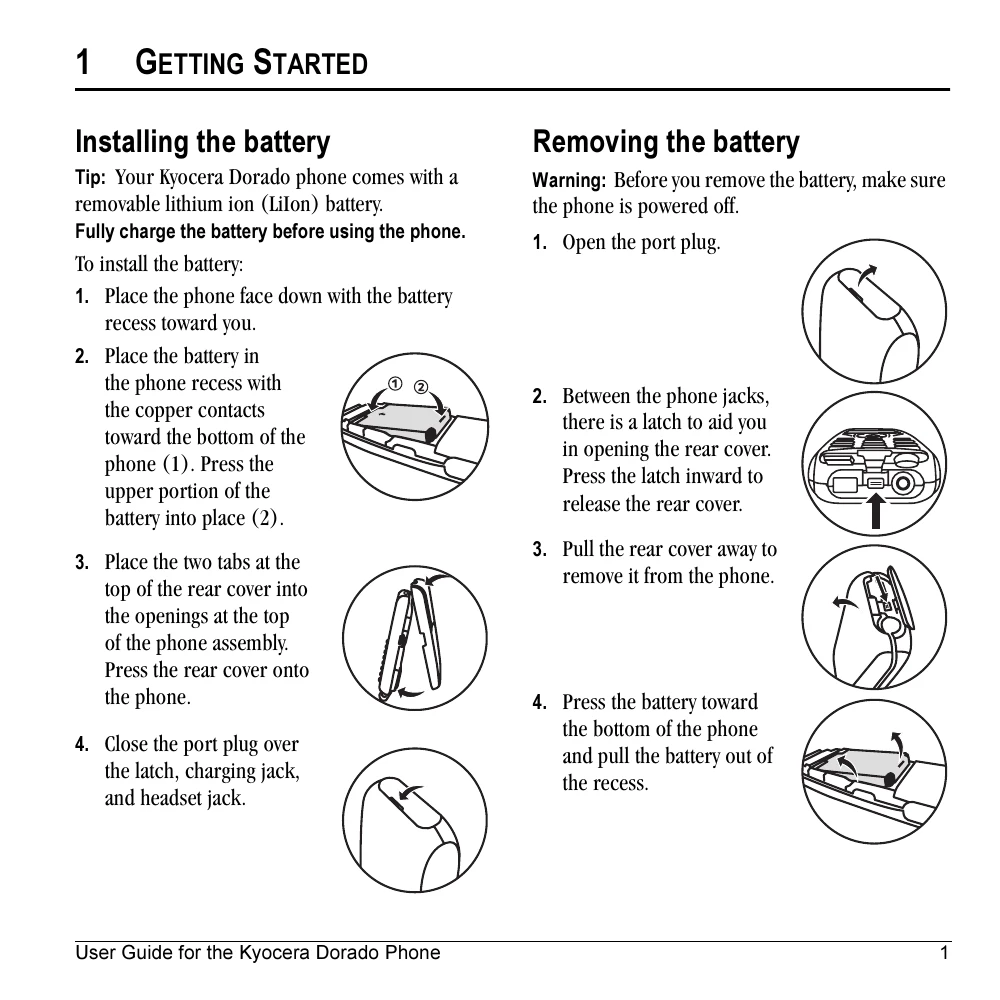
Place the phone face down, insert the battery into the recess, and secure the rear cover. Close the port plug.
Open the port plug, release the latch to open the rear cover, and then remove the battery.
Connect the AC adapter to the phone and a wall outlet. The battery icon indicates charging status.
Familiarize yourself with the buttons and icons: Volume control, Home screen, softkeys, Back key, Send/Talk key, Keypad, Shift key, Flashlight, Navigation key, OK key, Speakerphone key, End/Power key, Space key, Next key.
Turn the phone on/off, make/answer calls, redial numbers, use voicemail, access call lists, lock/unlock keypad, and use the flashlight.