Brand: KYOCERA
Category: Cell Phone
Document Type:
Language: EN
Brand: KYOCERA
Category: Cell Phone
Document Type:
Language: EN
Uploaded: Aug. 10, 2025, 12:07 a.m.
Contact Kyocera International for warranty service information.
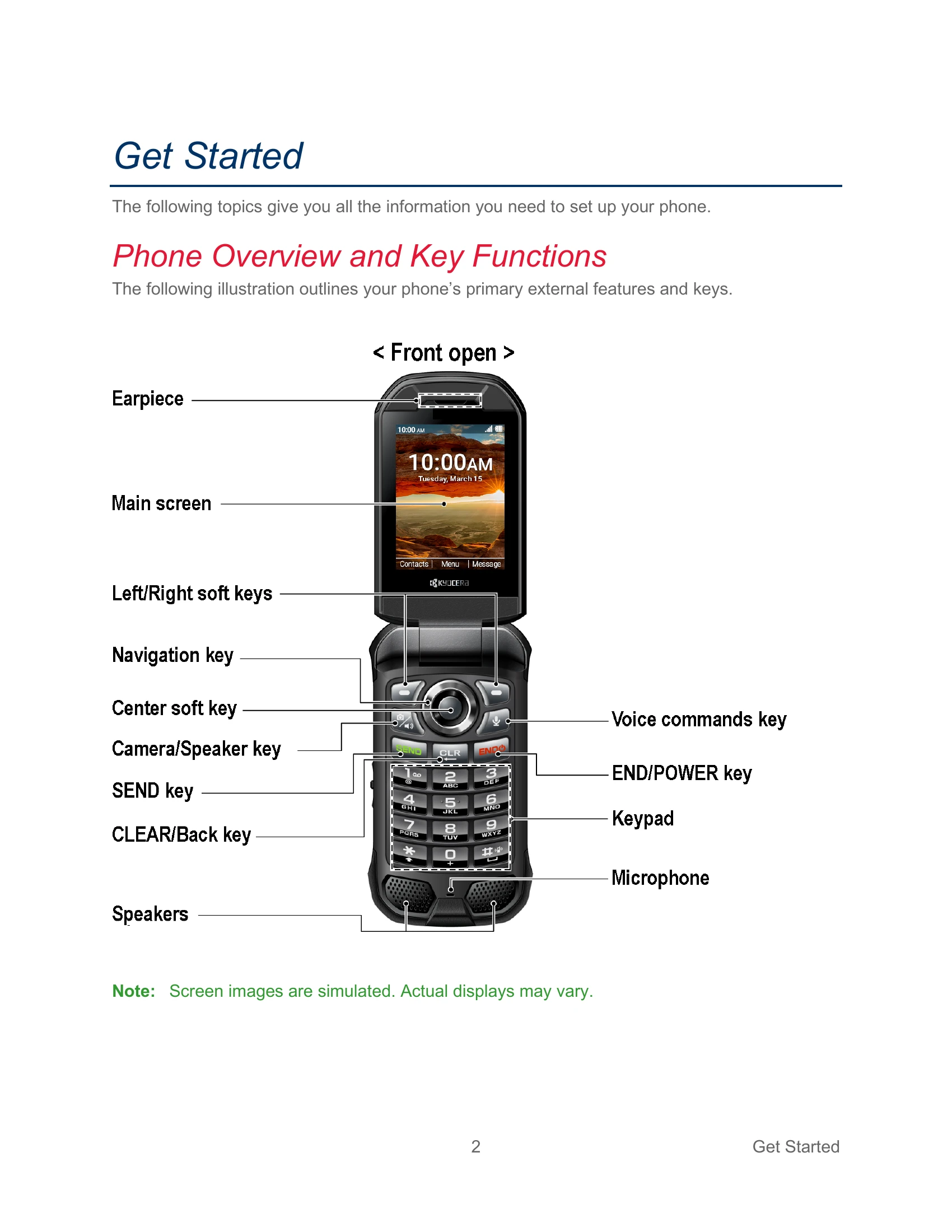
This guide provides instructions for setting up and operating your Kyocera phone. It covers basic functions like inserting the battery, charging, turning the phone on/off, and navigating menus. You will learn how to make and receive calls, manage contacts, send messages, use applications like the music player and camera, and configure settings such as Wi-Fi, Bluetooth, and security.
Key features include:
| Name | Role | Last Login | |
|---|---|---|---|
| John Doe | [email protected] | Administrator | 2023-10-27 10:30 AM |
| Jane Smith | [email protected] | Editor | 2023-10-27 09:15 AM |
| Peter Jones | [email protected] | Viewer | 2023-10-26 03:45 PM |