Manual for E1100

Manual for E1100

Brand: KYOCERA

Category: Cell Phone

Document Type:

Language: EN
Uploaded: Aug. 10, 2025, 12:07 a.m.

Warranty Information

No specific warranty period is mentioned in the provided pages.

Phone Battery

Install the Battery:
  1. Hold the phone face down.
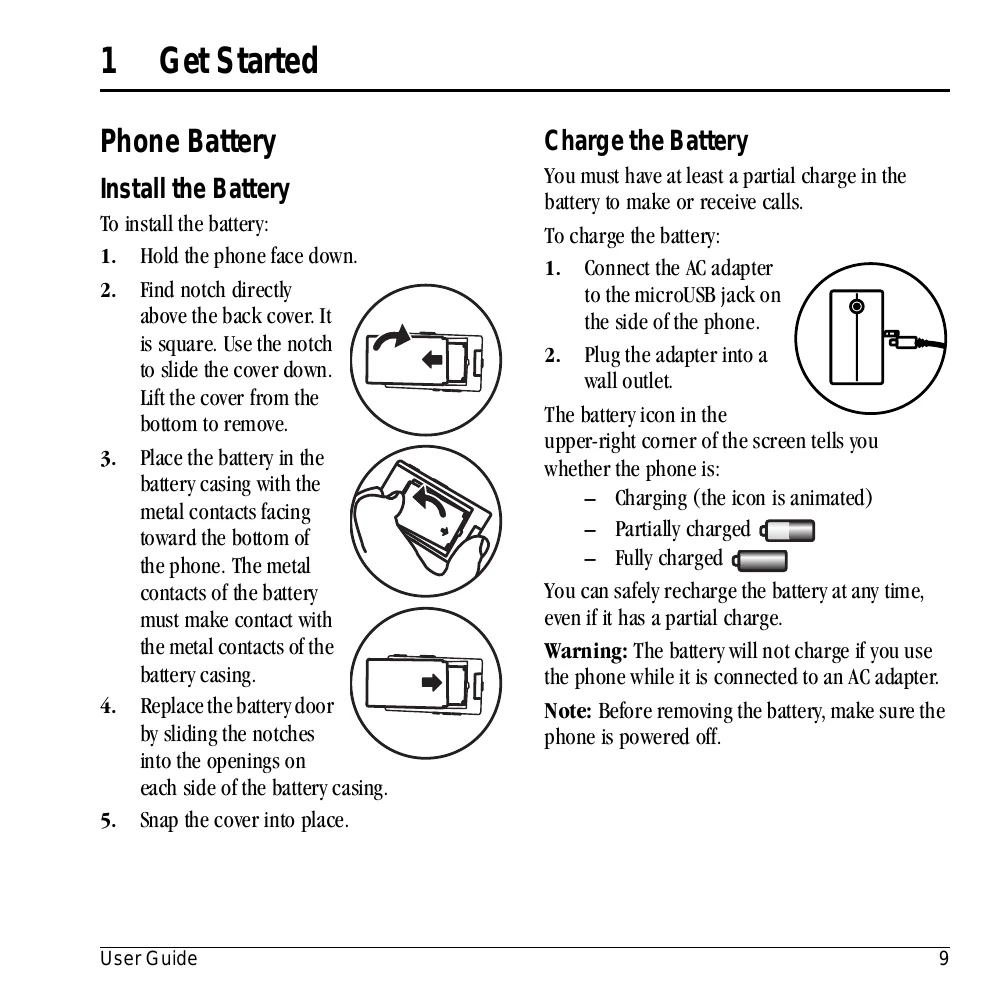
  2. Find the notch above the back cover, slide the cover down, and lift it off.
  3. Place the battery in the casing with metal contacts facing the bottom. Ensure battery contacts touch casing contacts.
  4. Replace the battery door by sliding notches into openings.
  5. Snap the cover into place.
Charge the Battery:
  1. Connect the AC adapter to the microUSB jack on the phone.
  2. Plug the adapter into a wall outlet.
The battery icon indicates charging status: animated for charging, solid for partially or fully charged. Warning: The battery will not charge if the phone is used while connected to an AC adapter. Note: Power off the phone before removing the battery.

Troubleshooting and error codes

Problem Solution
Screen frozen, keypad unresponsive Reset the phone by removing and replacing the battery. If the problem persists, return the phone to the dealer.
Privacy Policy