Brand: KYOCERA
Category: Cell Phone
Document Type:
Language: EN
Brand: KYOCERA
Category: Cell Phone
Document Type:
Language: EN
Uploaded: Aug. 10, 2025, 12:08 a.m.
This manual provides information for Kyocera Wireless Corp. products.
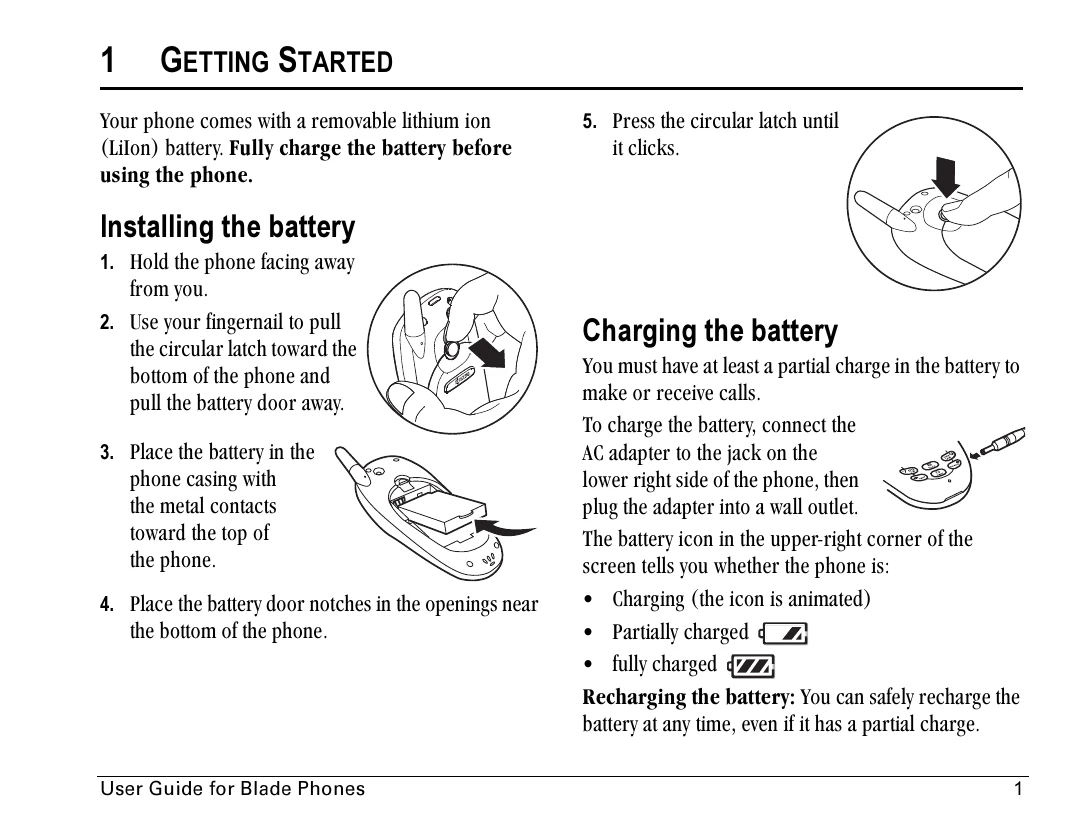
1. Installing the battery: Hold the phone, pull the latch, remove the door, place the battery with contacts facing up, and secure the door.
2. Charging the battery: Connect the AC adapter to the phone and plug it into a wall outlet. The battery icon indicates charging status.
| Header 1 | Header 2 | Header 3 | Header 4 |
|---|---|---|---|
| Data 1A | Data 1B | Data 1C | Data 1D |
| Data 2A | Data 2B | Data 2C | Data 2D |
| Data 3A | Data 3B | Data 3C | Data 3D |