Brand: KYOCERA
Category: Cell Phone
Document Type:
Language: EN
Brand: KYOCERA
Category: Cell Phone
Document Type:
Language: EN
Uploaded: Aug. 10, 2025, 12:07 a.m.
None
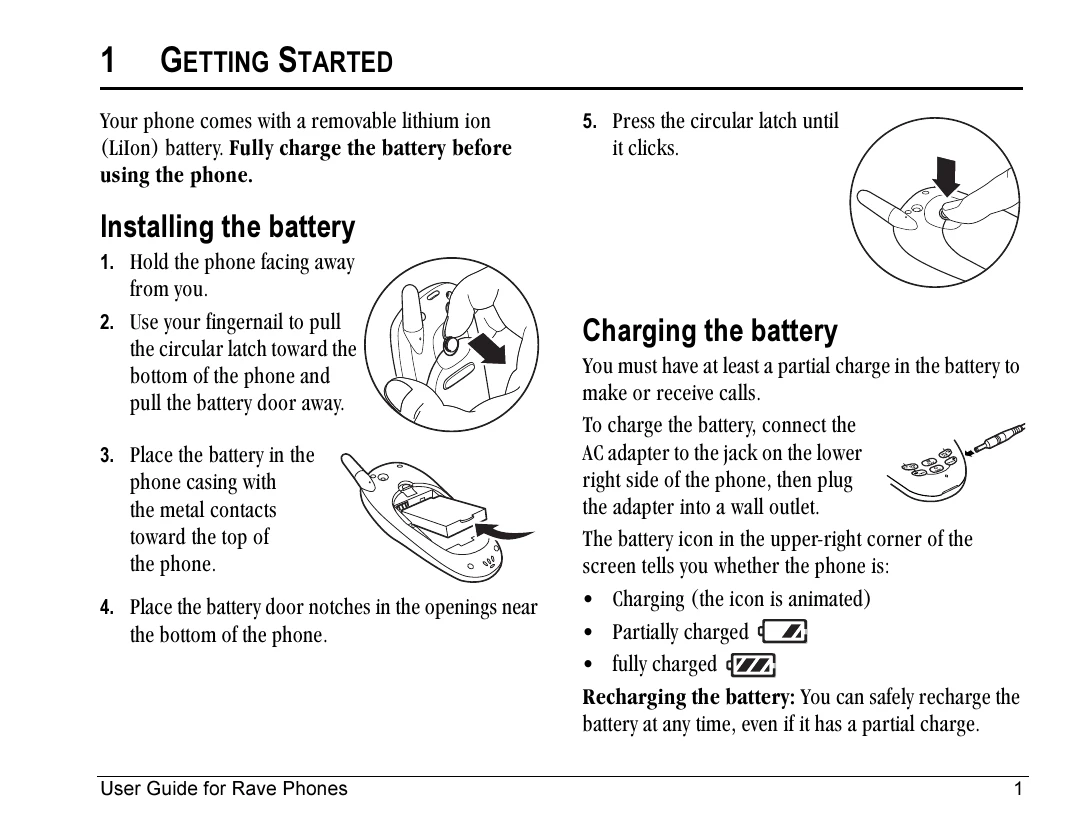
1. Hold the phone facing away from you.
2. Use your fingernail to pull the circular latch toward the bottom of the phone and pull the battery door away.
3. Place the battery in the phone casing with the metal contacts toward the top of the phone.
4. Place the battery door notches in the openings near the bottom of the phone.
5. Press the circular latch until it clicks.
To charge the battery, connect the AC adapter to the jack on the lower right side of the phone, then plug the adapter into a wall outlet.
The battery icon in the upper-right corner of the screen tells you whether the phone is:
Recharging the battery: You can safely recharge the battery at any time, even if it has a partial charge.
Turn the phone on: Press and wait until the hourglass icon appears.
Turn the phone off: Press and hold until the phone beeps or the screen goes blank.
Make a call: Enter the number and press.
End a call: Press (the red key).
Answer a call: Press (the green key).
Access voicemail: Press and hold and follow the system prompts.