Brand: KYOCERA
Category: Cell Phone
Document Type:
Language: EN
Brand: KYOCERA
Category: Cell Phone
Document Type:
Language: EN
Uploaded: Aug. 10, 2025, 12:08 a.m.
None
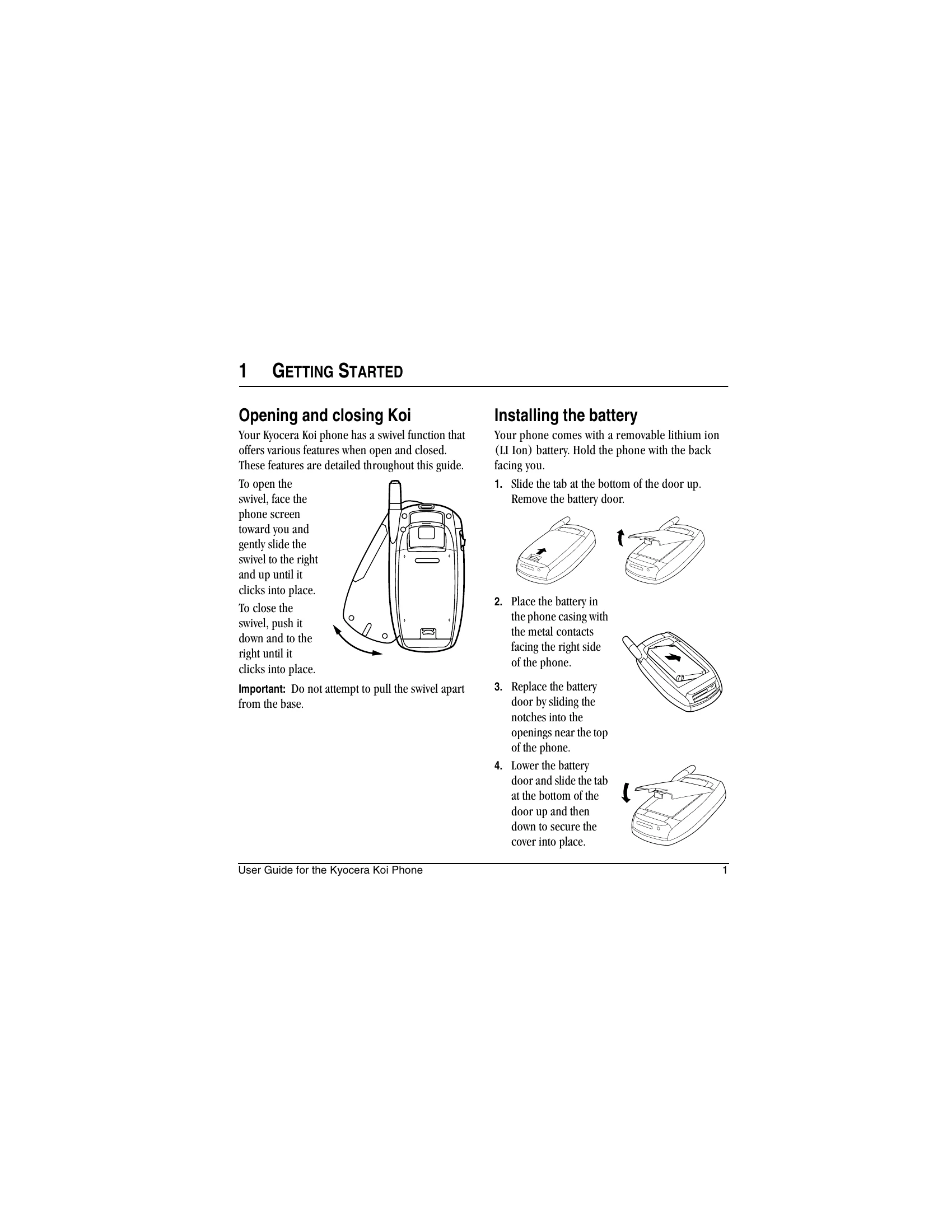
Opening and closing Koi: The phone has a swivel function that offers various features when open and closed.
Installing the battery: Slide the tab at the bottom of the door up to remove it. Place the battery in the phone casing with metal contacts facing right. Replace the door and secure it.
Connect the AC adapter to the jack on the bottom of the phone and plug into a wall outlet. The battery icon shows charging status.
Familiarize yourself with the home screen, keys, jacks, and other components as illustrated.
Use the jog shuttle (swivel closed) or navigation key (swivel open) for quick access to functions like recent calls, voice dialing, and custom menus.
Navigate through menus with the swivel open or closed using the jog shuttle and navigation keys.
| Header 1 | Header 2 | Header 3 | Header 4 |
|---|---|---|---|
| Row 1 Data 1 | Row 1 Data 2 | Row 1 Data 3 | Row 1 Data 4 |
| Row 2 Data 1 | Row 2 Data 2 | Row 2 Data 3 | Row 2 Data 4 |
| Row 3 Data 1 | Row 3 Data 2 | Row 3 Data 3 | Row 3 Data 4 |