Manual for KX444

Manual for KX444

Brand: KYOCERA

Category: Cell Phone

Document Type:

Language: EN
Uploaded: Aug. 10, 2025, 12:08 a.m.

Warranty Information

Refer to page 2 for warranty information.

Getting Started

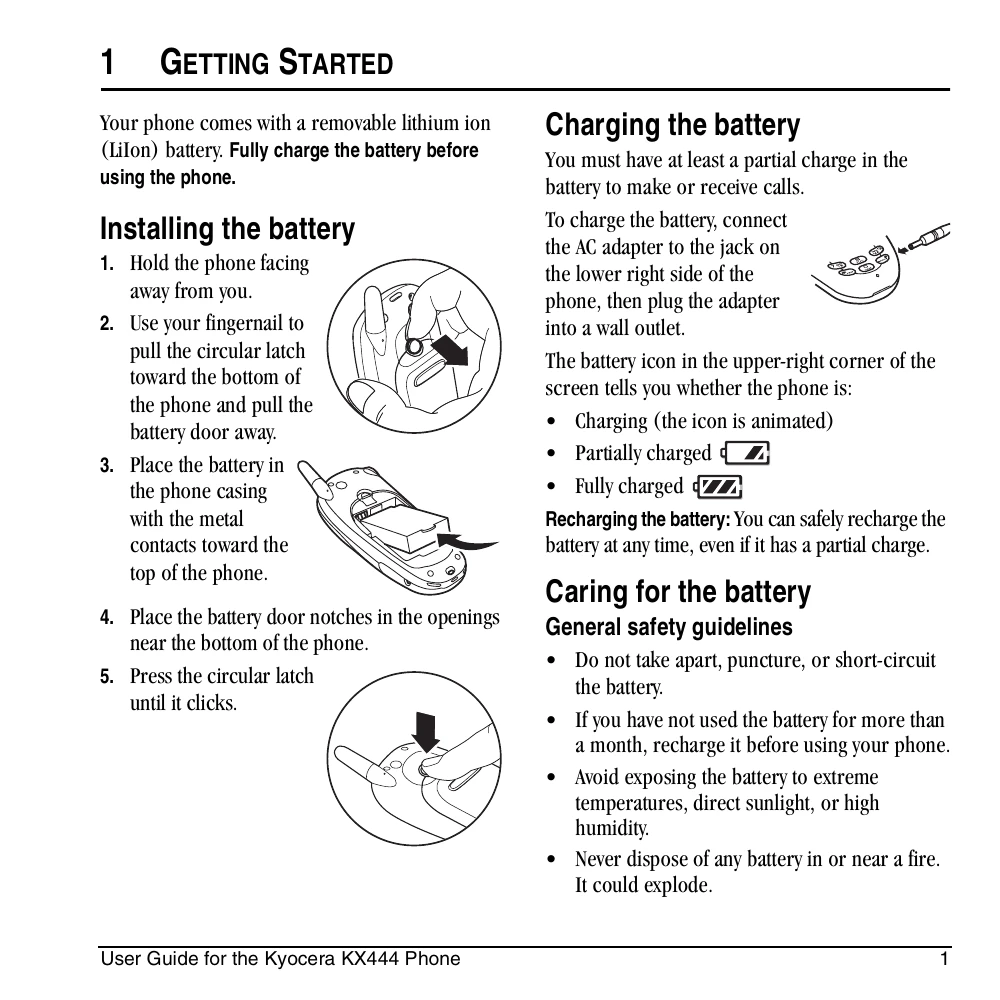
  • Installing the battery: Hold the phone facing away, pull the latch, remove the door, place the battery with contacts up, close the door, and press the latch until it clicks.
  • Charging the battery: Connect the AC adapter to the phone and a wall outlet. The battery icon indicates charging status.
  • Performing basic functions: Turn on by pressing the power button and waiting for the hourglass icon. Turn off by pressing and holding the power button. Make calls by entering the number and pressing the Send/Talk key. Answer calls by pressing the green key. Use the PTT button for Push to Talk calls. Access voicemail by pressing and holding the voicemail key.

Using menus

  • Navigate menus using the navigation keys (up, down, left, right) and select items with the OK key.
  • Press the Clear key to go back a menu level or return to the home screen.

Understanding screen icons

  • Various icons indicate network signal strength, call status, message alerts, battery level, and other phone functions.

Troubleshooting and error codes

Header 1 Header 2 Header 3 Header 4
Row Header 1 Data 1-1 Data 1-2 Data 1-3
Row Header 2 Data 2-1 Data 2-2 Data 2-3
Row Header 3 Data 3-1 Data 3-2 Data 3-3
Privacy Policy