Brand: KYOCERA
Category: Cell Phone
Document Type:
Language: EN
Brand: KYOCERA
Category: Cell Phone
Document Type:
Language: EN
Uploaded: Aug. 10, 2025, 12:07 a.m.
None
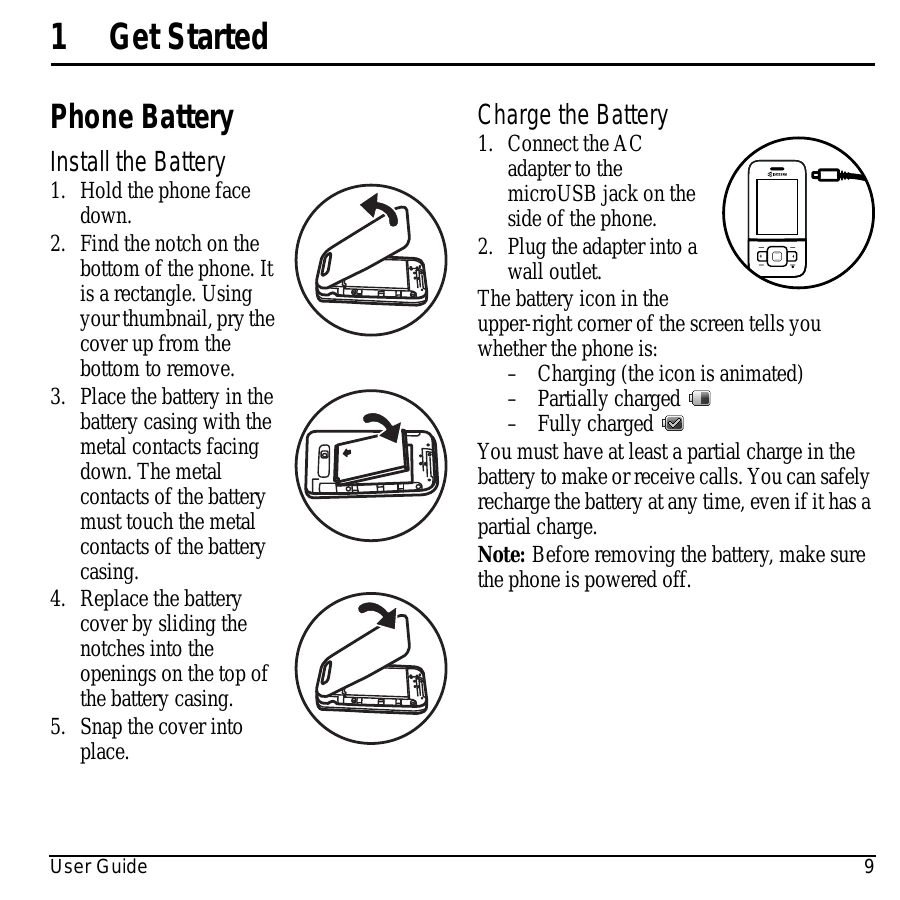
Install the battery by holding the phone face down, finding the notch, prying the cover up, placing the battery with contacts facing down, ensuring contacts touch, replacing the cover, and snapping it into place.
Charge the battery by connecting the AC adapter to the phone's microUSB jack and plugging it into a wall outlet. The battery icon indicates the charge status.
Familiarize yourself with the phone's features, including the earpiece speaker, home screen, softkeys, navigation key, speakerphone, send key, keypad, and end key.
The back of the phone has a camera lens, jacks for AC adapter and headset, and volume and camera keys.
Understand various icons that appear on the phone's screen, such as signal strength, battery status, airplane mode, and message notifications.
Access the main menu from the home screen by selecting Menu. Navigate through categories like Recent Calls, Contacts, Messaging, @metro, MetroWEB, Settings, Media Gallery, Camera, and Tools & Games.
Learn how to interpret guide conventions: 'Select' for softkeys or OK, 'Press' for phone keys, 'Scroll' for navigation, and '>' for menu selections.
| If the screen seems frozen and the keypad does not respond to keypresses, reset the phone by completing the following steps: |
| 1. Remove the battery cover. |
| 2. Remove and replace the battery. |
| If the problem persists, return the phone to the dealer for service. |