Brand: KYOCERA
Category: Cell Phone
Document Type:
Language: EN
Brand: KYOCERA
Category: Cell Phone
Document Type:
Language: EN
Uploaded: Aug. 10, 2025, 12:08 a.m.
Manual Publish Date: null
null
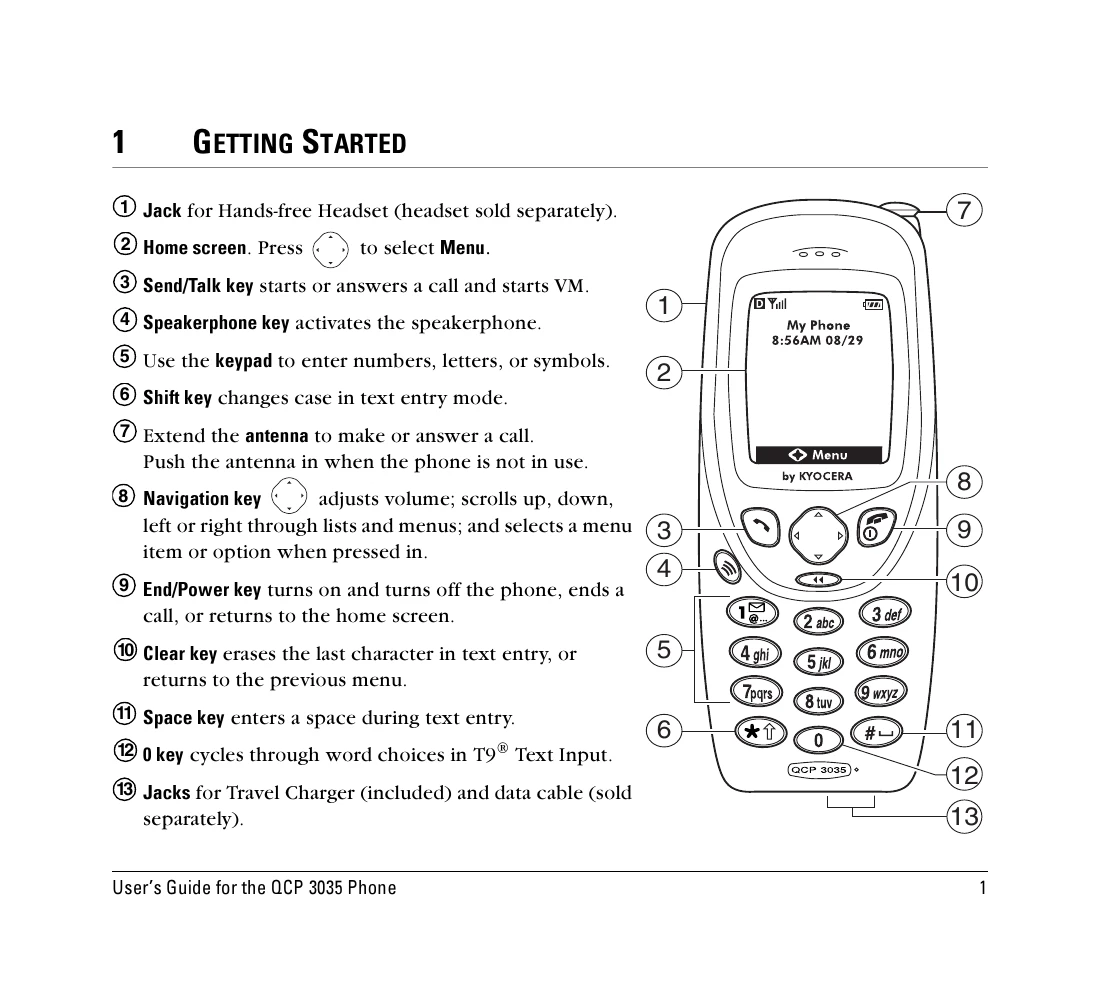
Turning the phone on/off: Press and hold the End/Power key for two seconds.
Making a call: Extend the antenna, enter the phone number, and press the Send/Talk key.
Answering a call: Press the Send/Talk key.
Ending a call: Press the End/Power key.
Adjusting volume: Use the Navigation key (up/down).
Locking/Unlocking Keypad: Press and hold the Navigation key (left) to lock, press 123 to unlock.
| Question | Answer |
|---|---|
| What is my lock code? | The default lock code is usually either 0000 or the last four digits of your phone number. If you forget your lock code, call your service provider. |
| How do I lock and unlock the phone? | For detailed instructions, see page 24. |
| How do I turn my ringer on? | Select Menu→Settings→Silence All→No, normal. |
| How do I change the ringer volume? | For detailed instructions, see page 5. |
| How do I change the ringer type? | For detailed instructions, see page 22. |
| How do I store phone numbers? | From the home screen, enter a phone number and press ⏏. |
| How do I change my banner? | Select Menu→Settings→Display→My Banner. Type your text and press ⏏. |
| How do I speed dial? | Enter the one- or two-digit speed dial number and press ⏏. |
| How do I erase all recent calls? | For detailed instructions, see page 25. |
| What do the icons on the top of the screen mean? | See page 2 for screen icon descriptions. |
| My phone displayed the message “Reading Info. Please wait ..." when I turned it on. What does this mean? | Your phone is performing routine maintenance. This normally takes a few minutes. |
| My phone is out of memory. What do I do? | Erase old messages or contacts or voice tags or voice memos. See "To erase messages automatically" on page 29 and "To erase information from a contact card" on page 12. |
| My phone is not charging properly. What can I do? | Remove the battery from the phone as described on page 8, and lightly clean the contacts using a white eraser. |
| How do I get accessories for my phone? | To shop for phone accessories, visit www.kyocera-wireless.com/store, or call (800) 211-1537 (U.S.A.) or (510) 683-4004 (outside U.S.A.) |
| Where to find help | Your service provider’s customer support department may be accessible directly from your phone when you dial a number such as *611. They can answer questions about your phone, phone bill, call coverage area, and specific features available to you (such as call forwarding or voice mail). For questions about the phone features, refer to the materials provided with your phone. Visit www.kyocera-wireless.com for the most current materials. For additional questions, you may contact the Kyocera Wireless Corp. Customer Care Center as follows: Web site: www.kyocera-wireless.com Email: [email protected] Phone: (800) 349-4478 (U.S.A. and Canada) or (858) 882-1401. Before requesting support, please try to reproduce and isolate the problem. When you contact the Customer Care Center, be ready to provide the following information: The name of your service provider. The actual error message or problem you are experiencing. The steps you took to reproduce the problem. The phone’s Electronic Serial Number (ESN). To find the ESN, remove the battery as described on page 8. The ESN is on the sticker on the inside of the phone. It can be found printed next to the “D:†or the “H:†(both are the ESN in different formats). |