Manual for S1310

Manual for S1310

Brand: KYOCERA

Category: Cell Phone

Document Type:

Language: EN
Uploaded: Aug. 10, 2025, 12:07 a.m.

Manual Publish Date: 2010-01-01

Warranty Information

Consult documentation for specific warranty details.

Phone Battery

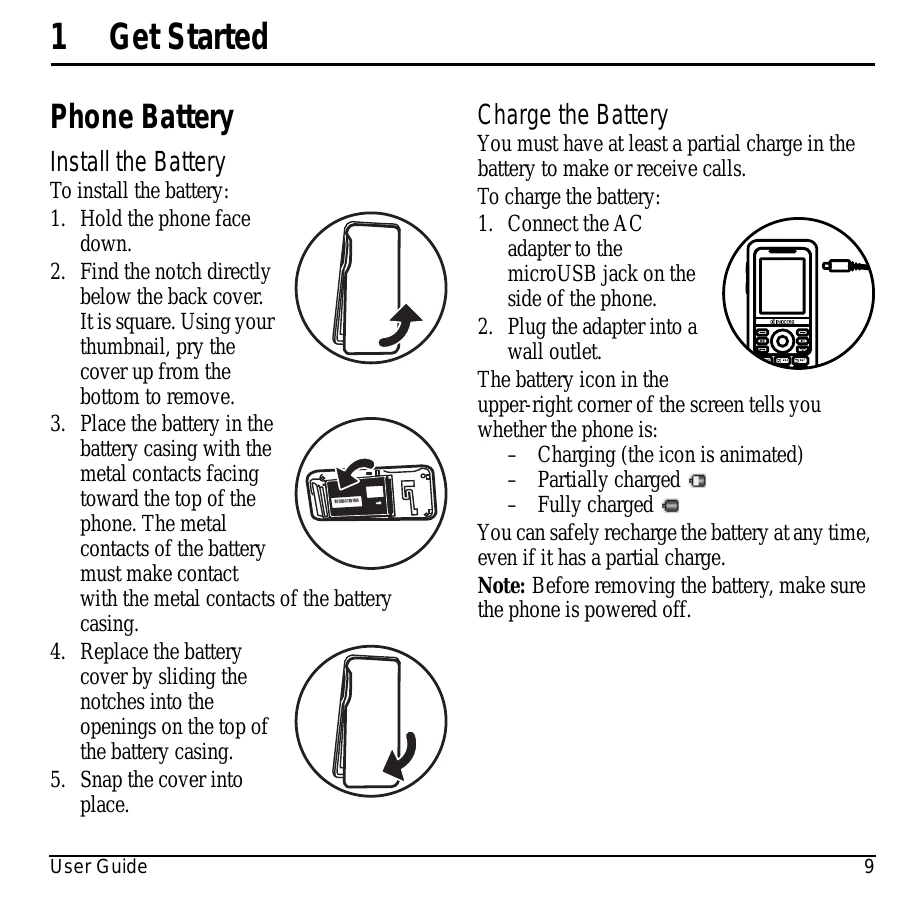
Install the Battery

  1. Hold the phone face down.
  2. Pry the back cover up from the bottom.
  3. Place the battery in the casing with metal contacts facing up.
  4. Replace the battery cover by sliding notches into openings.
  5. Snap the cover into place.

Charge the Battery

  1. Connect the AC adapter to the microUSB jack.
  2. Plug the adapter into a wall outlet.
The battery icon indicates charging status. Recharge anytime.

Phone Overview

Familiarize yourself with your phone's features:

  • Home screen: The main display.
  • Volume key: Adjusts ringer volume.
  • Left softkey: Selects menu items.
  • Speakerphone key: Activates speakerphone and answers calls.
  • Navigation key: Scrolls through lists and shortcuts.
  • Send key: Starts or answers calls.
  • Keypad: For entering numbers, letters, symbols.
  • * Shift key: Changes text mode, locks keypad.
  • Headset jack: For optional headset.
  • AC adapter/microUSB jack: For charging.
  • Right softkey: Selects @metro options.
  • OK key: Selects menu items or options.
  • Back key: Erases characters or returns to previous screen.
  • End key: Turns phone on/off, ends calls.
  • # Space key: Enters space, activates/deactivates vibrate.
  • 0 Next key: Cycles through word choices.
Privacy Policy