Manual for S2300

Manual for S2300

Brand: KYOCERA

Category: Cell Phone

Document Type:

Language: EN
Uploaded: Aug. 10, 2025, 12:07 a.m.

Manual Publish Date: 2010-01-01

Warranty Information

None

Get Started

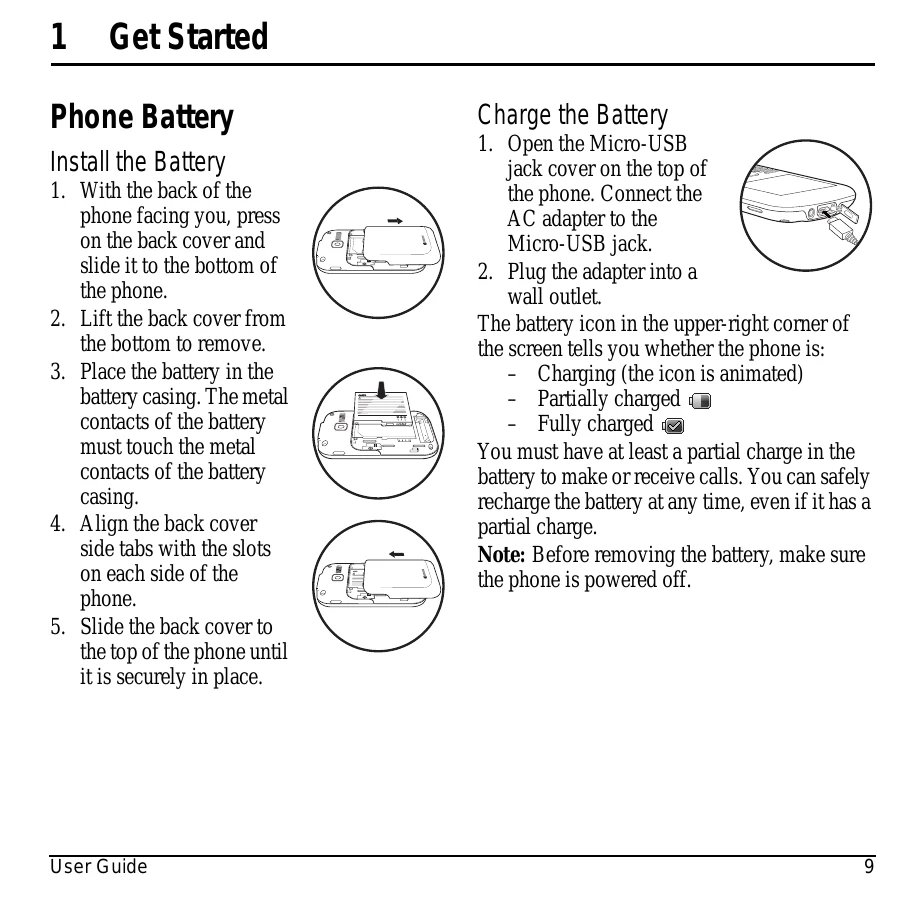
  • Install the Battery: Place the battery in the casing, aligning metal contacts, then secure the back cover.
  • Charge the Battery: Open the Micro-USB jack cover, connect the AC adapter, and plug into a wall outlet. The battery icon indicates charge level.

Phone Overview

  • Familiarize yourself with the phone's keypad and buttons, including Earpiece, Home screen, Left/Right softkeys, Navigation key, Speakerphone, Send, Function, Shift, Number/QWERTY keypads, OK, Back, and End keys.
  • Identify the back of the phone's features: Headset jack, Camera lens, Accessory eyelet, AC adapter/Micro-USB jack, External speaker, Camera key, and Volume key.

Screen Icons

  • Understand various icons indicating phone status such as digital mode, airplane mode, alarm clock, battery status, Bluetooth activity, camera mode, data service availability, and message notifications.

Troubleshooting and error codes

Problem Screen frozen, keypad unresponsive
Solution 1. Remove the battery cover.
2. Remove and replace the battery.
If the problem persists, return the phone to the dealer for service.
Privacy Policy