Manual for Lenovo A390

Manual for Lenovo A390

Brand: Lenovo

Category: Mobile Phone

Document Type:

Language: EN
Uploaded: Aug. 10, 2025, 12:07 a.m.

Initial Setup

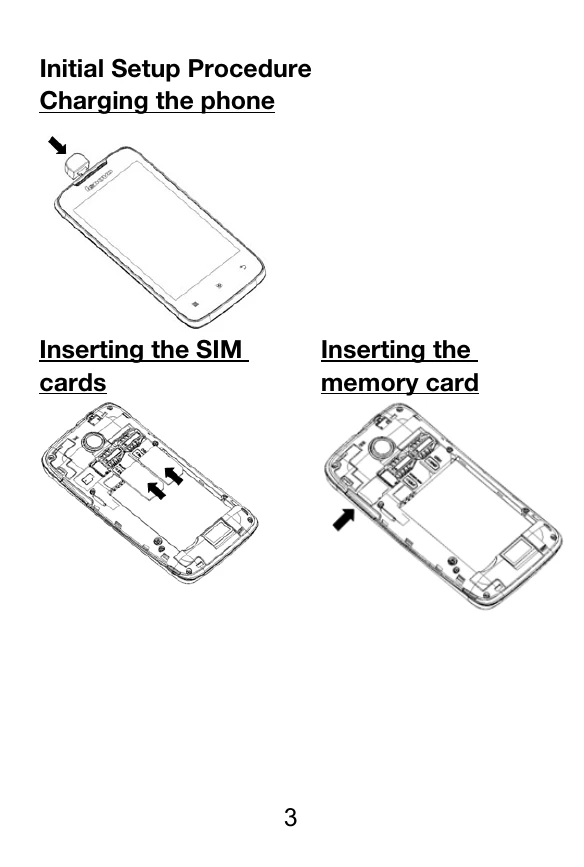
Charging the phone: Insert SIM cards and memory card as shown in the diagrams.

Port Assignment and Button Layout

  • 1 HOME KEY: Press to return to the idle interface.
  • 2 MENU KEY: Press to enter the commonly used menus.
  • 3 BACK KEY: Press to return to the superior menu.
  • 4 VOLUME KEY: Press to increase or decrease volume.
  • 5 POWER ON/OFF: Short-click to lock/unlock the screen, long-press to power on/off the phone.

Applications Overview

  • Browser: Browse websites via Wi-Fi.
  • Email: Send, receive, and view emails.
  • Gallery: Browse and edit images, supports slideshows and sharing.
  • Contacts: Add, delete, edit, and manage contact details.
  • Calendar: Create events, toggle day, week, and month views, set reminders.

Troubleshooting and error codes

KEY Description
1 HOME KEY Press to return to the idle interface
2 MENU KEY Press to enter the commonly used, the characteristic and more menu
3 BACK KEY Press to return to the superior menu.
4 VOLUME KEY Press to increase or decrease volume.
5 POWER ON/OFF Short-click this button to lock the screen function, long-press the key to power on/off the phone.
Privacy Policy