Brand: Lenovo
Category: Mobile Phone
Document Type:
Language: EN
Brand: Lenovo
Category: Mobile Phone
Document Type:
Language: EN
Uploaded: Aug. 10, 2025, 12:06 a.m.
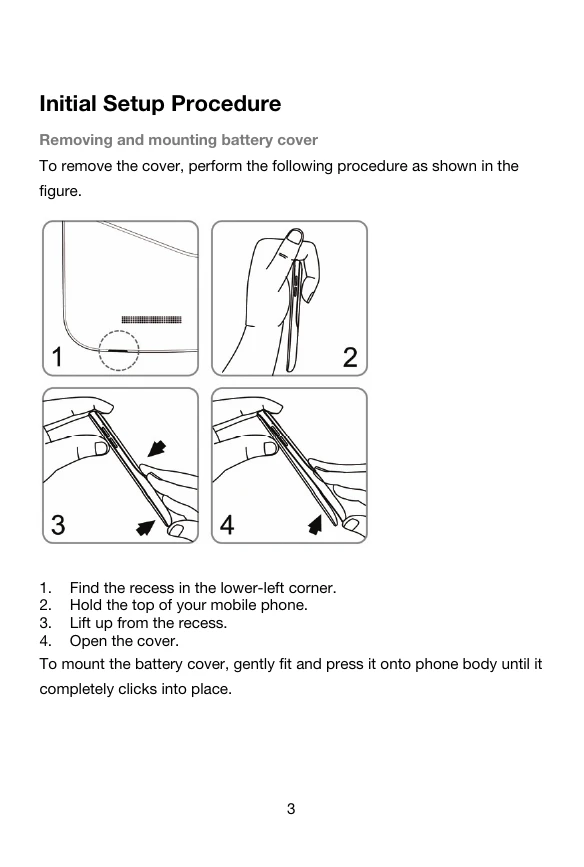
Removing and mounting battery cover
To remove the cover, perform the following procedure as shown in the figure.
To mount the battery cover, gently fit and press it onto phone body until it completely clicks into place.
Insert the charger into the phone's charging port.
Open the back cover, insert the SIM card into the SIM card slot, and then close the back cover.
Open the back cover, insert the memory card into the memory card slot, and then close the back cover.
| KEY | Description |
|---|---|
| 1 HOME KEY | Can return to the idle interface. |
| 2 MENU KEY | Can enter the commonly used, the characteristic and more menus. |
| 3 BACK KEY | Can return to the superior menu. |
| 4 VOLUME KEY | According to the volume switch increase or decrease volume. |
| 5 POWER ON/OFF | Short click this button to lock screen function, long press the key to power on/off the phone. |
Auto rotate screen according to the rotation of the device. To unlock the screen direction: Menu > Settings > Display > Auto-rotate screen. After launching one application, you can rotate the screen to your preferred direction.