Brand: Lenovo
Category: Smartphone
Document Type:
Language: EN
Brand: Lenovo
Category: Smartphone
Document Type:
Language: EN
Uploaded: Aug. 10, 2025, 12:05 a.m.
Manual Publish Date: 2015-06-26
Refer to the Lenovo Limited Warranty for a full explanation of warranty terms.
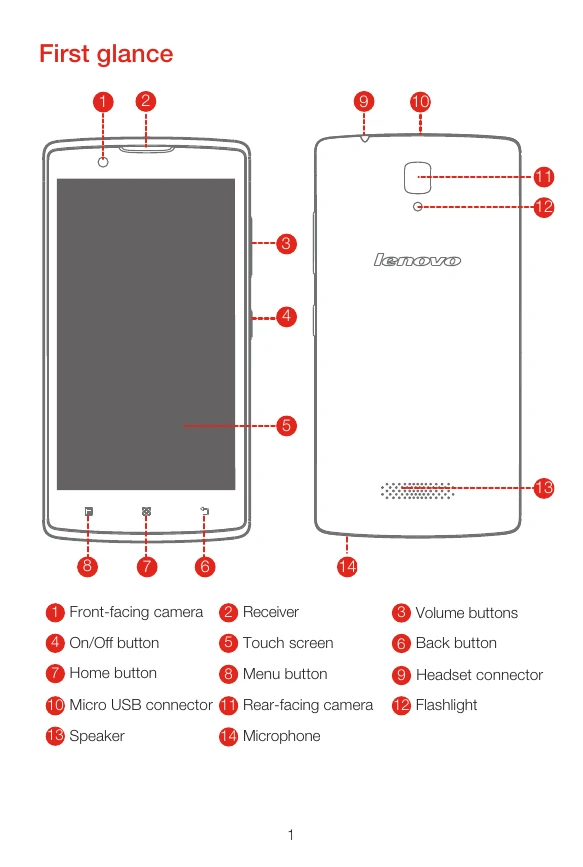
Familiarize yourself with the key components of your Lenovo A2010 smartphone, including the front-facing camera, receiver, touch screen, volume buttons, On/Off button, menu button, home button, back button, headset connector, Micro USB connector, rear-facing camera, flashlight, speaker, and microphone.
Insert your SIM card and memory card correctly into their respective slots. Align the battery connectors and place the battery in the compartment. Finally, install the back cover.
Connect your smartphone to a power outlet or computer using the provided USB cable and adapter. The phone can be turned on by pressing and holding the On/Off button until the Lenovo logo appears. To turn it off, press and hold the On/Off button and then tap 'Power off'.