Manual for A6000

Manual for A6000

Brand: Lenovo

Category: Smartphone

Document Type:

Language: EN
Uploaded: Aug. 10, 2025, 12:05 a.m.

Manual Publish Date: 2015-01-01

Warranty Information

Refer to the "Rechargeable battery notice" in the Important Product Information Guide for battery safety.

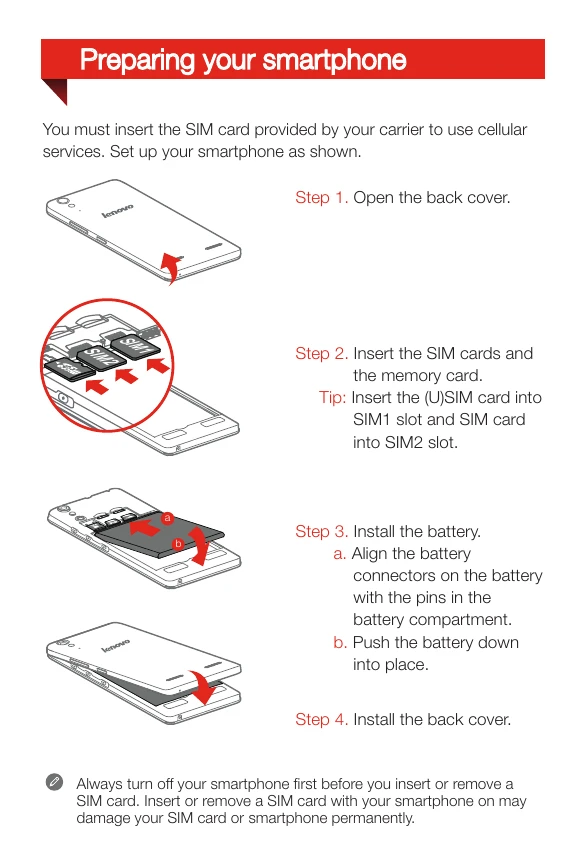
Preparing your smartphone:
  1. Open the back cover.
  2. Insert SIM cards and memory card.
  3. Install the battery by aligning connectors and pushing down.
  4. Install the back cover.
Charging the battery:
  • Method 1: Connect to a power outlet using the provided cable and adapter.
  • Method 2: Connect to a computer using the provided cable.
Turning on/off:
  • Turn on: Press and hold the On/Off button until the Lenovo logo appears.
  • Turn off: Press and hold the On/Off button, then tap Power off.
  • Reboot: Press and hold the On/Off button, then tap Reboot.

Troubleshooting and error codes

Header 1 Header 2 Header 3 Header 4
Row 1 Data 1 Row 1 Data 2 Row 1 Data 3 Row 1 Data 4
Row 2 Data 1 Row 2 Data 2 Row 2 Data 3 Row 2 Data 4
Row 3 Data 1 Row 3 Data 2 Row 3 Data 3 Row 3 Data 4
Privacy Policy