Brand: Lenovo
Category: Smartphone
Document Type:
Language: EN
Brand: Lenovo
Category: Smartphone
Document Type:
Language: EN
Uploaded: Aug. 10, 2025, 12:05 a.m.
Manual Publish Date: 2015-03-01
Read the full Lenovo Limited Warranty for a complete explanation of terms.
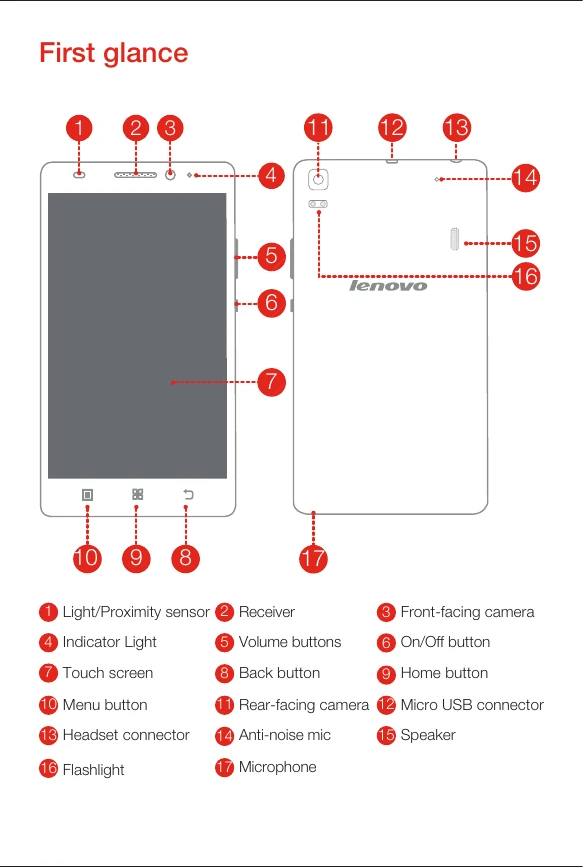
Identify the different parts of your phone: light/proximity sensor, receiver, front-facing camera, indicator light, volume buttons, on/off button, touch screen, back button, home button, menu button, rear-facing camera, Micro USB connector, headset connector, anti-noise mic, speaker, flashlight, and microphone.
Insert your SIM card and memory card, then install the battery and the back cover.
Connect your smartphone to a power outlet or computer using the provided cable and adapter.
Press and hold the On/Off button to turn the phone on or off.
| Header 1 | Header 2 | Header 3 | Header 4 |
|---|---|---|---|
| Row 1 Data 1 | Row 1 Data 2 | Row 1 Data 3 | Row 1 Data 4 |
| Row 2 Data 1 | Row 2 Data 2 | Row 2 Data 3 | Row 2 Data 4 |
| Row 3 Data 1 | Row 3 Data 2 | Row 3 Data 3 | Row 3 Data 4 |