Brand: Lenovo
Category: Smartphone
Document Type: Manual
Language: EN
Brand: Lenovo
Category: Smartphone
Document Type: Manual
Language: EN
Uploaded: Nov. 21, 2025, 7:34 p.m.
Manual Publish Date: 2020-01-01
View legal, safety, and regulatory information for your device.
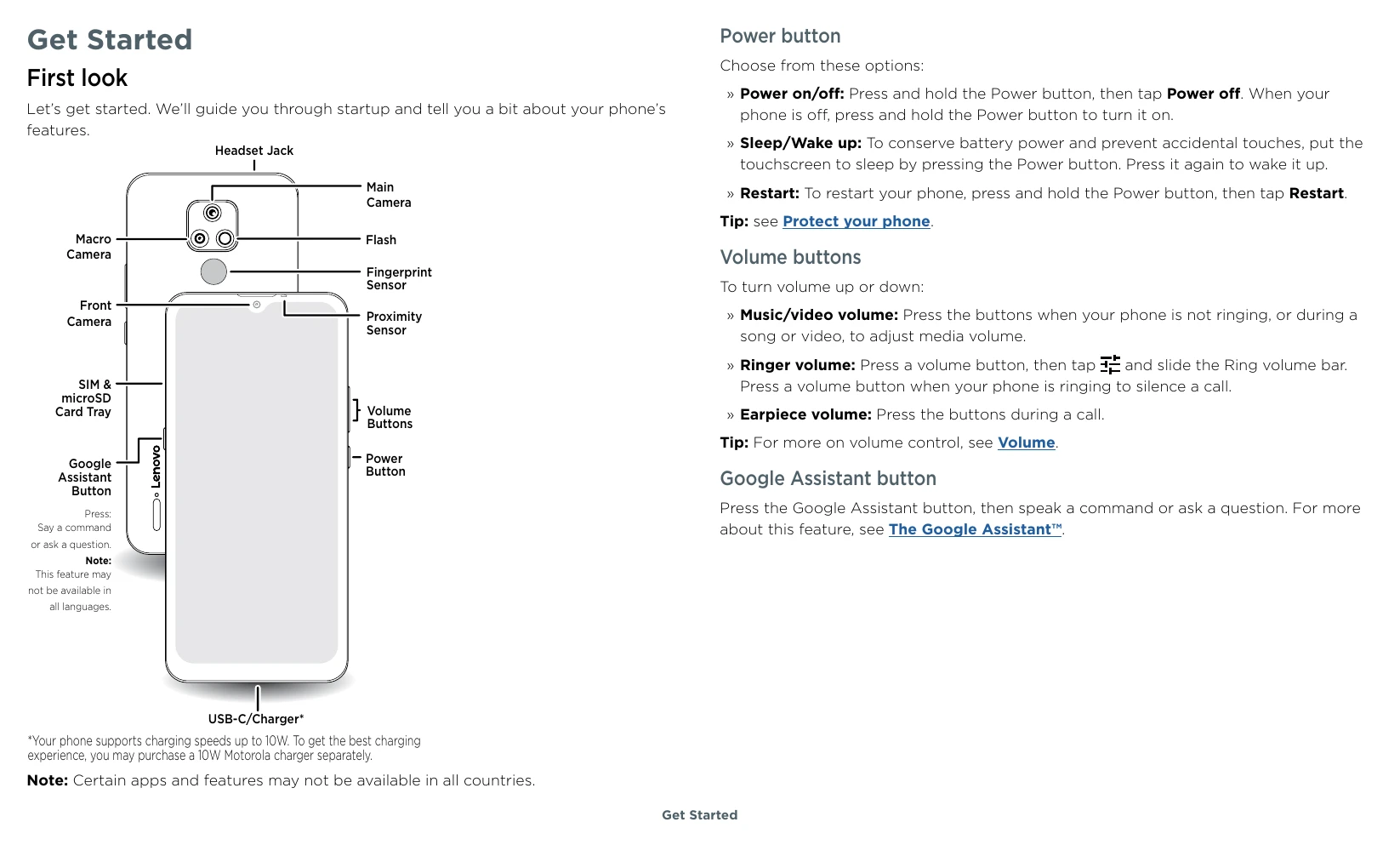
Get Started: Power on, sign in, and connect to Wi-Fi. Learn to navigate your phone using touch gestures or buttons. Manage battery life and care for your phone, including protection from water damage.
Learn the Basics: Understand the home screen, notifications, status icons, and volume controls. Explore quick settings and learn about personalization options like wallpapers and styles. Customize sounds and appearance.
Apps: Access pre-installed apps like Phone, Messages, Gmail, Duo, Calendar, Chrome, Camera, and Photos. Download new apps from the Google Play Store.
Troubleshoot: Learn how to restart your phone, check for software updates, and perform a factory reset. Find information on stolen phones and IMEI numbers.
Accessibility: Explore features to make your phone easier to use, including creating shortcuts, making your phone speak, and changing display settings.
| Problem | Solution |
|---|---|
| App locks up phone | Restart in Safe Mode. Press and hold the Power button, then press and hold the Power off option. Then try removing the app. To exit Safe Mode, restart your phone. |
| Phone stops responding | Press and hold the Power button until the screen goes dark and your phone restarts. |
| Cannot connect to Wi-Fi | Ensure Wi-Fi is turned on. Check network password. If issues persist, contact your service provider. |
| Cannot connect to Bluetooth | Ensure Bluetooth is turned on. Make sure the device is in discoverable mode. Pair the device again. |
| App not working correctly | Check app permissions. Try disabling and re-enabling the app or reinstalling it from Google Play. |