Manual for K6 NOTE

Manual for K6 NOTE

Brand: Lenovo

Category: Smartphone

Document Type: Manual

Language: EN
Uploaded: Nov. 21, 2025, 8:46 p.m.

Warranty Information

This phone is designed and manufactured not to exceed emission limits for RF energy set by the FCC.

Powering On/Off/Restarting:
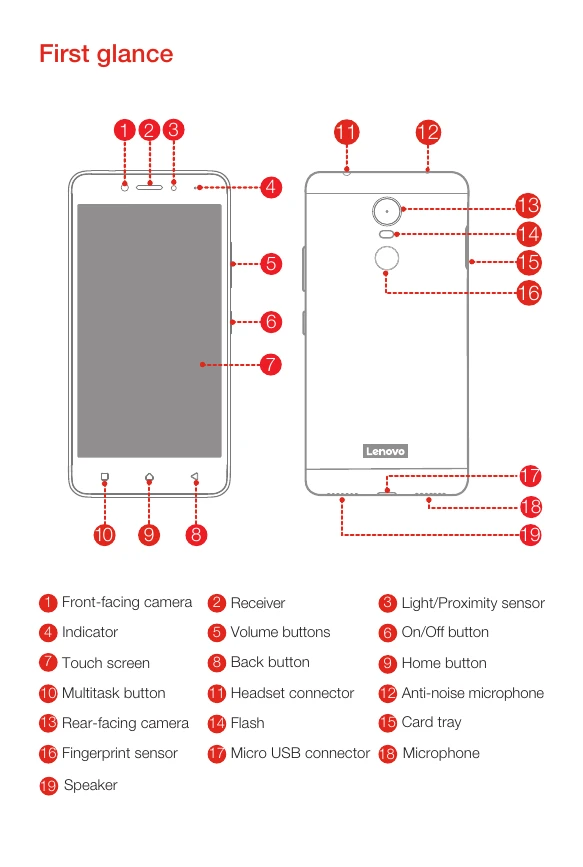
  • Turn On: Press and hold the On/Off button until the Lenovo logo appears.
  • Turn Off: Press and hold the On/Off button for a few seconds, tap 'Power off', then tap 'OK'.
  • Restart: Press and hold the On/Off button for a few seconds, tap 'Restart', then tap 'OK'.
Charging the Battery:
  • Connect your smartphone to a power outlet using the provided cable and USB power adapter.
  • Alternatively, connect your smartphone to a computer using the provided cable.
Inserting SIM and microSD Cards:
  • Use the eject tool to open the card tray.
  • Position a Nano-SIM card in Slot 1 and a microSD card in Slot 2, OR a Nano-SIM card in Slot 1 and another Nano-SIM card in Slot 2.
  • Carefully reinsert the tray.
Note: Always turn off your smartphone before inserting or removing SIM cards. Not all countries support LTE. Contact your carrier for details.
Privacy Policy