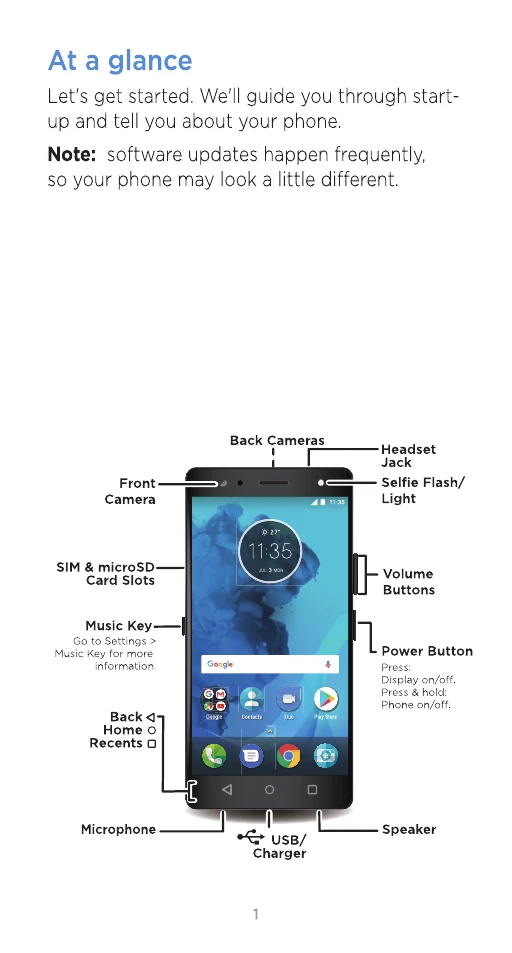
At a glance
Let's get started. We'll guide you through start-up and tell you about your phone.
Note: software updates happen frequently, so your phone may look a little different.
Put in the cards
Your phone supports using two SIM cards.
Caution: make sure you use the correct sized SIM cards and don't cut the SIM cards.
Finish up
Connect your charger to charge your phone fully and turn the power on. Then select your language and follow the screen prompts to get started.
For phones that use two SIM cards, follow the prompts to set them up.
Home screen & settings
From the Home screen, you can explore apps, check notifications, speak commands and more.
• Add a shortcut: swipe up, tap and hold an app, then drag it to your Home screen.
• Settings: to change your Wi-Fi, display brightness and more, swipe the status bar down with two fingers. To open more settings, tap.
• Share your phone: to add a guest user, swipe the status bar down with two fingers and tap.
Photos
Take crisp, clear photos.
• Launch it: swipe up > Camera.
• See it: swipe left for your photo gallery.
• Share it: view a photo or video from your gallery, then tap <.
Tip: swipe right for effects and settings.