At a glance
Let's get started. We'll guide you through start-up and tell you about your phone.
Note: software updates happen frequently, so your phone may look a little different.
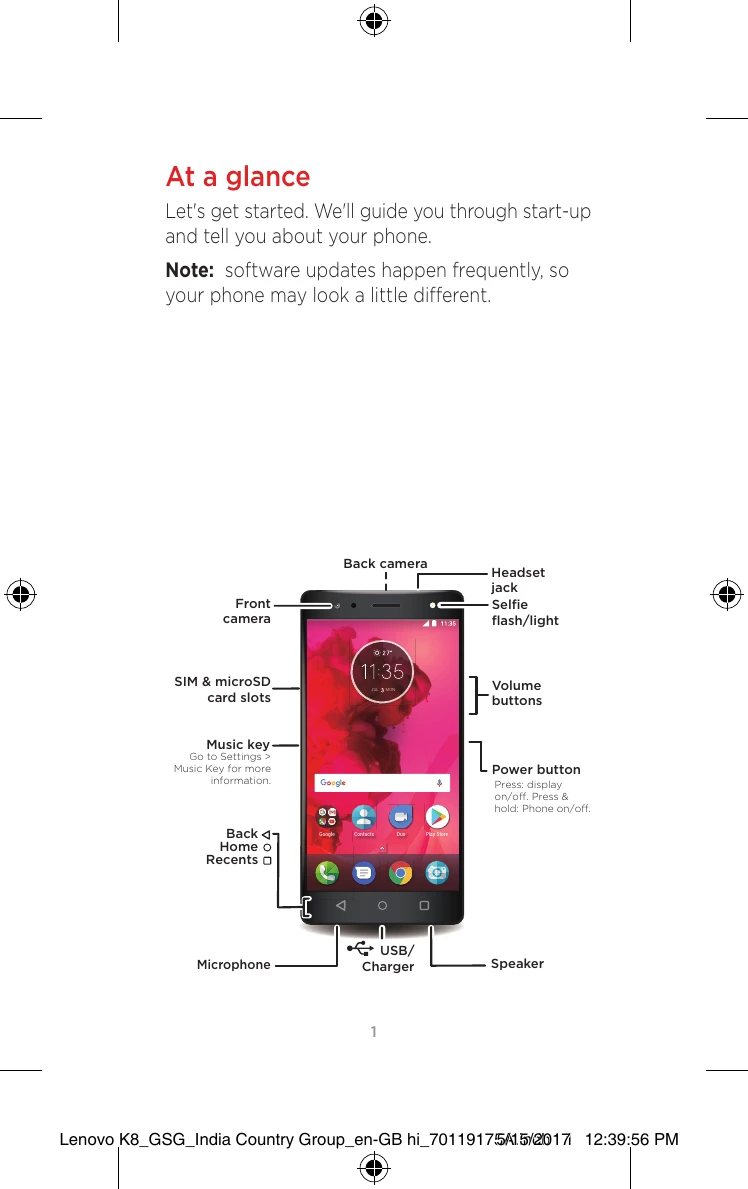
- Front camera
- Back camera
- Headset jack
- Selfie flash/light
- SIM & microSD card slots
- Volume buttons
- Music key Go to Settings > Music Key for more information.
- Power button Press: display on/off. Press & hold: Phone on/off.
- Back
- Home
- Recents
- Microphone
- USB/Charger
- Speaker
Home screen & settings
From the Home screen, you can explore apps, check notifications, speak commands and more.
- Add a shortcut: swipe up ∧, tap and hold an app, then drag it to your Home screen.
- Settings: to change your Wi-Fi, display brightness and more, swipe the status bar down with two fingers. To open more settings, tap ⚙.
- Share your phone: to add a guest user, swipe the status bar down with two fingers and tap 👤.
Photos
Take crisp, clear photos.
- Launch it: swipe up ∧ > Camera.
- See it: swipe left for your photo gallery.
- Share it: view a photo or video from your gallery, then tap ⇆.
Tip: swipe right for effects and settings.
Important safety, regulatory and legal information
Complete safety, regulatory and legal information is provided on your phone. See 'Learn more' for details.
Regulatory information To view the regulatory ID for this device, on the phone, go to Settings > Legal information > Regulatory information or visit: http://support.lenovo.com
Activation When this product is turned on for the first time (and is connected to the Internet), the international mobile station equipment identity (IMEI) number or serial number (SN) of this product, together with the information about the country and city where this product is first activated, will be registered with Lenovo; this will be a one-time registration. Confirming the mobile phone's activation will facilitate after-sales service to you by verifying the product's authenticity. During registration, the data transmitted amounts to less than 1 KB.
Plastic bag notice DANGER: plastic bags can be dangerous. Keep plastic bags away from babies and children to avoid danger of suffocation.
General battery notice The original batteries supplied with your product have been tested for compatibility and should only be replaced with approved parts. Risk of explosion if the battery is replaced with an incorrect type. Dispose of used batteries according to the instructions.
Built-in rechargeable battery notice CAUTION: do not attempt to replace the internal rechargeable lithium ion battery. Contact Lenovo Support for factory replacement.
Charging Lenovo and its affiliates are not responsible for the performance or safety of products not manufactured or approved by Lenovo or its affiliates. Use only approved Lenovo AC adaptors and batteries. Adaptor shall be installed near the equipment and shall be easily accessible.
Operating temperature Use the Lenovo Phone only in the temperature range of -10 °C (14 °F) -35 °C (95 °F) to avoid damage.
Prevent hearing damage To prevent possible hearing damage when using headsets, earphones or earbuds with this device, do not listen at high volume levels for long periods.
Dispose of according to local laws and regulations When the Lenovo Phone reaches the end of its useful life, do not crush, incinerate, immerse in water or dispose of the Lenovo Phone in any manner contrary to local laws and regulations. Some internal parts contain substances that can explode, leak or have an adverse environmental effect if disposed of incorrectly. See 'General recycling statement' and subsequent sections for additional information.
General recycling statement Lenovo encourages owners of information technology (IT) equipment to responsibly recycle their equipment when it is no longer needed. Lenovo offers a variety of programmes and services to assist equipment owners in recycling their IT products. For information on recycling Lenovo products, go to http://www.lenovo.com/recycling.
Important battery and WEEE information Batteries and electrical and electronic equipment marked with the symbol of a crossed-out wheeled bin may not be disposed of as unsorted municipal waste. Batteries and waste of electrical and electronic equipment (WEEE) shall be treated separately using the collection framework available to customers for the return, recycling and treatment of batteries and WEEE. When possible, remove and isolate batteries from WEEE prior to placing WEEE in the waste collection stream. Batteries are to be collected separately using the framework available for the return, recycling and treatment of batteries and accumulators. Country-specific information is available at: http://www.lenovo.com/recycling
Recycling information for India Recycling and disposal information for India is available at: http://www.lenovo.com/social_responsibility/us/en/sustainability/ptb_india.html
Restriction of Hazardous Substances Directive (RoHS) European Union Lenovo products sold in the European Union on or after 3 January 2013 meet the requirements of Directive 2011/65/EU on the restriction of the use of certain hazardous substances in electrical and electronic equipment ('RoHS recast' or 'RoHS 2'). For more information about Lenovo progress on RoHS, go to: http://www.lenovo.com/social_responsibility/us/en/RoHS_Communication.pdf India RoHS-compliant as per E-Waste (Management) Rules. Vietnam Lenovo products sold in Vietnam, on or after 23 September 2011, meet the requirements of the Vietnam Circular 30/2011/TT-BCT ('Vietnam RoHS').
Specific Absorption Rate information This mobile device meets the government's requirements for exposure to radio waves. Your mobile device is a radio transmitter and receiver. The exposure standard for mobile devices employs a unit of measurement known as the Specific Absorption Rate, or SAR. The India SAR limit for mobile devices is 1.6 W/kg averaged over 1 gram of tissue. Tests for SAR are conducted using standard operating positions with the device transmitting at its highest certified power level in all tested frequency bands. The highest SAR value for your Lenovo device when tested for use at the head and body is outlined as follows: Position | The highest SAR value | Regulation Head | 0.561 W/Kg | India 1 g SAR Limit (1.6 W/kg) Body-worn | 1.380 W/Kg | India 1 g SAR Limit (1.6 W/kg) During use, the actual SAR values for this device are usually well below the values stated above. This is because, for purposes of system efficiency and to minimise interference on the network, the operating power of your mobile devices is automatically decreased when full power is not needed for the call. The lower the power output of the device, the lower its SAR value. To meet RF exposure guidelines during body-worn operation, the device must be positioned at least 1.0 cm away from your body.
Precautionary guidelines for mobile users Mobile users are advised to take precautionary measures while using a mobile handset, such as: 1. Keep distance - Hold the mobile phone away from your body to the extent possible. 2. Use a headset (wired or Bluetooth) to keep the handset away from your head. 3. Do not press the phone handset against your head. Radio Frequency (RF) energy is inversely proportional to the square of the distance from the source – being very close greatly increases energy absorption. 4. Limit the length of mobile calls. 5. Use text as compared to voice wherever possible. 6. Put the mobile phone on speaker mode. 7. If the radio signal is weak, a mobile phone will increase its transmission power. Find a strong signal and avoid movement – Use your phone where reception is good. 8. Metal and water are good conductors of radio waves so avoid using a mobile phone while wearing metal-framed glasses or when your hair is wet. 9. Let the call connect before you put the handset to your ear or start speaking and listening – A mobile phone first makes the communication at higher power and then reduces the power to an adequate level. More power is radiated while the call is connecting. 10.If you have a choice, use a landline (wired) phone, not a mobile phone. 11. When your phone is ON, don't carry it in your chest/breast or trouser pocket. When a mobile phone is ON, it automatically transmits at high power every one or two minutes to check (poll) the network. 12. Reduce mobile phone use by children as a younger person will likely have a longer lifetime exposure to radiation from mobile phones. 13. People with active medical implants should preferably keep the mobile phone at least 15 cm away from the implant.
Learn more Where is my legal, safety and regulatory information? In order to provide you with better access to this important information, we've made the materials accessible from the phone's settings menu and on the web. Review these materials prior to using your device. To access the materials from a connected phone, go to Settings > Legal information, and select a topic. To access the materials on the web, go to http://support.lenovo.com.
Get support To get support on network service and billing, contact your wireless network operator. To learn how to use your smartphone and view its technical specifications, go to http://support.lenovo.com.
Download publications To obtain the latest smartphone manuals, go to: http://support.lenovo.com
Access your user guide Your user guide contains detailed information about your smartphone. To access your user guide, go to http://support.lenovo.com and follow the instructions on the screen.
Legal notices LENOVO is a trademark of Lenovo in the United States, other countries, or both. Other company, product or service names may be trademarks or service marks of others. ©Copyright Lenovo 2017. Product ID: Lenovo K8 (Model XT1902-1) Designed and manufactured by Motorola Mobility, a wholly owned subsidiary of Lenovo. Manufactured under licence from Dolby Laboratories. Dolby and the double-D symbol are trademarks of Dolby Laboratories.